Leia em português: Microsoft Foundry: o log da resposta não explica o percurso
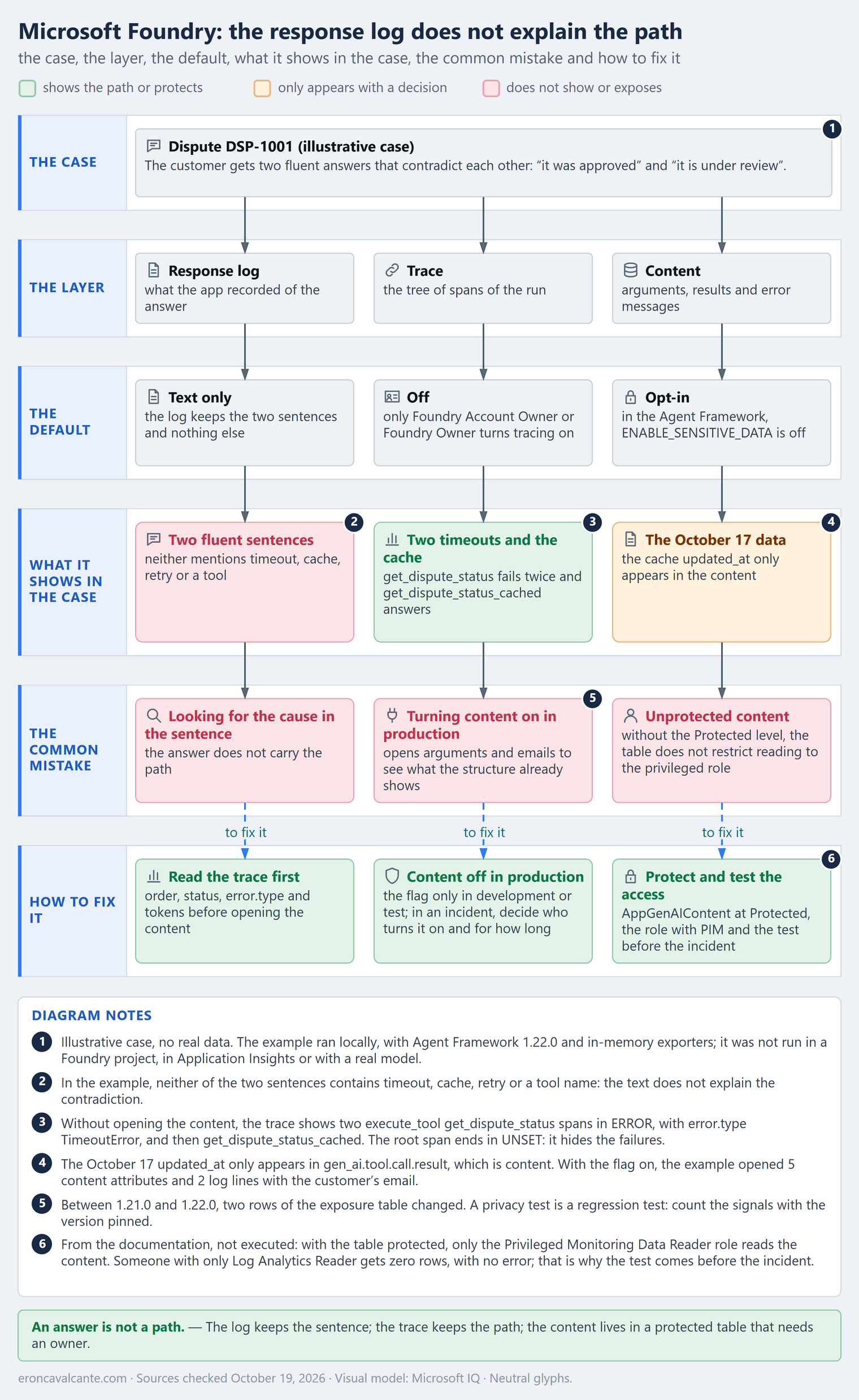
Picture a support agent that answers questions about card disputes. A customer asks about dispute DSP-1001 and gets “it was approved”. Later, they ask again and get “it is under review”. Both answers are fluent and they contradict each other, and the application log keeps only the two sentences. The second came from a cache holding data from October 17, after two backend calls that timed out, and nothing in the sentence says so. The case is illustrative, but the pattern is real: the response log shows what the agent said, not the path it took.
An answer is not a path
What is an agent trace?
It is the record of one run as a tree of spans: each step the agent took becomes a span, with a start, an end, a status and attributes. In the example measured further on, Agent Framework generates three kinds: invoke_agent, the root, one per run; chat, one per model call; and execute_tool, one per tool executed. The Foundry documentation sums up the use in two questions: where a response came from, and which step introduced an error or a latency spike.
The article on guardrails and agent evaluation dealt with instruments, such as evaluators and red teaming, that run before deployment and measure in aggregate. Here the focus is investigating one case after the incident, not aggregate evaluation before deployment.
| Piece | State on October 19, 2026 | What it changes |
|---|---|---|
| Tracing for prompt and hosted agents | GA | Coverage is stable for these two types |
| Tracing for workflow and external agents | Preview | Coverage can change |
| Tracing in the Foundry project | Off by default | Nothing is collected or stored until Foundry Account Owner or Foundry Owner turns it on |
| Trace retention and sampling | Follow Application Insights | The trace of the case may not exist when you go looking |
| OpenTelemetry GenAI conventions | Development status | Names and attributes can change between versions |
| Content of messages and tools | Opt-in in the instrumentation | In Agent Framework, ENABLE_SENSITIVE_DATA is off by default |
<table_name>_steps from evaluate_data_agent, in Fabric |
Preview | It is generated by an evaluation run, not by production traffic |
Sources checked on October 19, 2026. The table summarizes the documentation read on that date. The example in the hands-on section was run locally; nothing here was measured in a Foundry project or in a tenant.
The problem it solves
When the only record is the answer, the investigation starts at the sentence and ends in guesswork. The map below avoids three mistakes: looking for the cause in the returned sentence, turning on the content in production to see a path that the structure already shows and turning on the trace without protecting the content.
How it works — step by step
- Turn on tracing in the project. It is off by default, and nothing is collected or stored until Foundry Account Owner or Foundry Owner enables it. Once it is on, the project offers out-of-the-box traces for the past 90 days.
- Find the run of the case. On the Traces tab you can search, filter or sort the ingested traces, and a search by Response ID or by Trace ID leads to the conversation.
- Read the structure before the content: the order of the spans, the status, the
error.typeand the input tokens of each turn answer most of the questions. - Count the attempts through the repeated
execute_toolspans. The article on tool calling shows the loop in which the model asks for the tool and the code runs it; each turn of that loop leaves a span. - Decide the content. In Agent Framework, the
ENABLE_SENSITIVE_DATAvariable is off by default, and the documentation says to turn it on only in development or test. - Protect the
AppGenAIContenttable with the Protected level, so that only the Privileged Monitoring Data Reader role reads the content. - Test the access before the incident: someone with only Log Analytics Reader should not see the sensitive content, and someone with the privileged role should.
A use case: a card dispute
The support agent has two tools: get_dispute_status, which queries the backend, and get_dispute_status_cached, which reads a cache. In the example, the script of the fake chat client decides which one to call; in a real agent the model decides, which is why the path matters. Whoever investigates the case asks six questions, and only three need the content:
| Question from whoever investigates | Where it is | Needs the content? |
|---|---|---|
| Which tools ran, and in what order? | execute_tool spans, in run order |
No |
| Which call failed or was repeated? | ERROR status and the error.type of the span |
No |
| How much context did each turn carry? | gen_ai.usage.input_tokens of the chat spans |
No |
| With which arguments did the tool run? | gen_ai.tool.call.arguments |
Yes |
| What did it return, and how old was the data? | gen_ai.tool.call.result |
Yes |
| What was the error message? | exception event, exception.message attribute |
Yes; Agent Framework only includes it with the flag on |
In practice: the same agent, two runs
The example runs the same agent in two situations: with a healthy backend and with the backend down. It did not run in a Foundry project, in Application Insights or with a real model: a fake chat client repeats a script, and in-memory exporters keep spans, metrics and logs. What it shows is what Agent Framework records, not what Foundry displays. The code and the answers stay in English in both languages, so both versions of the article publish the same program.
I measured with agent-framework-core 1.22.0 and OpenTelemetry SDK 1.45.1, on Python 3.12.10. The package mirror in my environment only went up to 1.21.0, so I installed 1.22.0 from the python-1.22.0 tag; 1.21.0 only enters the comparison between versions, further on. The input tokens of the chat client are an estimate (chars // 4), not the count of a tokenizer. The three blocks below form a single program: save them to one file, in order, and run it with python.
The first block turns on the instrumentation with in-memory exporters and defines the script: the question, the customer’s email (personal data, on purpose) and the two runs, ok and failed. The FLAG_KEYS set holds the five sensitive attributes that the content flag controls.
import asyncio
import json
import logging
from collections.abc import Mapping, Sequence
from typing import Any, ClassVar

from agent_framework import (
    Agent,
    BaseChatClient,
    ChatMiddlewareLayer,
    ChatResponse,
    Content,
    FunctionInvocationLayer,
    Message,
    tool,
)
from agent_framework.observability import ChatTelemetryLayer, enable_instrumentation
from opentelemetry import metrics, trace
from opentelemetry.sdk.metrics import MeterProvider
from opentelemetry.sdk.metrics.export import InMemoryMetricReader
from opentelemetry.sdk.trace import TracerProvider
from opentelemetry.sdk.trace.export import SimpleSpanProcessor
from opentelemetry.sdk.trace.export.in_memory_span_exporter import InMemorySpanExporter

exporter = InMemorySpanExporter()
provider = TracerProvider()
provider.add_span_processor(SimpleSpanProcessor(exporter))
trace.set_tracer_provider(provider)
reader = InMemoryMetricReader()
metrics.set_meter_provider(MeterProvider(metric_readers=[reader]))


class Lines(logging.Handler):
    def __init__(self) -> None:
        super().__init__()
        self.lines: list[str] = []

    def emit(self, record: logging.LogRecord) -> None:
        self.lines.append(record.getMessage())


log = Lines()
logging.getLogger().addHandler(log)
logging.getLogger().setLevel(logging.DEBUG)

QUESTION = "What is the status of dispute DSP-1001?"
EMAIL = "maria@example.com"
CALL = {"dispute_id": "DSP-1001", "customer_email": EMAIL}
SCRIPTS = {
    "ok": [("get_dispute_status", CALL), "Dispute DSP-1001 was approved."],
    "failed": [
        ("get_dispute_status", CALL),
        ("get_dispute_status", CALL),
        ("get_dispute_status_cached", {"dispute_id": "DSP-1001"}),
        "Dispute DSP-1001 is under review.",
    ],
}
FLAG_KEYS = {
    "gen_ai.input.messages", "gen_ai.output.messages", "gen_ai.system_instructions",
    "gen_ai.tool.call.arguments", "gen_ai.tool.call.result",
}
The second block brings the fake chat client, which returns the next step of the script, the two tools and the function that runs the agent with the content flag on or off. The Client class stacks on top of it the tool, middleware and telemetry layers of Agent Framework; it is the telemetry layer that creates the chat spans.
class Scripted(BaseChatClient):
    def __init__(self, script: list, **kwargs: Any) -> None:
        super().__init__(**kwargs)
        self.script, self.step = script, 0

    def _inner_get_response(self, *, messages: Sequence[Message], stream: bool,
                            options: Mapping[str, Any], **kwargs: Any):
        move = self.script[self.step]
        self.step += 1
        if isinstance(move, str):
            content = Content.from_text(move)
        else:
            content = Content.from_function_call(call_id=f"call_{self.step}", name=move[0], arguments=move[1])
        chars = sum(len(str(getattr(c, a, None) or "")) for m in messages for c in m.contents
                    for a in ("text", "arguments", "result", "exception"))
        response = ChatResponse(
            messages=[Message(role="assistant", contents=[content])], model="script-1",
            usage_details={"input_token_count": chars // 4, "output_token_count": 10})

        async def reply() -> ChatResponse:
            return response

        return reply()


class Client(FunctionInvocationLayer, ChatMiddlewareLayer, ChatTelemetryLayer, Scripted):
    OTEL_PROVIDER_NAME: ClassVar[str] = "script"


def make_tools(backend_up: bool) -> list:
    @tool(approval_mode="never_require")
    async def get_dispute_status(dispute_id: str, customer_email: str) -> dict:
        """Look up the dispute status in the backend."""
        if not backend_up:
            raise TimeoutError("backend timed out after 2 s")
        return {"dispute_id": dispute_id, "status": "approved", "updated_at": "2026-10-18"}

    @tool(approval_mode="never_require")
    async def get_dispute_status_cached(dispute_id: str) -> dict:
        """Look up the dispute status in the cache."""
        return {"dispute_id": dispute_id, "status": "under_review", "updated_at": "2026-10-17"}

    return [get_dispute_status, get_dispute_status_cached]


async def run_agent(scenario: str, sensitive: bool) -> tuple[str, list]:
    exporter.clear()
    log.lines.clear()
    enable_instrumentation(enable_sensitive_data=sensitive)
    agent = Agent(client=Client(script=SCRIPTS[scenario]), name="support",
                  instructions="Answer questions about card disputes.",
                  tools=make_tools(backend_up=scenario == "ok"))
    answer = await agent.run(QUESTION)
    spans = list(exporter.get_finished_spans())
    return answer.text, [s for s in spans if s.parent is None] + [s for s in spans if s.parent]
The third block measures what the flag exposes, opens the content of the tool spans and prints the report as JSON.
def signals(spans: list) -> dict:
    keys = {k for s in spans for k in s.attributes}
    exceptions = [e for s in spans for e in s.events if e.name == "exception"]
    points = [set(p.attributes) for rm in reader.get_metrics_data().resource_metrics
              for sm in rm.scope_metrics for m in sm.metrics for p in m.data.data_points]
    return {
        "span_content_keys": len(keys & FLAG_KEYS),
        "tool_definitions_spans": sum("gen_ai.tool.definitions" in s.attributes for s in spans),
        "exception_messages": sum("exception.message" in e.attributes for e in exceptions),
        "log_lines_with_email": sum(EMAIL in line for line in log.lines),
        "metric_tool_content_keys": len({k for p in points for k in p if "arguments" in k or "result" in k}),
    }


def opened(spans: list) -> list:
    rows = []
    for s in spans:
        if s.name.startswith("execute_tool"):
            result = s.attributes.get("gen_ai.tool.call.result")
            message = [e.attributes["exception.message"] for e in s.events if e.name == "exception"]
            rows.append({"tool": s.name.split()[1],
                         "arguments": json.loads(s.attributes["gen_ai.tool.call.arguments"]),
                         "result": json.loads(result) if result else None,
                         "exception": message[0] if message else None})
    return rows


async def main() -> None:
    ok_answer, _ = await run_agent("ok", sensitive=False)
    failed_answer, off = await run_agent("failed", sensitive=False)
    flag_off = signals(off)
    _, on = await run_agent("failed", sensitive=True)
    flag_on = signals(on)
    names = [s.name.split()[1] for s in off if s.name.startswith("execute_tool")]
    report = {
        "response_log": [{"scenario": "ok", "answer": ok_answer}, {"scenario": "failed", "answer": failed_answer}],
        "path": [{"span": s.name, "status": s.status.status_code.name, "error": s.attributes.get("error.type"),
                  "input_tokens": s.attributes.get("gen_ai.usage.input_tokens")} for s in off],
        "calls": [{"tool": t, "calls": names.count(t),
                   "errors": sum(s.name == f"execute_tool {t}" and s.status.status_code.name == "ERROR" for s in off)}
                  for t in dict.fromkeys(names)],
        "exposure": [{"signal": k, "flag_off": flag_off[k], "flag_on": flag_on[k]} for k in flag_off],
        "opened": opened(on),
        "metrics": sorted({m.name for rm in reader.get_metrics_data().resource_metrics
                           for sm in rm.scope_metrics for m in sm.metrics}),
    }
    body = [f'  {json.dumps(key)}: [\n' + ",\n".join(f"    {json.dumps(row)}" for row in rows) + "\n  ]"
            for key, rows in report.items()]
    print("{\n" + ",\n".join(body) + "\n}")


asyncio.run(main())
The output, copied from the run:
{
  "response_log": [
    {"scenario": "ok", "answer": "Dispute DSP-1001 was approved."},
    {"scenario": "failed", "answer": "Dispute DSP-1001 is under review."}
  ],
  "path": [
    {"span": "invoke_agent support", "status": "UNSET", "error": null, "input_tokens": 207},
    {"span": "chat script-1", "status": "UNSET", "error": null, "input_tokens": 9},
    {"span": "execute_tool get_dispute_status", "status": "ERROR", "error": "TimeoutError", "input_tokens": null},
    {"span": "chat script-1", "status": "UNSET", "error": null, "input_tokens": 38},
    {"span": "execute_tool get_dispute_status", "status": "ERROR", "error": "TimeoutError", "input_tokens": null},
    {"span": "chat script-1", "status": "UNSET", "error": null, "input_tokens": 67},
    {"span": "execute_tool get_dispute_status_cached", "status": "UNSET", "error": null, "input_tokens": null},
    {"span": "chat script-1", "status": "UNSET", "error": null, "input_tokens": 93}
  ],
  "calls": [
    {"tool": "get_dispute_status", "calls": 2, "errors": 2},
    {"tool": "get_dispute_status_cached", "calls": 1, "errors": 0}
  ],
  "exposure": [
    {"signal": "span_content_keys", "flag_off": 0, "flag_on": 5},
    {"signal": "tool_definitions_spans", "flag_off": 1, "flag_on": 1},
    {"signal": "exception_messages", "flag_off": 0, "flag_on": 2},
    {"signal": "log_lines_with_email", "flag_off": 0, "flag_on": 2},
    {"signal": "metric_tool_content_keys", "flag_off": 0, "flag_on": 0}
  ],
  "opened": [
    {"tool": "get_dispute_status", "arguments": {"dispute_id": "DSP-1001", "customer_email": "maria@example.com"}, "result": null, "exception": "backend timed out after 2 s"},
    {"tool": "get_dispute_status", "arguments": {"dispute_id": "DSP-1001", "customer_email": "maria@example.com"}, "result": null, "exception": "backend timed out after 2 s"},
    {"tool": "get_dispute_status_cached", "arguments": {"dispute_id": "DSP-1001"}, "result": {"dispute_id": "DSP-1001", "status": "under_review", "updated_at": "2026-10-17"}, "exception": null}
  ],
  "metrics": [
    "agent_framework.function.invocation.duration",
    "gen_ai.client.operation.duration",
    "gen_ai.client.token.usage"
  ]
}
In reading order: response_log brings the answers of the two runs, all that the application log keeps; path opens the path of the run that failed, with the flag off; calls counts the calls per tool; exposure compares what the flag off and the flag on expose; opened is the content of the tool spans with the flag on; metrics lists the metrics the framework created.
| Span | Status | Error | Input tokens |
|---|---|---|---|
invoke_agent support |
UNSET | — | 207 |
chat script-1 |
UNSET | — | 9 |
execute_tool get_dispute_status |
ERROR | TimeoutError |
— |
chat script-1 |
UNSET | — | 38 |
execute_tool get_dispute_status |
ERROR | TimeoutError |
— |
chat script-1 |
UNSET | — | 67 |
execute_tool get_dispute_status_cached |
UNSET | — | — |
chat script-1 |
UNSET | — | 93 |
| Tool | Calls | With error |
|---|---|---|
get_dispute_status |
2 | 2 |
get_dispute_status_cached |
1 | 0 |
What the trace tells without opening the content:
- The root hides the failures. The
invoke_agentspan ends with statusUNSET, despite two failures: the agent absorbed the errors and answered. Whoever looks only at the root sees a healthy run. - The failure lives in the tool spans. Both
execute_tool get_dispute_statusspans end inERRORwitherror.typeequal toTimeoutError, with no need for the content. - The repetition is a pattern of spans. Two equal spans in sequence and a third with another tool: the agent tried the backend twice and moved on to the cache.
- The context grows with each turn. The input tokens go from 9 to 38, 67 and 93; the sum, 207, is the value of the root.
- The answers carry none of this. In
response_log, neither sentence containstimeout,cache,retryor the name of a tool.
What the trace shows and what it does not say
What it shows, without opening the content: the order of the tools, which call failed and with what kind of error, the repetition and the growth of the context. For the question “why does the second answer contradict the first?”, that already points the way: the backend failed twice and the cache tool ran next.
What it does not say:
- The reason for the choice. Why did the agent go to the cache after two failures? In the example it was the script; in a real agent it would be the model, and the structure does not record the why. My reading: at best, only the messages show what the model asked for and what it received, and they require the content to be on.
- The age of the data. The structure shows that
get_dispute_status_cachedran; theupdated_atof October 17 only appears ingen_ai.tool.call.result, which is content. - The count of attempts. The OpenTelemetry convention defines the metric
gen_ai.invoke_agent.tool_calls, with the number of tool calls per agent invocation, failures included. Agent Framework 1.22.0 did not emit it: the three metrics measured are about duration and tokens. The repetition only appears as repeated spans. - The stability of the names. The GenAI conventions have Development status; an attribute that supports a query today can change.
Who can see the content: the access layers
Foundry stores the sensitive content of traces in a dedicated table, which Azure RBAC protects. The documentation lists seven attributes in that category: the input and output messages, the system instructions, the tool definitions, the arguments and the result of each tool call and the explanation of an evaluation. In the measured example, the Agent Framework flag covers five of the seven. gen_ai.tool.definitions comes out in both cases, because the tool definitions, with the customer_email parameter, go on the root span even with the flag off; and gen_ai.evaluation.explanation does not appear, because the example runs no evaluation.
Since September 30, 2026, for new data, the values of those seven attributes stop going to AppDependencies, AppTraces and AppEvents. The keys stay, with a pointer to AppGenAIContent, and whoever read the value in the old tables needs to read it in the new one. Queries, alerts, dashboards, workbooks and reports that depended on the old tables need updating; the built-in experiences of Application Insights and Foundry keep working. Two Azure preview flags, in the Microsoft.Insights namespace, control the transition: protectGenAISensitiveData brings the new behavior forward, and optOutProtectGenAISensitiveData keeps the old one for a while, until it is discontinued on September 30, 2027. Registering them requires the Log Analytics Contributor role and an Owner permission on the subscription, or a role with Microsoft.Features/*.
Once the table is protected, only the Privileged Monitoring Data Reader role reads the content; you assign it on the Application Insights resource linked to the Foundry project. With PIM, the access can be temporary. What the documentation describes in this section was not executed:
| Layer | What it decides | Default |
|---|---|---|
| Tracing in the Foundry project | Whether the trace exists | Off; only Foundry Account Owner or Foundry Owner turns it on |
ENABLE_SENSITIVE_DATA in the code |
Whether the content enters the spans | Off |
AppGenAIContent table |
Where the content is stored | Dedicated table, separate from the rest of the telemetry |
| Protected protection level | Who is blocked without explicit permission | Deny by default |
| Privileged Monitoring Data Reader role, with PIM | Who reads, and for how long | Only whoever receives the role |
The query below (snippet not executed; the table page lists the columns, not an example query) reads the content of a trace:
AppGenAIContent
| where TraceId == "<trace-id>"
| project TimeGenerated, SpanId, ParentSpanId, ToolCallArguments, ToolCallResult
| order by TimeGenerated asc
Without the role, the query does not fail. The protected tables documentation describes the test for someone with only Log Analytics Reader as a query that succeeds and returns zero rows. That is why the access test has to come before the incident: zero rows is easily read, without meaning to, as “nothing was recorded”.
What the content exposes: the measurement across two versions
The same numbers, read as exposure. With the flag off, the trace keeps the structure and no content; with the flag on, it opens everything the question table calls “Yes”:
| Signal | Flag off | Flag on |
|---|---|---|
| Content attributes on the spans, out of 5 possible | 0 | 5 |
Spans with gen_ai.tool.definitions |
1 | 1 |
| Exception events with the message | 0 | 2 |
| Log lines with the customer’s email | 0 | 2 |
| Argument or result keys on the metrics | 0 | 0 |
The opened key of the JSON shows what the flag on opens: the arguments of the two backend calls, with customer_email equal to maria@example.com, the message backend timed out after 2 s and the cache result, with updated_at equal to 2026-10-17. It is the data the investigation needed. With the log level at DEBUG, as in the example, the arguments also go to the log, in two lines with the email. With the flag off, the log only says the function failed and the type of the error.
What changed between two versions. I ran the same code on 1.21.0, from October 8, 2026, and on 1.22.0, from October 15, 2026. Two rows changed:
| Signal | Flag | 1.21.0 | 1.22.0 |
|---|---|---|---|
| Exception events with the message | Off | 2 | 0 |
| Argument or result keys on the metrics | On | 1 | 0 |
The other eight values of the previous table did not change. The 1.22.0 release lists, among its changes, redacting sensitive telemetry and omitting tool arguments from metrics (pull requests 9288 and 9361, merged on October 14, 2026). On 1.21.0, with the flag on, the metric agent_framework.function.invocation.duration carried the key gen_ai.tool.call.arguments, with the arguments and the email; the name of that key comes from a separate probe, not from the code published here. The current Agent Framework documentation says that function invocation metrics never include arguments or results.
The lesson is not about 1.21.0. A privacy test is a regression test: the behavior changed in seven days, between two versions, and only a count of signals with the version pinned shows when it changes again.
Other sources of path: Fabric and Work IQ
Two other places keep something that looks like a path, and it is worth knowing what each one is.
In Fabric, the evaluate_data_agent function runs the evaluation of a data agent and creates two tables: the summary one and <table_name>_steps, which, according to the page, holds detailed reasoning and step-by-step execution. The feature is in preview and requires F2 or higher capacity. From what the page describes, the table is born from an evaluation run, not from production traffic; it helps understand a test, not investigate a real case. What the page describes was not executed.
In Work IQ, the overview page says that every tool invocation is logged and evaluated, for auditability, usage analytics, rate limiting and real-time compliance enforcement. That an invocation record is not the agent’s reasoning is my reading. The design of the Work IQ MCP tools is in the article on the topic; here only the record matters. What the page describes was not executed.
Production best practices
- Read the structure before the content. Order, status,
error.typeand tokens per turn show most of the path without exposing anyone’s data. - Keep the content off in production. The documentation says to turn on
ENABLE_SENSITIVE_DATAonly in development or test. When an incident requires the content, decide who turns it on, for how long and who reads it. - Test privacy as a regression, with the version pinned. Between 1.21.0 and 1.22.0, two rows of the exposure table changed; a count of signals with the version pinned shows the difference as soon as it arrives.
- Update queries, alerts and workbooks. Since September 30, 2026, whoever reads the value of one of the seven attributes in the old tables finds a pointer to
AppGenAIContent. - Treat arguments as personal data, in the log too. In the example, the customer’s email showed up in two log lines with the flag on. The documentation says to redact personal data, such as email addresses and phone numbers.
- Count attempts through the spans. Without an attempts metric, repetition is two equal
execute_toolspans in sequence. - Make sure the role is in place before the incident. Without it, the query returns zero rows, with no error, and the team may conclude that nothing was recorded.
What has to be in place
The order below is causal, not chronological: each stage exists because the previous one is in place.
Foundation — the path is recorded. Tracing is on in the project, switched on by someone who can, and each run leaves agent, model and tool spans, with status and error.type.
It is in place when, for any run from yesterday, someone opens the trace and reads the order of the tools and which one failed.
Production with context — the content policy is decided and tested. The content is off where it should not be on, the AppGenAIContent table is protected, and the privacy test with the version pinned runs on every update.
It is in place when a test fails if a framework update starts exposing an argument, result or exception message that the policy does not allow.
Scale and efficiency — whoever investigates can query. The Privileged Monitoring Data Reader role is with whoever investigates, with PIM for temporary access, and the runbook says zero rows is a reason to check the role before concluding that nothing was recorded.
It is in place when someone new on call opens the content of a trace without asking the platform team for help.
Frequently asked questions (FAQ)
Does the trace say why the model picked that tool?
No. The structure records the order, the status and the type of error; the reason for the choice is not an attribute. My reading: at best, the messages of the model show what it asked for and what it received, and they only enter with the content on.
Do I need to turn on the content to see the path?
No. The order of the spans, the status, the error.type and the input tokens per turn are structure and stay in the trace with the flag off. The content answers another question: with which arguments and with which result.
I looked for the trace of the case and did not find it. What happened?
It may not exist. Tracing only records once it is on, and retention and sampling follow your Application Insights configuration. On the Traces tab, the search is by Response ID or by Trace ID.
If I query AppGenAIContent without the role, do I get an error?
No. The protected tables documentation describes the test: the query succeeds and returns zero rows. That is why zero rows can be read, by mistake, as “nothing was recorded”.
Is there a metric that counts tool attempts?
The OpenTelemetry convention defines gen_ai.invoke_agent.tool_calls, with Development status. Agent Framework 1.22.0 did not emit it among the three metrics of the example; the repetition shows up as repeated execute_tool spans.
Are the OpenTelemetry conventions for GenAI stable?
No. The Foundry documentation says they have Development status and may change in future releases. Pin the version and test the query that depends on an attribute.
Does the trace replace evaluation before deployment?
No. Evaluation measures in aggregate before deployment; the trace helps investigate one case after the incident. One does not do the work of the other.
Does tracing cover every type of agent?
Not yet in the same way. Tracing is GA for prompt and hosted agents and in preview for workflow and external agents.
Conclusion
The response log keeps what the agent said; the trace keeps the path; and the content of that path sits in a table that needs an owner. Turn on tracing, read the structure before the content, keep the content off in production and protect AppGenAIContent with the right role. Before the next incident, test two things: whether the path of yesterday’s run can be read in the trace, and whether whoever investigates can open the content without asking the platform team for help. Zero rows is not the same as nothing recorded.
Official references
- Foundry: agent tracing concepts.
- Foundry: trace data and who can see it.
- Foundry: restrict access to sensitive content in traces.
- Foundry: traces with Microsoft Agent Framework.
- Foundry: set up tracing.
- Azure Monitor: AppGenAIContent table.
- Azure Monitor: configure protected tables.
- Microsoft Agent Framework: observability.
- Agent Framework: python-1.22.0 release.
- OpenTelemetry: GenAI conventions for spans.
- OpenTelemetry: GenAI conventions for metrics.
- Fabric: evaluate a data agent.
- Work IQ: overview.
👉 If you have an agent in production whose log only keeps the text of the response, open the trace of yesterday’s run and see whether the path can be read in it, before the next incident. Want to talk about agent observability on Foundry? Reach out on LinkedIn.