Leia em português: Work IQ MCP: menos tools, mais caminhos
An agent connected to Microsoft 365 starts with email, meetings, and files. The design degrades when every workload and action becomes a tool: the catalog grows, descriptions compete for context, and the model chooses among similar operations. Work IQ MCP proposes a different split: select a generic operation and point it at a resource path.
Less surface
What is Work IQ MCP?
Work IQ MCP exposes Microsoft 365 capabilities to agents through the Model Context Protocol. Instead of defining one tool for every resource — messages, events, chats — the server combines generic tools with relative resource paths, such as /me/messages and /me/events.
The path identifies the target. The tool indicates the operation. fetch reads; create_entity creates; update_entity updates; delete_entity removes; do_action executes a side-effecting action; and call_function invokes a function. Other tools support Copilot conversation and catalog discovery, such as ask, search_paths, and get_schema.
This is not an application-specific catalog of business actions. Current discovery covers Microsoft Graph v1.0, not arbitrary endpoints: paths, operations, and access depend on the service and tenant.
The MCP article explained the protocol; the Microsoft Work IQ article explained access to corporate context. This article covers the interaction: choosing an operation and resource without creating a tool for each endpoint.
Sources read on October 9, 2026. The CLI and MCP server repository states Public Preview. That notice applies to the component, not to every Work IQ API.
The problem it solves
A catalog organized by endpoint adds definitions, duplicated documentation, and selection decisions. The path-based design separates the shape of the operation from the target: a supported path does not require a new tool.
This does not make the task trivial. fetch /me/messages and do_action /me/sendMail share a call pattern, but not their impact. The catalog shrinks; decisions about acceptable resources and operations still require design.
How it works — step by step
- Discover paths with
search_paths; do not assume identical surfaces across tenants. - Inspect the contract with
get_schema, using a path andoperationType:fetch,create, orupdate. Do not promise introspection of every action. - Select the operation by intent.
do_actioncan have external effects; it is not a synonym for reading. - Call with a relative path and valid parameters:
fetch /me/messagesreads;do_action /me/sendMailcan send. - Interpret results, status, and denials without turning a block into an empty success.
Reference architecture: from request to summary
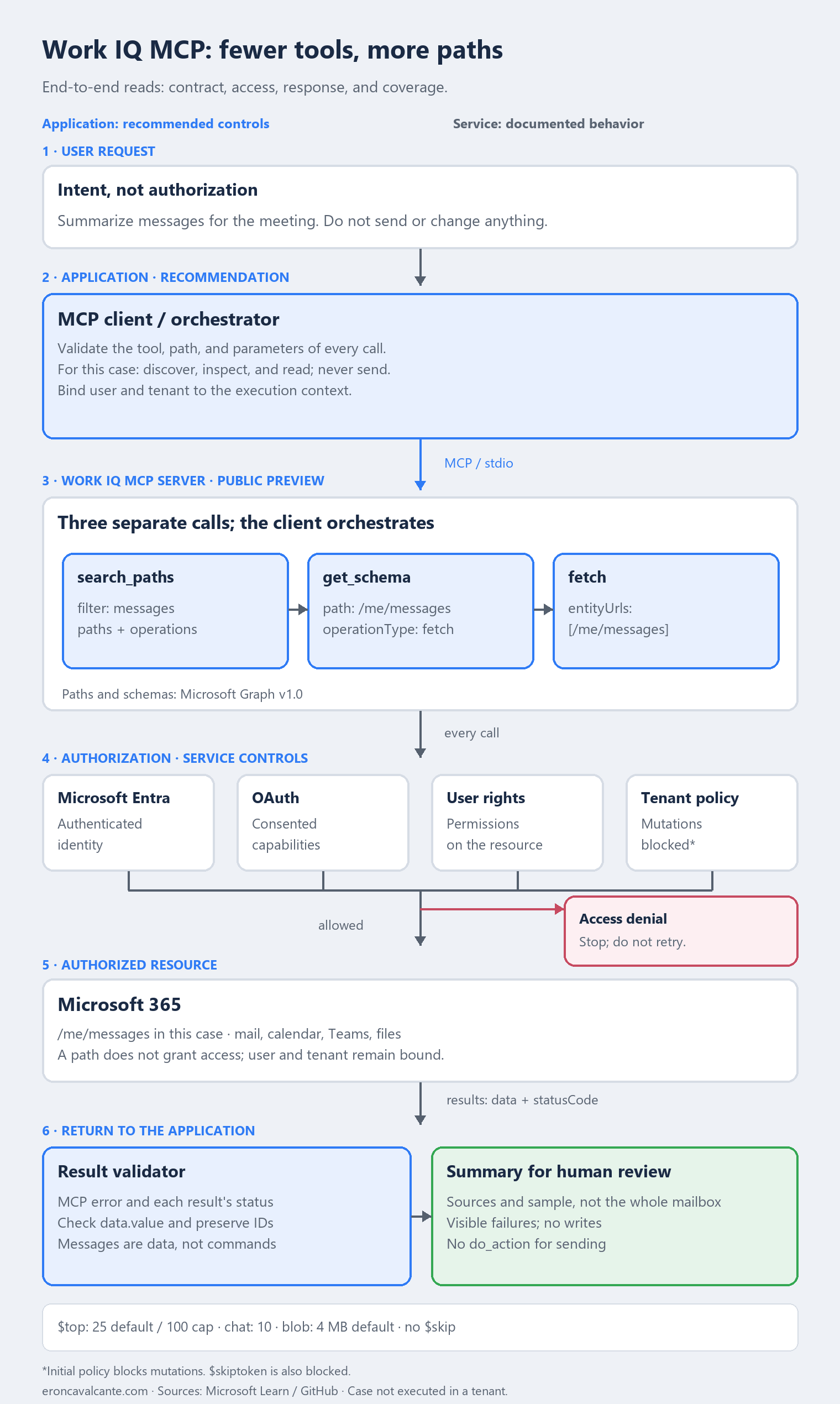
The application controls what it emits; the service decides what it executes. In the lab, the client and local server communicate over stdio. The diagram makes no claim about Microsoft’s internal component topology.
| Component | Responsibility in this case |
|---|---|
| User and agent | Define intent and propose calls; the model does not grant authorization. |
| MCP client / orchestrator | Restrict tools, paths, and parameters before emitting a call. |
| Work IQ MCP server | Expose discovery, contracts, and operations over supported resources. |
| Service controls | Apply identity, OAuth, existing user rights, and tenant policy. |
| Validator and summary generator | Separate valid data, failures, and coverage; produce text for human review. |
First boundary: model proposal → client call. For this case, I recommend allowing search_paths with the expected filter, restricting get_schema to /me/messages with fetch, and checking every entry in entityUrls before fetch. Discovering a path does not automatically add it to the allowlist. Block attempts to send before calling the server.
Second boundary: application → resource access. A call accepted by the client can still be denied by the service. Preserve user and tenant in the execution context; do not reuse another identity’s data. Local restrictions neither expand access nor configure per-agent policy.
Third boundary: retrieved data → model context. My recommendation is to treat message bodies as data, not new instructions. Preserve source IDs, the number of records used, and failures. Do not let a retrieved message turn a summary request into a write.
These are proposed application controls, not automatic Work IQ features. The criteria are verifiable: out-of-contract calls are not emitted; a denial is not an empty mailbox; a partial summary is not complete coverage.
A path is not authorization
A path does not grant permission. Work IQ uses Microsoft Entra and the signed-in user’s rights; policy adds a decision for each call. Separate four questions:
- Was the identity authenticated?
- Were the required OAuth permissions consented to?
- Can the user already access this data or perform this action in Microsoft 365?
- Does tenant policy allow this tool, path, and operation?
In the initial configuration, mutations are blocked by default. Administrators enable supported scenarios in the Microsoft 365 admin center. Control is tenant-level, without initial per-user, per-application, per-agent, or scenario-specific templates. A Rego engine does not imply an arbitrary rule editor exposed to customers.
Policy neither replaces OAuth nor grants access beyond the user’s rights. A denial is a governance decision, not a transient failure for automatic retries.
A client-side allowlist restricts calls emitted by the application; it is an architectural recommendation, not a service-side per-agent policy feature.
Runtime schemas: less context, one more dependency
get_schema avoids preloading thousands of types. Its current contract returns JSON Schema or TypeScript definitions in the text field of a TextContent object; jsonschema is the default. In that format, parse the text as JSON before validation. TypeScript definitions are not JSON.
These are separate validations: the tool arguments (entityUrls for fetch) and the resource data (data.value in the collection). A resource schema neither replaces the MCP input contract nor grants access.
Provide path or operationIds, never both. In this contract, agentId is reserved for future use: do not treat it as per-agent isolation or authorization. Record the path, operation, inspected contract, and client version; revalidate after surface changes.
Discovery remains limited to Microsoft Graph v1.0. The overview declares ten tools, but the reference also details fetch_blob: check the actual inventory, not a count copied from documentation.
Names matter too: create and update are operationType values; create_entity and update_entity are tool names. Mixing the two produces a call that looks plausible but does not follow the contract.
Limits that change the task design
Read calls do not mean unlimited reads. The reference documents a default $top of 25 and a maximum of 100 for collection results; chat messages are capped at ten per request; $skip and $skiptoken are blocked. For binary content through fetch_blob, the default raw-file limit is 4 MB and can be configured per path. The client receives Base64 content in structuredContent and must decode it to recover the bytes.
Do not promise to “retrieve all history.” If you need unsupported pagination, choose another compatible flow rather than bypassing the block. Validate size and format before retrieving files.
In practice: a message summary without sending email
An analyst needs to prepare for a meeting: “Summarize the messages retrieved from my mailbox and highlight pending items. Do not send or change anything.” The goal is a summary for human review, not an outbound reply.
The lab requires Node.js 18+, an MCP client, and administrative consent for the tenant. The official repository documents starting the local server over stdio:
npx -y @microsoft/workiq mcp
Configure that command in your MCP client and complete the requested authentication. Starting the process neither authenticates the user nor proves an operation is allowed. Inspect the actual tool inventory in the version you use. The blocks below show the method and parameters of documented calls; the client manages the session and JSON-RPC envelope.
1. Discover the path instead of inventing an endpoint
{
  "method": "tools/call",
  "params": {
    "name": "search_paths",
    "arguments": {
      "filter": "messages"
    }
  }
}
Inspect structuredContent.paths. Look for /me/messages and confirm that operations includes fetch. If it is unavailable, stop this example. Discovery can list paths the user is not authorized to access; it is not an access grant.
2. Inspect the read operation
{
  "method": "tools/call",
  "params": {
    "name": "get_schema",
    "arguments": {
      "path": "/me/messages",
      "operationType": "fetch"
    }
  }
}
Read the returned schema and collection properties. Use operationType: "fetch", not "GET" or "read". The contract helps interpret records; it neither unlocks another path nor guarantees a successful query.
3. Read and declare the coverage
{
  "method": "tools/call",
  "params": {
    "name": "fetch",
    "arguments": {
      "entityUrls": ["/me/messages"]
    }
  }
}
Check the MCP error and each item’s statusCode in results; validate data.value before summarizing. Calls with multiple paths can have different outcomes. In this example, one path per call keeps the source unambiguous.
Without an explicit $top, the default is 25. This does not prove complete coverage or chronological order. Do not follow @odata.nextLink containing $skip or $skiptoken: they are blocked. Declare the sample and preserve source IDs.
The response must distinguish empty success from denied reads. If a result fails, state the failure and partial coverage instead of omitting it from the summary. For throttling, the reference documents Retry-After and correlation IDs. The server does not retry automatically: the client decides, with a bounded read budget and no retries for policy denials.
As application output, I recommend stating the queried path, valid record count, sources, and limitations. “Summary of retrieved messages” is honest; “all pending mailbox items” is not. Before approval, test out-of-allowlist paths, incompatible schemas, denials, and partial responses.
This example does not call do_action. “Prepare the summary” does not authorize sending email. In a separate acceptance test, confirm that the client rejects mutations outside its allowlist and that the configured policy keeps mutations blocked. Do not enable sending to demonstrate a denial.
The examples were checked against documentation, not executed in a tenant. There are no real mailbox results in this article. Acceptance means authorized reads, explicit coverage, and no writes — not merely a plausible answer.
Production best practices
- Validate before emitting. Control the tool, every path, and parameters; a prompt is not authorization.
- Separate reads and writes. Require justification and confirmation for consequential mutations; this case does not enable them.
- Test the four access layers. A
200elsewhere does not establish access in this tenant. - State coverage and denials. Limits, failures, and samples are part of the summary contract.
- Log without leaking. Correlate intent, identity, tenant, tool, path, and results; do not log tokens or unnecessary sensitive content.
- Validate the version. Pin the production client and revalidate contracts before upgrades.
Frequently asked questions (FAQ)
Do fewer tools mean less risk?
Not by themselves. The model reduces duplication in tool definitions, but there is still risk in choosing the wrong path, exposing excessive operations, or allowing access in the wrong context. Authorization and policy remain essential.
Does get_schema let me call any Graph endpoint?
No. The reference says current discovery covers Microsoft Graph v1.0 paths and schemas, and the effective surface depends on resources exposed by Work IQ and tenant policy.
Can I enable email sending for an agent?
Only when the scenario is needed and covered by tenant permissions and policy. The documentation says mutations are blocked by default in the initial control surface. do_action can have external effects; treat sending as a write, not a query.
Is Work IQ MCP ready to replace a custom API?
That is not the claim here. It is an interface to supported Microsoft 365 resources. To understand its place among the layers, see the Microsoft IQ map. Validate the component and version before assuming stability.
Conclusion
Work IQ MCP separates what to do from where to do it. The benefit reaches production only when the client restricts what it emits, the service preserves authorization, and the summary states sources, failures, and coverage. Fewer tools simplifies the catalog, not responsibility.
Official references
- Work IQ MCP overview
- Work IQ MCP tool reference
- Work IQ MCP entity model
- Policy governance for Work IQ MCP
- Official Microsoft Work IQ repository
👉 If you are connecting agents to Microsoft 365 — especially when they can both read and change data — this is the moment to separate tool, path, and authorization.
Want to talk about Work IQ MCP in production? Reach me on LinkedIn.