Introduction
The RAG (Retrieval-Augmented Generation) architecture represents a new approach to building generative AI applications that use company-specific information. Instead of relying only on the static knowledge of a large language model (LLM), RAG architecture integrates search and data-retrieval mechanisms into the response-generation process. This is especially useful in customer service scenarios: imagine chatbots that search corporate knowledge bases for manuals, policies, or product data, and then generate contextualized and accurate answers for customers. In this technical article, aimed at developers, data engineers, and solution architects, we will break down how RAG architecture works technically using Microsoft Azure and OpenAI tools — such as Azure Cognitive Search, Azure OpenAI Service, vectorization with embeddings, and data storage in Azure (Blob Storage, Cosmos DB, etc.). We will cover the components involved, the step-by-step data flow, and a practical example of a customer-service application with semantic search and personalized response generation.
Overview of the RAG Architecture
RAG architecture combines two fundamental building blocks: retrieval of relevant information and natural-language generation. In simple terms, the process works like this:
- A user question or request reaches the system (for example, through a chat or virtual assistant).
- The system first queries a knowledge base to find information relevant to the question. This search can be performed semantically, using embedding vectors to find text passages related to the query even when there is no exact keyword match.
- The search results (relevant documents or passages) are then provided as additional context to a language model (for example, GPT-4 in Azure OpenAI) together with the original question.
- The LLM generates a response in natural language that combines its understanding and generation capabilities with the retrieved information, producing a highly informative and contextualized final answer for the user.
In other words, the “augmented” in RAG means that the model’s answer is enriched with external information retrieved at the time of the question. This removes the need to train or update the language model with proprietary data; instead, corporate knowledge is maintained in databases that can be queried in real time. As Microsoft describes it, in RAG architecture the pre-trained language model is used without additional training, generating answers that are complemented by information obtained from the search mechanism.
Main Components of the RAG Solution
Let us detail the main components and services involved in implementing a RAG architecture using Azure and OpenAI tools:
Azure Cognitive Search (Azure AI Search): An intelligent search service in the Azure cloud that acts as the information-retrieval system. It allows documents from multiple sources to be indexed and highly relevant queries to be performed, including semantic and vector search capabilities. Azure Cognitive Search provides scalable infrastructure for indexing and search, with Azure security and reliability. In a RAG scenario, it works as the “search brain” that finds the most relevant content in the corporate knowledge base to answer each question.
- Knowledge Base (Data in Azure Blob/Cosmos DB): The set of company documents and information that will be used to answer questions. This data may include product manuals, help-desk articles, FAQs, previous ticket records, internal policies, and more. It can be stored in several Azure sources — such as PDF files in Azure Blob Storage, documents in SharePoint, records in SQL or NoSQL databases (for example, Azure Cosmos DB), etc. Azure Cognitive Search can connect to these sources to index all content, structured or unstructured, using available connectors. During indexing, the service extracts text from documents, optionally applies cognitive enrichment (OCR, translation, etc. if configured), and creates a searchable index. With vector support, each document or passage can also have an associated embedding vector for semantic search.
- Vectorization and Embeddings: A mechanism that converts texts (both user questions and knowledge-base documents) into high-dimensional numerical vectors so that semantically similar texts are close to one another in that vector space. In the Azure/OpenAI context, we can use an Azure OpenAI Embedding model (for example, one based on the Ada embedding model) to generate these vectors. Document vectors are calculated and stored in the Azure Cognitive Search index (or in a separate vector DB, depending on the architecture), and at query time the user’s question vector is compared to find the documents with the highest cosine similarity. This process makes it possible to find relevant answers even when the wording of the question does not exactly match the text of the documents, providing a much more effective semantic search than traditional keyword search.
- Azure OpenAI Service (Language Models): A service that provides access to advanced language models (such as GPT-3.5 and GPT-4) hosted on Azure infrastructure. This is where natural-language response generation occurs. Azure OpenAI is used in two ways in the RAG architecture: (1) to generate embeddings (as mentioned above, using Embedding endpoints) and (2) to generate the textual content of the response through prompts passed to the GPT model. Azure OpenAI Service ensures that these AI capabilities are available in a scalable and secure way in the cloud and can be easily integrated into corporate applications through APIs. It is worth noting that the LLM, in this context, remains not specifically trained on the company’s data — instead, it receives the documents retrieved by Azure Cognitive Search and uses them as a reference to compose the answer. This gives us the best of both worlds: the power of GPT to understand and answer complex questions combined with the up-to-date, factual knowledge from proprietary data.
- Application/Orchestrator: The integration layer that coordinates the flow among the components above. It can be a web backend application, a serverless function (Azure Functions), or even a specialized tool such as LangChain or Semantic Kernel. This layer receives the user’s question, performs the required calls — first to Azure Cognitive Search to obtain relevant documents, then to Azure OpenAI to generate the answer — and then aggregates the result to return it to the user. It can also handle additional functionality, such as context management in multi-turn conversations, security handling (for example, authenticating users and ensuring the query only accesses data the user is allowed to see), response post-processing (formatting, citing sources), and integration with other APIs (for example, retrieving customer profile data to personalize the answer).
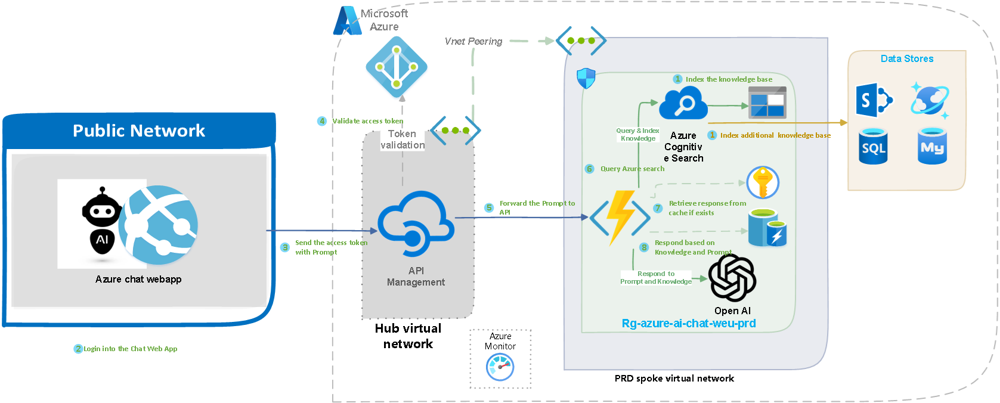
Example of a technical architecture for a RAG solution using Azure services. On the left, a web application (Chat UI) in the public network environment receives the user’s question. Then, through API Management (center), the request is forwarded to a backend on the internal network (virtual hub). This orchestrator performs a search in Azure Cognitive Search (right side), which indexes the corporate knowledge base (SharePoint, SQL, Azure Storage, etc.). The relevant documents found (chunks) are sent to the Azure OpenAI service (GPT model) to compose the final answer, which is then returned to the web application for the user. The entire flow is monitored by Azure Monitor, and components such as Azure Active Directory ensure security (for example, user-token validation).
Data Flow and Detailed Operation
With the components mapped, let us follow the path of a request inside the RAG architecture, step by step, to understand the interaction between Azure Cognitive Search and Azure OpenAI in the customer-service context:
- User Question (Input) – The customer asks a question through the support channel (a chat on the website, Microsoft Teams, WhatsApp, or another integrated channel). For example: “My product X is defective; how do I claim the warranty?”. This question reaches the App UX, the user interface of our system (which can be a web chatbot, a virtual assistant, or even a virtual agent in a call center).
- Query Orchestration – The application or backend service receives the question and starts the RAG process. At this stage, the application can generate an embedding of the question (a representative vector) using Azure OpenAI. The application then sends the query to Azure Cognitive Search. There are two possible approaches here:
- Vector Search: The question in vector format is compared with the document vectors in the index to return the most semantically relevant passages from the knowledge base (for example, the paragraph in the product manual that discusses warranty).
- Semantic/Classical Search: Alternatively, Azure Cognitive Search could perform a traditional text search or use internal semantic algorithms to return relevant documents. Today, the recommended practice in RAG is vector search with embeddings, possibly combined with filters (for example, searching only in documents in the “warranty” category).
In any case, the result of this stage is a set of the best documents or snippets related to the customer’s question, usually limited to the top 3 or top 5 results to keep things concise (you want a few highly relevant passages because of the token limit that can be sent to the language model).
- Prompt Composition – With the search results in hand, the orchestrator now builds a prompt to be sent to the Azure OpenAI language model. This prompt usually consists of a brief instruction or context (for example: “You are a support assistant that uses the company’s knowledge base. Answer politely and concisely.”), followed by the retrieved content (the texts from the documents found) and finally the user’s question. This technique is called prompt grounding, because it “grounds” the model in the information provided so that the answer is supported by trusted data.
- Response Generation with Azure OpenAI – The complete prompt is sent to the model endpoint (for example, GPT-4) in Azure OpenAI Service. The model processes the input, considering both the question and the contextual references from the documents, and generates an answer in natural language. For example, it might produce: “Hello! To claim the warranty for product X, you should contact our authorized technical support. According to the manual, you must present the invoice and the product serial number. The warranty period for product X is 1 year from the purchase date.” — note how the hypothetical answer incorporates details that were in knowledge-base documents (product manual, warranty policy).
- Returning the Response to the User – The application receives the generated answer and forwards it back to the customer through the chat interface. The user then sees the answer a few seconds after asking the question, obtaining accurate and contextualized information. Optionally, the system can also display references or citations alongside the answer, indicating which document or article the information came from — this increases trust and transparency (and is feasible because we know exactly which documents were retrieved in the search step).
Throughout this flow, several technical benefits become clear. First, the LLM never extrapolates or “invents” facts purely out of thin air — it relies on the retrieved data, which drastically reduces the chance of hallucinations and increases the accuracy of the response. Second, it was not necessary to train the GPT model with any information about warranties or product X beforehand; the knowledge was dynamically incorporated through search, saving time and resources (no fine-tuning). Third, the solution is scalable and updateable: if the warranty policy changes tomorrow, simply update the document in the knowledge base (for example, replace the manual PDF in Blob Storage and reindex it) and the virtual assistant will already start answering with the new information — there is no dependence on retraining models, because RAG always searches the updated data before answering.
Practical Application in Customer Service
Let us consider a concrete scenario of an automated customer-service flow using RAG:
- Context: An e-commerce company implements a customer-support chatbot on its website using Azure Cognitive Search and Azure OpenAI. The company has a large knowledge base: help articles, frequently asked questions, manuals for products sold, exchange and return policies, and even customer-specific data (for example, order history) in its internal systems.
- Customer Query: A customer opens the chat and asks: “Hi, I placed an order last week and did not receive confirmation. How can I check whether my order was registered?”.
- Meus‘Meus Pedidos’.” e um procedimento interno sobre verificação de pedidos.
- Response Generation: With this content in hand, the system builds the prompt and sends it to Azure OpenAI (GPT-3.5 Turbo model, for example). The model then produces a response to the customer mentioning the suggested steps (check spam, access the customer area) and perhaps adding: “If you still have problems, I can check it here for you. What is your order number?”, simulating personalized support.
- Additional Interaction: The customer provides the order number; the system (through the orchestrator) can then, in addition to RAG, integrate with the order-database API to retrieve the specific status of that order and use the LLM to format the response: “I found your order: it is confirmed and being prepared for shipment. You should receive the confirmation email soon.”. Here we see how RAG can integrate with additional automations to provide personalized answers, combining general knowledge (FAQ) with customer-specific data.
From a technical standpoint, this practical example shows the flexibility of RAG architecture. It allows you to chain searches and additional actions (for example, querying other systems through APIs) together with natural-language generation, offering robust service. Tools such as LangChain can simplify this flow by coordinating “chains” of operations (search for this, call that, then generate an answer) within the same conversation context.
Technical Considerations and Best Practices
To successfully implement a RAG solution in production, a few additional technical points deserve attention from developers and architects:
- Indexing and Chunking Strategy: Splitting long documents into smaller chunks before indexing is crucial. Each chunk should contain enough content to be useful, but not be so large that it exceeds token limits when several are concatenated in the prompt. A common practice is to use chunks of a few hundred words, segmented by topics or logical headings in the document. Azure Cognitive Search offers indexing pipelines and even cognitive skills to extract these parts from documents. It is also important to periodically update the index as new documents are added or changed (this can be scheduled, for example, daily or in real time depending on the need).
- Quality of Embeddings: The choice of embedding model and vector dimensionality influences the quality of vector search. OpenAI embedding models (such as text-embedding-ada-002) are generally efficient and multilingual, which is useful if your knowledge base and questions involve Portuguese and perhaps other languages. Also make sure to normalize texts (remove excess formatting, irrelevant stopwords, etc.) before generating embeddings to improve semantic matching.
- Data Filtering and Security: In a corporate context, not all information should be accessible to every user. Consider using the security filter features of Azure Cognitive Search, such as filters by label or ACL, to restrict documents by user or department when necessary. For example, the chatbot can identify the signed-in user and only retrieve documents that the user is permitted to see. Azure Cognitive Search and other Azure components integrate with Azure Active Directory for access control, and the entire system can operate inside isolated virtual networks, ensuring security and compliance when handling data.
- Performance and Cache: Although Azure OpenAI is quite fast given what it does, the text-generation step still adds latency (usually a few seconds per response, depending on prompt size and model). To improve response time for common questions, one useful technique is to implement a cache. The example architecture we presented incorporates Azure Redis Cache, which stores already-generated answers for identical queries. This way, if multiple users ask something very similar (“how to issue a second copy of an invoice”), the first answer can be reused for a period of time, reducing unnecessary load on the model. But be careful to invalidate or expire caches if the knowledge base is updated (so outdated answers are not served).
- Monitoring and Telemetry: Use Azure Monitor and Application Insights to track the performance of your RAG system. Important metrics include search time, response-generation time, prompt size, hit rate (possibly measuring how often the user was satisfied or did not need escalation to a human), as well as usage costs for each service (for continuous optimization). Monitoring helps identify bottlenecks — for example, if search is returning poorly relevant results (which may require better tuning of indexes or queries) or if the model sometimes fails to follow the expected guidelines (which may require more refined prompt engineering).
- Scalability: RAG architecture benefits from the cloud’s native scalability. Azure Cognitive Search can be scaled for larger indexes or higher query throughput (simply choose the appropriate SKU and replicate/partition as needed). Azure OpenAI, in turn, allows inference instances to be scaled according to demand. This means the solution can be sized to serve anything from a few hundred to thousands of queries per second, if necessary, while maintaining consistent performance globally. This elastic scalability is a major advantage of using managed Azure services, especially for customer-service applications where demand can fluctuate (imagine peaks during Black Friday or a product launch).
Conclusion
Implementing RAG architecture with Microsoft Azure and OpenAI tools offers an elegant and powerful technical solution for building advanced virtual assistants and customer-service chatbots. To recap, by integrating Azure Cognitive Search and Azure OpenAI, we can bring together the best of both worlds: intelligent search over corporate data + state-of-the-art natural-language generation. From the developer and architect point of view, the RAG approach eliminates the need to train complex models with proprietary data while ensuring that system responses are always based on up-to-date and relevant information. In this technical guide, we saw how each component contributes to the whole — from storing documents in Blob/Cosmos and indexing them, through vectorizing queries, to the final orchestration that delivers an answer to the user.
In short, RAG architecture provides more accurate, contextualized, and reliable automated service, able to scale with demand and stay aligned with the company’s current knowledge without AI retraining efforts. For technical teams, this means fewer concerns about outdated data in the model and more control over the sources of truth used in answers. With Azure and OpenAI, Microsoft provides the ready-made building blocks for these solutions — allowing developers to focus on personalizing the experience and integrating with business processes. Intelligent automation in customer support, enabled by RAG, is a significant step toward virtual assistants that are truly useful in everyday work, and familiarity with its architecture empowers IT professionals to lead this transformation within their organizations.
Bibliography
Official sources consulted
Azure OpenAI Service (GPT Models, Embeddings, Security)
https://learn.microsoft.com/pt-br/azure/ai-services/openai/overview
Azure Cognitive Search (Vector and semantic search, and security)
https://learn.microsoft.com/pt-br/azure/search/search-what-is-azure-search
Semantic Kernel (agent and prompt orchestration in RAG)
https://learn.microsoft.com/en-us/semantic-kernel/overview
Azure Blob Storage and Cosmos DB for unstructured and vector data
https://learn.microsoft.com/pt-br/azure/storage/blobs/storage-blobs-introduction
https://learn.microsoft.com/pt-br/azure/cosmos-db/introduction
Overview of OpenAI embeddings (text-embedding-ada-002)