The security checklist was approved without a single caveat. Public network access disabled, private endpoint created, traffic leaving through the VNet, a diagram with a padlock drawn over the resource. Three weeks later the agent went to production with an HTTP tool, someone pointed that tool at an external endpoint, and the contents of an internal document left the environment over port 443 — the same port the NSG opens for everyone. Nobody breached the private network. The private network simply never had an opinion about that path. A private endpoint closes the entrance; it knows nothing about the exit, and an agent with tools is, by definition, an outbound machine.
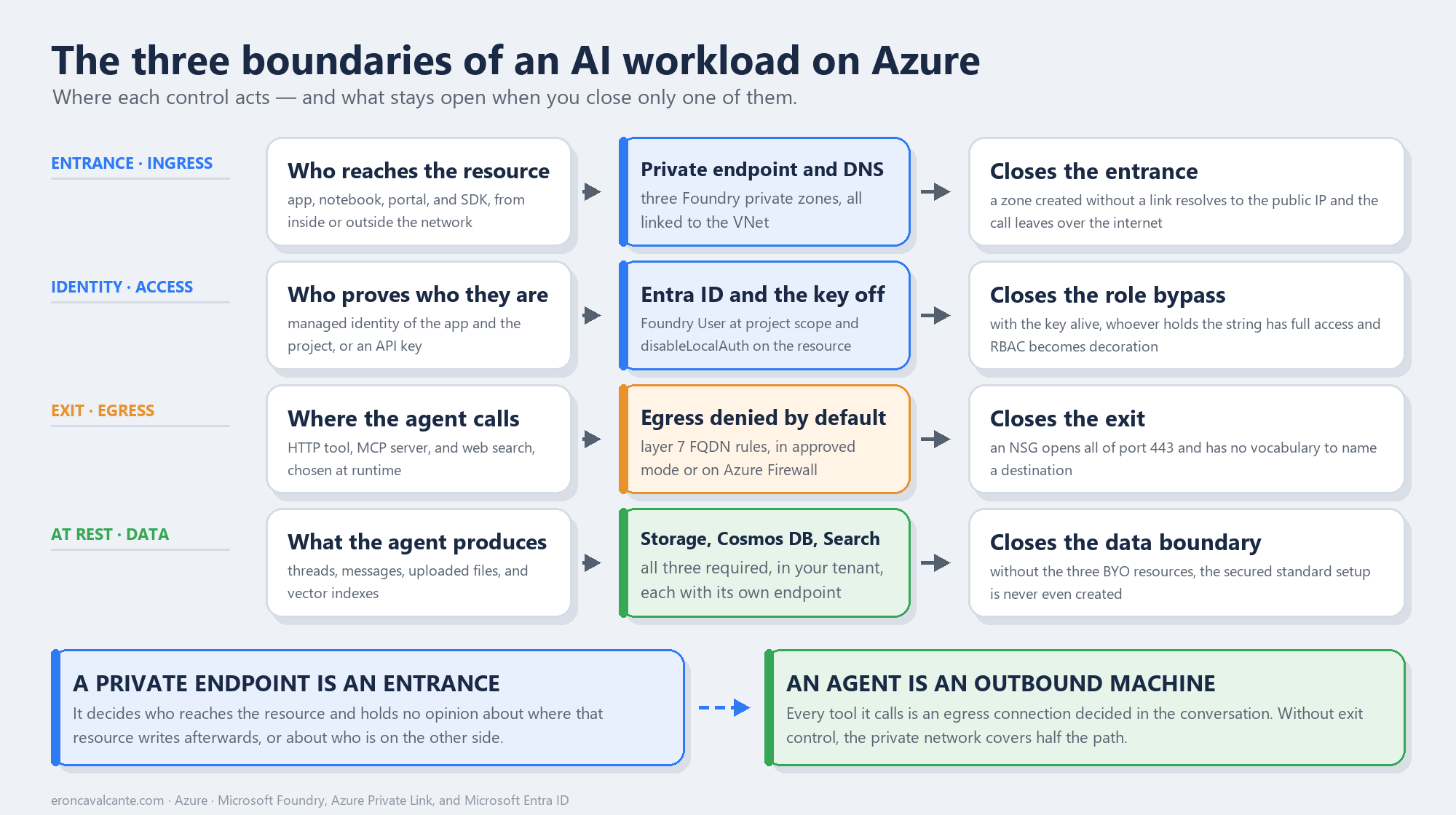
The three boundaries An AI workload has three different boundaries, and most projects protect one of them well and assume the others came along for free. The entrance boundary decides who can reach the resource — that is private endpoint and private DNS territory. The identity boundary decides who can do what after reaching it — that is Entra ID territory, and turning the key off. The exit boundary decides where your data is allowed to go — that is egress control territory, and it is the one almost always left open. All three have to be closed separately, because none of them follows from another.
What does it mean to isolate an AI workload?
Isolating an AI workload is not “putting it behind a private endpoint”. It is removing four surfaces from the reach of the public internet at the same time: the inference endpoint, the identity calling that endpoint, the egress of whatever executes the task, and the storage where the state of that task lives.
The starting point has changed shape. Today’s Microsoft Foundry resource is a Microsoft.CognitiveServices/accounts with kind: AIServices, and projects are sub-resources of it. The older model — a hub based on Microsoft.MachineLearningServices/workspaces — still works, but it is now documented as Foundry (classic), and new investment is going into the first one. That matters for networking because the two have different isolation surfaces, and a good share of the material circulating online describes the older model.
The contrast that matters: a private endpoint answers “who can reach me?”. It does not answer “who are you” or “where are you allowed to write”. Those two questions have owners of their own, which is why there are three boundaries and not one.
The problem it solves
An AI workload breaks the assumption traditional network security rests on: that the application talks to a known, stable set of destinations. An agent with tool calling is the opposite of that. It decides at runtime which tool to call, and every tool is an outbound connection — an MCP server, a third-party API, a web search. The list of destinations stopped being a property of the deployment and became a property of the conversation.
Add a detail that changes the risk math: the agent reads text nobody controls. A retrieved document can carry a planted instruction, and the agent holds a valid credential, sits inside the perimeter, and reaches internal systems over private endpoints. In that design, egress is not an operational detail — it is the only place where exfiltration can be stopped.
The four mistakes I see most often in the field:
- Mistaking a private endpoint for a perimeter. It controls ingress. The outbound path is still governed by something else — or by nothing.
- Creating the private endpoint and forgetting DNS. The private zone exists but was never linked to the VNet. The name resolves to the public IP and the connection fails in a way that does not look like a DNS problem.
- Leaving the API key alive. As long as
disableLocalAuthisfalse, whoever holds the string has full access to the resource — no role, no scope, no Conditional Access. Your whole RBAC design becomes decoration. - Believing an NSG handles egress. An NSG is layer 4. It allows or blocks port 443, not the destination. Outbound control by FQDN is layer 7.
How it works — step by step
- Decide the network model before creating the resource. For hosted agents, VNet injection must be part of creating the Foundry account: adding it later is not supported. That is an irreversible decision disguised as a setting.
- Size the subnets with headroom. The agent subnet needs delegation to
Microsoft.App/environments. The minimum is/27, but/24is the recommendation for production — and it cannot be shared between two Foundry resources. - Use RFC 1918 ranges only.
10.0.0.0/8,172.16.0.0/12, or192.168.0.0/16. Public ranges and CGNAT (100.64.0.0/10) are not supported on the delegated subnet and fail at creation. - Create the inbound private endpoint and disable public access. In the standard setup with private networking, accounts and projects are already born with Public network access Disabled, and the rule applies to every protocol, WebSocket included.
- Configure the three Foundry DNS zones. Not one: three, and the reason is in the next section.
- Create the private endpoints of the dependent resources — by hand. The endpoints for Azure AI Search, Storage, and Cosmos DB are not created automatically along with the Foundry resource.
- Turn off the key and hand out roles.
disableLocalAuth: trueon the resource, and Foundry User for whoever builds, scoped to the project. - Close egress. A firewall with FQDN rules, or approved-outbound mode. Without it, everything before this protects half the path.
- Validate by resolving names from inside the VNet. Run
nslookupagainst each FQDN from a machine on the network and confirm the answer is a private IP.
The entrance boundary: private endpoint and the three DNS zones
Here is the detail that breaks more deployments than any other: a Foundry resource needs three private DNS zones, not one.
| Resource | Sub-resource | Private DNS zone |
|---|---|---|
| Foundry | account |
privatelink.cognitiveservices.azure.com |
| Foundry | account |
privatelink.openai.azure.com |
| Foundry | account |
privatelink.services.ai.azure.com |
| Azure AI Search | searchService |
privatelink.search.windows.net |
| Azure Cosmos DB | Sql |
privatelink.documents.azure.com |
| Azure Storage | blob |
privatelink.blob.core.windows.net |
The reason is that the same Foundry resource exposes three different endpoint suffixes, and which one you hit depends on the SDK: the older Azure OpenAI SDK talks to openai.azure.com, the Cognitive Services one to cognitiveservices.azure.com, and the new Foundry SDK to services.ai.azure.com. Configuring only the zone your code uses today works — until the day someone switches libraries and the name resolves to the public IP again.
And there is a cruel subtlety in how this fails. Creating the zone is not enough: it needs a virtual network link to the VNet. Without that link, the public CNAME keeps resolving to the public endpoint, the request leaves over the internet, and the error you get never mentions DNS at all. In a hub-and-spoke topology with your own DNS servers, the path is a conditional forwarder pointing at the Azure DNS Virtual Server, 168.63.129.16.
One classic symptom is worth more than a paragraph of theory: Timeout of 60000ms exceeded when loading the Agents pages in the project is, in the documentation, the portrait of a project that cannot talk to Cosmos DB — private endpoint or DNS. It is not a slow portal.
The identity boundary: the key is the hole in your RBAC design
With networking solved, the question networking never answered remains: who is who. And it is worth being blunt — as long as the API key is active, your RBAC is ornamental. The Foundry documentation says nearly that: roles apply when authentication goes through Microsoft Entra ID; with key-based authentication, the key grants full access with no role restriction.
The fix is disableLocalAuth: true on the resource, with one operational caveat that belongs in your cutover plan: the change is not instant. Propagation usually completes in minutes, but it can take hours depending on region, load, and gateway cache state. In other words: turning off the key is not a control you reach for in the middle of an incident.
The second trap is picking the wrong role — and it got worse because the roles were recently renamed. Azure AI User, Azure AI Owner, Azure AI Account Owner, and Azure AI Project Manager became Foundry User, Foundry Owner, Foundry Account Owner, and Foundry Project Manager. The IDs and permissions are unchanged, but both names are still in circulation. In scripts, use the GUID.
| Role | For whom | What it authorizes |
|---|---|---|
| Foundry Agent Consumer | Whoever only consumes the agent | Interacting with agent endpoints, nothing else |
| Foundry User | Developer who builds and tests | Read access to project and account, plus the project’s data actions |
| Foundry Project Manager | Tech lead | Creating projects, publishing agents, assigning Foundry User |
| Foundry Account Owner | Platform manager | Creating accounts and projects, deploying models — without building |
| Foundry Owner | Self-sufficient team | Everything above, building included |
And the explicit warning that saves an afternoon of debugging: do not use roles that start with Cognitive Services for Foundry scenarios — they exist to access AI Services resources directly. For the same reason, do not use Azure AI Developer: despite the name, its scope is Azure Machine Learning workspaces and Foundry hubs, not Foundry projects or hosted agents. For project access, it is Foundry User or Foundry Owner.
Worth registering what has taken shape alongside this: Microsoft Entra Agent ID, announced at Ignite 2025 and now generally available, gives each agent its own identity in the directory, next to human identities — with Conditional Access, an audit trail, and lifecycle management. It is the answer to the problem of an agent treated as a generic application, and it is now where a production design rests.
The exit boundary: where most projects stop protecting
This is the forgotten boundary, and the reason is cultural: classic network security was built to protect what comes in. In an AI workload, the value is in what goes out.
The strongest model is the managed virtual network in AllowOnlyApprovedOutbound mode. There, all egress is denied by default and only what is allowed by service tag, private endpoint, or FQDN rule gets through — and FQDN rules cover ports 80 and 443 only. Three practical consequences belong in the decision:
- Adding the first FQDN rule provisions a managed Azure Firewall, with the cost that implies. You cannot bring your own firewall into the managed network, and each Foundry account gets its own.
- The modes are a one-way street. After
AllowInternetOutboundthere is no going back toDisabled; afterAllowOnlyApprovedOutboundthere is no going back toAllowInternetOutbound. - The portal does not create a managed network. It is CLI, Bicep, or Terraform — and the
az cognitiveservices account managed-networkcommand group is marked preview.
In the bring-your-own-VNet alternative, the design is the classic one: Azure Firewall in a dedicated subnet and a UDR forcing egress from the agent subnet through the firewall, with application rules by FQDN. Two specific requirements here tend to be discovered in production:
- You have to allow the Managed Identity FQDNs for Azure Container Apps, or the
AzureActiveDirectoryservice tag. Without them the agent cannot even obtain a token. - There must be no TLS inspection in the firewall. A self-signed certificate injected into the path breaks the agent silently.
The contrast with an NSG deserves its own line, because that is where the misunderstanding lives: an NSG allowing outbound 443 allows every destination on 443. It has no vocabulary for “you may talk to the ERP API and you may not talk to some bucket”. That sentence only exists at layer 7.
user → App Gateway (WAF) → App Service in the VNet
                                 │
                                 ├─ private endpoint → Foundry (inference)
                                 │                        │
                                 │                        ├─ PE → Azure AI Search
                                 │                        ├─ PE → Cosmos DB
                                 │                        └─ PE → Storage
                                 │
                                 └─ external tool → Azure Firewall (FQDN) → internet
The baseline Foundry chat reference architecture assembles exactly this: Application Gateway with WAF as the layer 7 entry point, App Service integrated with the VNet, every PaaS resource over private endpoints, Azure Firewall inspecting egress, and a jump box behind Azure Bastion for administration. Note that the reference uses Application Gateway, not Front Door.
Where the data actually lives
With the three boundaries closed, the compliance question remains: where does agent state sit? In the standard setup, the answer is “in your tenant”, because it requires three BYO resources — all three, not two:
| Resource | What it holds |
|---|---|
| Azure Storage | Files uploaded by developers and end users |
| Azure Cosmos DB for NoSQL | Messages, conversation history, agent definitions and versions |
| Azure AI Search | Vector indexes created by the File Search tool |
It is neither optional nor partial: trying to create a secured standard agent without all three returns a capability host error complaining that a connection property needs a value. Cosmos DB has to be NoSQL, and the starting size is 3,000 RU/s — five containers of 1,000 RU/s in the enterprise_memory database.
Two topology constraints that change cost and design: the Foundry resource must be in the same region as the VNet; Cosmos DB, AI Search, and Storage may live elsewhere, with the cross-region traffic cost that implies. And for customer-managed keys (CMK), migration is one-way — you can move from Microsoft-managed keys to CMK, but not back.
The errors that show up when a piece is missing
Worth knowing the symptoms before meeting them at three in the morning:
403right after assigning a role. Role assignments take up to five minutes to take effect. Wait before investigating.401with a seemingly correct managed identity. Entra ID authentication requires a custom subdomain on the resource. A regional endpoint will not do.- Subnet delegation error when deleting the environment. Deletion order matters: delete and purge the Foundry resource before the virtual network.
- A capability host that refuses changes. It is not updatable. If the configuration changed, the path is recreating the project.
- A hosted agent that cannot pull an image from a private ACR. Support for an ACR behind a private network depends on when the project was created: projects created after June 25, 2026 support it; earlier ones need the ACR reachable over its public endpoint.
- Code Interpreter without files. In a private BYO configuration it only works in scenarios without upload or download; the
container_idworkaround exists via SDK only, not through the portal.
Production best practices
- Treat network topology as a day-zero decision. VNet injection for hosted agents and subnet delegation are not reversible by editing.
- Provision the three DNS zones from the start, even if today’s code uses a single SDK.
- Link the zone to the VNet and test with
nslookupfrom inside the network. A zone created but not linked is the most common defect and the least obvious to diagnose. - Turn the key off early, in development, and account for propagation of up to hours before considering the cutover effective.
- Use the role GUID in automation, not the name, while the rename rolls out.
- Pick
Foundry Agent Consumerfor consumers. It is the least privilege available and almost nobody uses it. - Write the list of allowed outbound destinations as a versioned artifact. If nobody can produce that list, egress is not under control.
- Confirm there is no TLS inspection on the agent path.
- Size the agent subnet by concurrent session, not by number of agents: the default is one usable IP per simultaneous session.
- Plan administrative access before disabling public access. With public access disabled, the portal and the playground require VPN, ExpressRoute, or a jump box behind Bastion.
What has to be in place
Foundation — authority over the path. The VNet exists with subnets sized and delegated, the DNS zones are linked, public access is disabled on the Foundry resource and on all three dependent resources, and each of them has its own private endpoint. Nobody reaches anything over the internet, and names resolve to private IPs from inside the network.
It is in place when an nslookup from the VNet returns a private address for every FQDN, and the same command outside it opens no connection.
Production with context — identity becoming authorization. The key is off, every call carries an Entra ID identity, Foundry roles are assigned at the right scope — project for builders, agent for consumers — and the project’s managed identity holds exactly the data roles it needs on Storage, Cosmos DB, and AI Search. No static credential survives in an environment variable.
It is in place when removing a role assignment takes someone’s access away — proof that the access came from the role and not from a forgotten key.
Scale and efficiency — the platform as a product. Egress is denied by default and opened by an explicit, versioned list; creating a new environment is a template, not a manual runbook; and the topology absorbs one more project without a redesign, with subnet IP consumption tracked as capacity.
It is in place when adding a new external destination means changing a file reviewed in a pull request, not opening a firewall ticket.
The order is causal, not chronological. You cannot hand out meaningful roles before the path is defined, and you cannot control egress before knowing who is speaking.
Frequently asked questions (FAQ)
Does a private endpoint alone protect my AI workload?
No. It closes ingress to the resource. It authenticates nobody — that is Entra ID — and it does not control where the agent writes afterwards, which requires layer 7 egress control.
Why three DNS zones for a single resource?
Because the Foundry resource exposes three endpoint suffixes — cognitiveservices.azure.com, openai.azure.com, and services.ai.azure.com — and the SDK you choose determines which one is used. Configure every zone your workload might use.
Can I add network isolation to an existing Foundry resource?
For hosted agents, no: network injection has to be part of creating the account. An inbound private endpoint can be added later, but VNet injection cannot.
What subnet size do I need?
The accepted minimum is /27 and the production recommendation is /24. Size it by concurrent sessions, since the default is one usable IP per session, and remember the agent subnet cannot be shared across Foundry resources.
Does turning off the API key break anything?
It breaks any client still authenticating with a key — and not immediately, because propagation can take hours. Migrate clients to managed identity first, confirm in the logs that no key-based call remains, and only then turn it off.
Isn’t an NSG enough to control egress?
No. An NSG operates at layer 4 and decides ports and IP ranges. Restricting by destination name requires a firewall with FQDN rules — either in approved-outbound mode or with Azure Firewall in your own VNet.
Conclusion
A secure AI workload architecture is not one padlock, it is three: who reaches, who may, and where it goes — plus the question of where the data rests. A private endpoint with DNS actually resolving closes the first. Entra ID with the key turned off closes the second. Egress denied by default closes the third, and that is the one left open in most projects that already passed a security review. BYO resources answer the fourth.
The maturity signal is simple and uncomfortable to check: ask someone for the list of external destinations your agents are allowed to reach. If the answer is a versioned document, the exit boundary exists. If the answer is “they call whatever they need”, what exists is a private network wrapped around an open door.
👉 If you are taking agents to production in a regulated environment — especially in banking, insurance, or healthcare, where the auditor’s question is not whether the data is encrypted but where it is allowed to leave through, this is the starting point.
Want to talk about network isolation and identity for AI workloads? Reach out on LinkedIn.