Language models know how to converse — but, on their own, they do not query your database, read the company document index, or trigger actions in the real world. That is where AI agents and tool calling (also called function calling) come in. In this guide, you will understand the concept in depth, see the execution cycle step by step, review a code example, and learn best practices for putting an agent into production securely.
What is an AI agent?
An agent is a language model that decides and ACTS: it interprets a goal, chooses tools, executes steps, and uses the result to reach the final answer. Unlike a simple chatbot — which only predicts the next text — the agent operates in a reasoning-and-action loop, chaining multiple calls until it completes the task.
In practice, what turns a “model that answers” into an “agent that solves” comes down to three ingredients:
- Goal: a clear instruction for what must be achieved.
- Tools: functions, APIs, or data sources that the model can invoke.
- Control loop: the logic that executes the calls, returns the results to the model, and repeats until there is a final answer.
What is tool calling (function calling)?
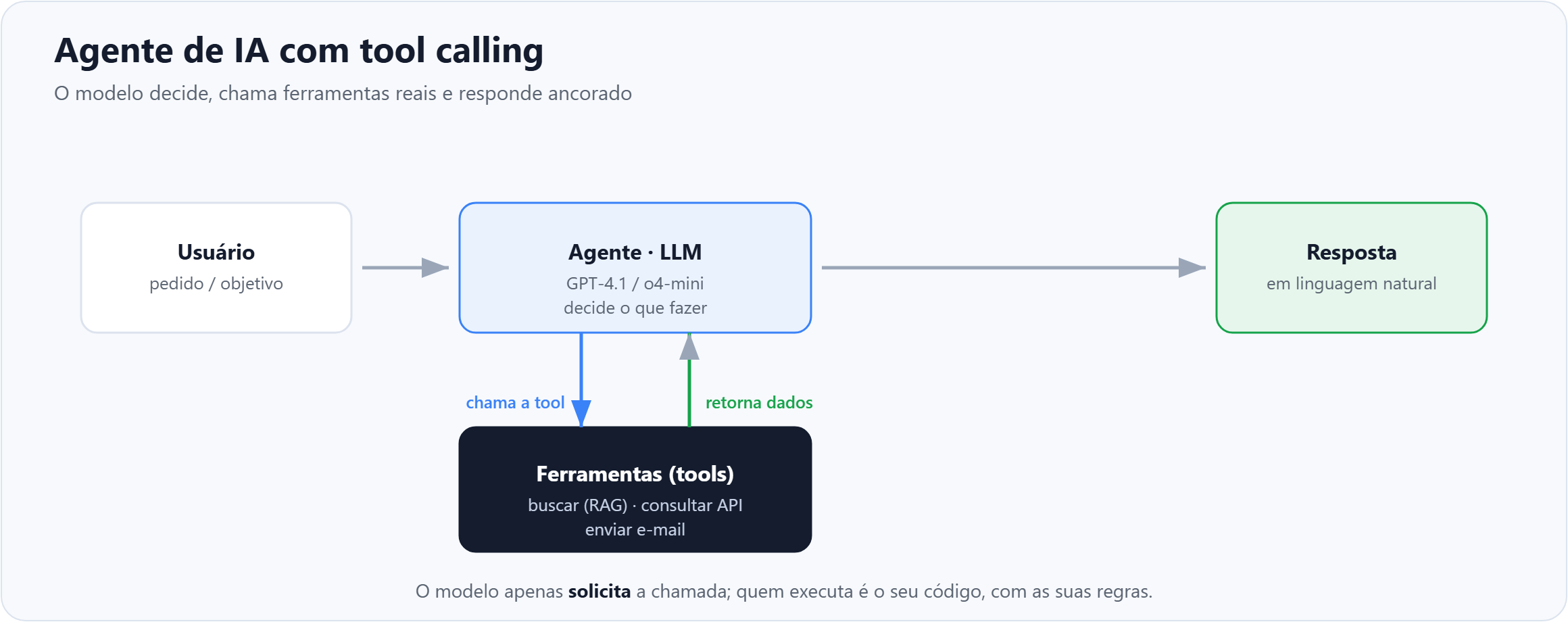
Tool calling is the model’s ability to request calls to external functions or APIs that you have registered. You describe each tool — name, description, parameters, and types — and the model decides when and how to use it, returning structured JSON with the arguments. An essential security point: the model only requests execution; your code runs the function, with your validations and permissions.
Examples of common tools:
buscarDocumentos(consulta)— queries a vector index (RAG) with the company manuals.consultarPedido(id)— reads the status of an order in an internal system.criarChamado(assunto, descricao)— opens a support ticket.enviarEmail(destinatario, corpo)— sends a notification.
How it works in practice: the agent cycle
- The user makes a request (e.g., “what is the status of order 123?”).
- The model realizes it needs external data and calls the tool
consultarPedido(123), returning the arguments as JSON. - Your code actually executes the function (queries the database/API) and returns the result to the model.
- The model evaluates the result. If it needs more data, it calls another tool — and the loop repeats.
- When it has everything it needs, the model writes the final answer in natural language, grounded in real data.
Anatomy of a tool
Each tool is described by a schema that the model reads to decide whether and how to call it. The clearer the name, description, and parameters, the better the model’s decision. An example definition (function calling JSON format):
{
  "name": "consultarPedido",
  "description": "Consulta o status atual de um pedido pelo seu identificador.",
  "parameters": {
    "type": "object",
    "properties": {
      "id": {
        "type": "integer",
        "description": "Identificador numerico do pedido, ex.: 123"
      }
    },
    "required": ["id"]
  }
}
In your code, you intercept the model’s decision, execute the corresponding function, and return the result. In Python pseudocode:
resposta = client.responses.create(model="gpt-5", input=mensagens, tools=ferramentas)

for chamada in resposta.tool_calls:
    if chamada.name == "consultarPedido":
        args = json.loads(chamada.arguments)
        resultado = consultar_pedido(args["id"])   # your real function
        mensagens.append(tool_result(chamada.id, resultado))

# returns the results to the model for the final answer
final = client.responses.create(model="gpt-5", input=mensagens, tools=ferramentas)
print(final.output_text)
Example: support assistant with a search tool (RAG)
- Create the agent in Azure AI Foundry (Agent Service) and choose a model — today there are better options than GPT-4 for agents: GPT-4.1, GPT-5, or the reasoning models o3/o4-mini.
- Register a retrieval tool that queries a vector index (RAG) built from the company’s manuals and FAQs.
- Define the instruction (system prompt): “answer product questions using the search tool; cite the source; if you cannot find it, say you do not know instead of making it up.”
- Test: for each question, the agent decides to call search, receives the relevant snippets, and answers grounded in them (grounding).
- Add governance: content filters, groundedness evaluation, Managed Identity, and logging of tool calls.
Agent architecture patterns
- Single agent with tools: the most common pattern. One model, a small set of tools. Ideal for 80% of cases.
- RAG + agent: the search tool feeds the model with up-to-date knowledge, reducing hallucination.
- Multi-agent (orchestration): an “orchestrator” agent delegates subtasks to specialist agents. Powerful, but it adds latency and complexity — use it only when a single agent is not enough.
- Human-in-the-loop: sensitive actions (payments, deletions, external emails) go through human confirmation before execution.
Error handling and limits
- Timeouts and retries: external tools fail. Handle exceptions and return a clear error message to the model so it can decide the next step.
- Iteration limit: define a maximum number of calls per task to avoid infinite loops and uncontrolled cost.
- Argument validation: never blindly trust the generated JSON — validate types and ranges before execution.
- Idempotency: for actions that change state, ensure that an accidental retry does not cause a duplicate effect.
Best practices
- Describe tools well: the model only uses what it understands well. Clear names, descriptions, and parameters matter more than they may seem.
- Less is more: start with 1–2 tools. Too many confuse the agent and make selection worse.
- Validate outputs: never execute sensitive actions without checking or confirmation.
- Ground the answers: ask the agent to cite retrieved sources and admit when it does not know.
- Observe and evaluate: log tool calls to debug, measure, and continuously improve.
- Manage cost and latency: each iteration is a model call. Fewer steps and more focused tools reduce time and spend.
Model tip For agents that chain multiple tools, reasoning models (o3/o4-mini) and GPT-4.1/GPT-5 make better decisions about when and which tool to call than the original GPT-4 — they make fewer mistakes in the sequence of steps and know when to stop once they already have the answer.
When to use an agent (and when not to)
Use an agent when the task requires querying dynamic data, executing actions, or chaining several steps — such as support that checks orders, assistants that open tickets, or flows that combine search and calculation. Avoid an agent when a simple text answer or direct RAG (search + answer, without actions) already solves the problem: adding tools and loops unnecessarily only increases cost, latency, and error surface.
Frequently Asked Questions (FAQ)
What is the difference between a chatbot and an AI agent?
A chatbot answers with text; an agent decides and acts — it calls tools, queries data, and executes steps until it achieves a goal.
Is tool calling the same as function calling?
Yes. They are two names for the same concept: the model requests, in a structured format, the call to a function/API that you registered. “Tool calling” is the newer and broader term.
Is tool calling secure?
Yes, if you validate outputs and never execute sensitive actions without confirmation. The model only requests the call; your code executes it, with your rules and permissions.
What is the difference between an agent and RAG?
RAG is a technique for retrieving context to answer better. The agent is the orchestrator that can use RAG as one of its tools — in addition to executing actions. Many agents use RAG underneath.
How many tools should an agent have?
Start with one or two. Too many tools confuse the model and make selection worse. Add more as real needs arise.
Do I need an expensive model to get started?
No. You can prototype with smaller models (such as o4-mini) and evolve to GPT-4.1/GPT-5 as orchestration complexity increases.
Conclusion
Agents + tool calling transform the model from “something that only talks” into “something that solves.” It is the bridge between generative AI and your real systems — and the foundation of modern enterprise assistants. Start small, with one or two well-described tools, add governance, and evolve from real use cases.
👉 I demonstrate agents in practice in the channel videos.