The demo was flawless. The agent understood the request, called the right tool, answered in eight seconds, and the room applauded. Three weeks later it is in production, someone pasted a forwarded email into the chat, and the agent executed the instruction written in that email’s footer — not the one the user asked for. Nobody can say whether this had happened before, because there is no measurement: there is only the memory that “it worked in the demo”. The model was not the problem. The problem was shipping a system about which no verifiable claim existed.
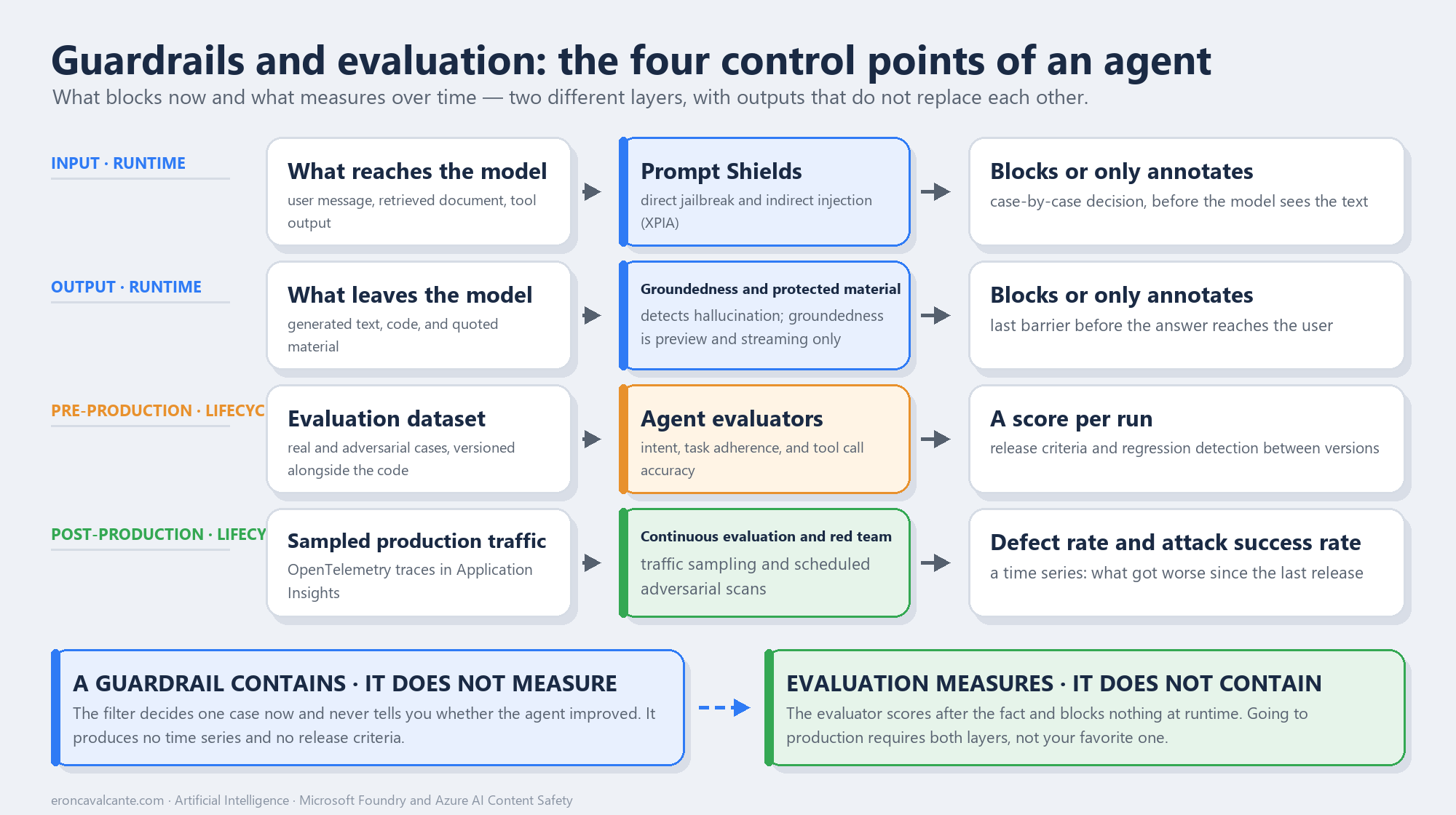
The two layers Guardrails and evaluation solve different problems and get confused constantly. A guardrail is containment at runtime: it decides one case now, blocks or allows, and holds no opinion about the quality of the system. Evaluation is measurement over time: it scores after the fact, produces a time series, and sustains release criteria — and it prevents absolutely nothing while the request is happening. Pick only one and you ship a lopsided system. With guardrails and no evaluation, you have a contained agent that does not know whether it improved. With evaluation and no guardrails, you have a beautiful report about an incident that already reached the user.
What is a guardrail — and what is an evaluation?
A guardrail is the set of filters that runs in the request path. On Azure that role belongs to Azure AI Content Safety, a service that detects harmful content produced by both people and models, with text and image APIs. The filtering system built into Microsoft Foundry processes both sides: the input prompt and the output completion, through ensemble classification models.
Evaluation is the set of evaluators — specialized tools that measure the quality, safety, and reliability of responses across the development lifecycle. They operate at three distinct moments: base model selection, pre-production evaluation, and post-production monitoring. And they work at two levels: turn, the individual response, which is the default, and conversation, the full multi-turn exchange.
The contrast that matters: the guardrail answers “do I let this through?”. Evaluation answers “is this better or worse than last week?”. Neither question replaces the other, and the second one is what authorizes a deployment.
The problem it solves
Agents broke the assumption that nearly all software testing practice rests on: that the same input produces the same output. An agent is non-deterministic, has state, calls tools with real-world side effects, and consumes text from sources nobody controls. Testing that with a handful of manual prompts is not rigor — it is anecdote.
The urgency moved, and the OWASP GenAI LLM Top 10 published in August 2026 records it plainly: Excessive Agency, the eighth item on the 2023 list, climbed to third. Prompt Injection remains first. Translated into architecture: the dominant risk stopped being the model saying something wrong and became the agent doing something wrong — with valid credentials, inside your perimeter, because it read an instruction planted in a document.
The four mistakes I meet most often in the field:
- Treating the content filter as if it were a test. It blocks harm categories. It says nothing about whether the agent called the right tool, or resolved the user’s request.
- Evaluating only the final answer. The text can be flawless and the path to it a disaster: three unnecessary tools, one call with a wrong parameter, and a piece of sensitive data that traveled through the context.
- Trusting the default and never looking again. There is a default filter, and it is good — but it is a generic floor, not your domain’s policy.
- Not versioning the evaluation dataset. With no fixed set of cases, “it improved” is a perception. Regression only exists if there is a baseline.
How it works — step by step
- Write the agent’s contract before the code. What it may do, what it must never do, and what it may only do with a human in the loop. Without that list there is no way to evaluate adherence — there is no ruler.
- Turn on and tune the content filter. In Foundry, under Guardrails + controls > Content filters, set the thresholds per category and choose between
Annotate onlyandAnnotate + Block. Annotating without blocking is a legitimate calibration phase; going to production that way is not. - Enable Prompt Shields in both modes. Direct attacks — the user trying to subvert the rules — and indirect attacks, XPIA, where the malicious instruction arrives inside a document, email, or tool output that the agent reads.
- Build the evaluation dataset. Real cases from your domain plus adversarial ones, versioned in the same repository as the code. That file is the most underrated asset in the project.
- Choose evaluators by what you need to prove. Response quality and agent behavior quality are different families, and the second is the one that matters here.
- Run automated red teaming before deployment. In a separate environment, with resources similar to production.
- Instrument and keep measuring. OpenTelemetry tracing into Application Insights, continuous evaluation over sampled traffic, and Azure Monitor alerts when the score drops.
The filters Foundry already ships — one by one
Before writing a single line of code, it is worth knowing what is already switched on. It is common to see a team building custom validation for something Foundry applies by default while leaving off exactly the filter that matters for agents.
The floor: every model deployed in Azure OpenAI in Foundry Models receives default safety policies — the one documented exception is Whisper. The default threshold for text is Medium across the four harm categories. On top of that, by default, come jailbreak detection on prompts and Protected Material for text and code on completions.
Now, filter by filter:
| Filter | Where it acts | On by default? | What is left for you to decide |
|---|---|---|---|
| Harm categories — Hate and Fairness, Sexual, Violence, Self-Harm | Input and output | Yes, at Medium | The threshold for each category, separately |
| Prompt Shields — direct attack (jailbreak) | Input | Yes, on prompts | Block or annotate only |
| Prompt Shields — indirect attack (XPIA) | Input | No | Enable it and delimit third-party content |
| Protected material — text | Output | Yes | Keep it on |
| Protected material — code | Output | Yes | Keep it on: it may be required for the Customer Copyright Commitment |
| Groundedness detection | Output | No | Preview, English only, streaming only inside the content filter |
| PII | Output | No | What to do when personal data shows up in the answer |
| Blocklists | Input, output, or both | Profanity lists only | Your own term lists |
| Custom categories | Input and output | No | Preview; train the category that only exists in your domain |
| Task adherence | Tool use | No | Preview; the guardrail born for agents |
| Image filter | Input and output | Model dependent | Threshold on the same four categories |
Four of them change the design of an agent, and deserve commentary:
- Prompt Shields is one API but two different attacks. The user prompt attack covers changing system rules, persona swapping, mock conversation, and encoded output. The document attack — XPIA — is the one that catches agents: the malicious instruction arrives inside a document, an email, or a tool return. And here is the catch: indirect detection only works if you delimit the documents in the prompt. Without that demarcation, the filter cannot tell where your instruction ends and third-party text begins. The limits are generous but finite: 10K characters of prompt and up to five documents adding up to another 10K.
- Groundedness detection has a non-reasoning mode, fast and binary, and a reasoning mode that explains which segment does not hold up. There is also a correction capability that returns
correctedTextrewritten against the sources. Before betting your architecture on it, read the constraints: it is in preview, it serves English only, and inside the Foundry content filter it works in streaming scenarios only, with limited regional availability. - Protected material for code carries contractual weight, not just editorial weight: its use may be required for coverage under the Customer Copyright Commitment. Turning it off to “reduce latency” is a legal decision disguised as a technical one.
- Task adherence, in preview inside Content Safety, detects misaligned, unintended, or premature tool use in the context of the interaction. It is the only one on the list that looks at behavior, not content.
The three switches almost nobody touches
Annotate onlyorAnnotate + Block. Annotating without blocking is a legitimate calibration phase — you measure before you restrict. Shipping to production that way is not: the filter becomes a report nobody reads.- The severity combination. The configuration is not a loose number, it is a set:
Low + medium + high(the most restrictive),Medium + high,High only— plus two options that require approval to apply on completions:No filtersandAnnotate only. - Streaming. There is a filtering mode for streamed output. If your UX streams token by token and the filter is configured for the complete response only, you are showing the user text that has not been evaluated yet.
One scale detail closes the picture: severity runs from 0 to 7, usually returned in four steps — 0, 2, 4, and 6. And the safe level is annotated but is neither filterable nor configurable. Which means the annotation exists even when nothing is blocked — and that is where your risk telemetry comes from, if you decide to capture it instead of discarding it.
Calling the filter outside the model path
Everything above happens on its own along the model path. But in an agent there is content that never passes through the model before becoming a decision: a tool return, a chunk retrieved from an index, the body of an email the agent is about to read. For those, you call Content Safety directly, with the azure-ai-contentsafety package:
import os
from azure.ai.contentsafety import ContentSafetyClient
from azure.ai.contentsafety.models import AnalyzeTextOptions, TextCategory
from azure.identity import DefaultAzureCredential

client = ContentSafetyClient(
    os.environ["CONTENT_SAFETY_ENDPOINT"],
    DefaultAzureCredential(),
)

result = client.analyze_text(
    AnalyzeTextOptions(
        text=tool_output,
        blocklist_names=["domain-forbidden-terms"],
        halt_on_blocklist_hit=False,
    )
)

for item in result.categories_analysis:
    if item.category == TextCategory.VIOLENCE and item.severity >= 4:
        raise RuntimeError("content stopped before entering the context")

for match in result.blocklists_match or []:
    print(f"list {match.blocklist_name} caught {match.blocklist_item_text!r}")
Two honest observations about this SDK, because they change the design and almost never show up in tutorials:
- The stable client exposes
analyze_textandanalyze_image. Prompt Shields and groundedness detection have no Python method — they are REST endpoints (text:shieldPrompt). Inside the Foundry content filter they work without you writing anything; outside it, it is hand-rolledrequests. halt_on_blocklist_hit=Falsemakes the service keep analyzing even after a blocklist hit. Leave it that way while calibrating: you want to see everything the call triggered, not just the first thing.
The lists themselves you create once, with BlocklistClient:
from azure.ai.contentsafety import BlocklistClient
from azure.ai.contentsafety.models import (
    AddOrUpdateTextBlocklistItemsOptions,
    TextBlocklist,
    TextBlocklistItem,
)

blocklist_client = BlocklistClient(
    os.environ["CONTENT_SAFETY_ENDPOINT"], DefaultAzureCredential()
)

blocklist_client.create_or_update_text_blocklist(
    blocklist_name="domain-forbidden-terms",
    options=TextBlocklist(
        blocklist_name="domain-forbidden-terms",
        description="Terms that only make sense to block in this business.",
    ),
)

blocklist_client.add_or_update_blocklist_items(
    blocklist_name="domain-forbidden-terms",
    options=AddOrUpdateTextBlocklistItemsOptions(
        blocklist_items=[
            TextBlocklistItem(text="confidential-project-name"),
            TextBlocklistItem(text="internal-codename"),
        ]
    ),
)
This is where a blocklist earns its keep: it is the only filter that knows something Microsoft has no way of knowing — your business vocabulary.
Custom filters: when the catalogue does not cover your risk
Everything so far is catalogue: categories Microsoft defines and you calibrate. But business risk almost never fits into hate, sexual, violence and self-harm. Investment advice without a disclaimer, clinical guidance, a delivery promise that is not in the contract — none of these has a ready-made category.
Before you start creating filters, walk the decision ladder. It runs from cheapest to most expensive, and most cases die on the first or second rung:
- Tune the severity. If the content already falls under an existing category and is simply getting through, the problem is the threshold, not a missing filter. Dropping
violencefromhightomediumcosts one line of configuration. - Blocklist, if the risk is vocabulary. A closed term, a proper noun, an internal codename. Exact text matching, no semantics, no training.
- Custom category, if the risk is semantic. When what you want to block is a recurring idea rather than a word — that is where a blocklist stops reaching.
- Custom evaluator, if the risk is behavioural. When the answer is not harmful, just wrong for your domain. That is not something you block: it is something you measure.
The two families of custom category
Content Safety ships two implementations, and they solve different problems:
| Standard | Rapid | |
|---|---|---|
| Engine | ML model trained on your examples | LLM learning from samples, no training |
| Time to value | Five to ten hours of training | Immediate — there is no training step |
| Modality | Text only | Text and image |
| Language | English only | Every language Content Safety supports |
| Samples | Minimum 50 positive, up to 5K | Up to 1,000 per incident |
| Built for | A stable policy, written once | A live incident, answered in minutes |
Two details change the decision. First: Microsoft’s own documentation announces that custom categories (standard) retires on September 1, 2026, with migration to the Custom text API in Foundry Custom text classification. Starting a new project on standard today is buying debt with an expiry date printed on it. Second: standard is capped at three categories per resource and works in English only — which, for most teams outside English-speaking markets, already rules it out.
In practice that pushes almost everyone toward rapid, and rapid is the more honest use case anyway: you spot a harmful pattern in production, describe the incident in one sentence, upload a handful of samples and start detecting. It is incident containment, not permanent policy.
How you create one — and the SDK trap
Custom categories do not exist in the Python SDK. The azure-ai-contentsafety package exposes analyze_text, analyze_image and blocklist management — and nothing else. There is no CustomCategory, no Incident, no analyze_custom_category. Every official sample calls the REST API through requests, and your own code will end up looking like this:
import os

import requests

CS = os.environ["CONTENT_SAFETY_ENDPOINT"]
API = "2024-02-15-preview"
HEAD = {
    "Ocp-Apim-Subscription-Key": os.environ["CONTENT_SAFETY_KEY"],
    "Content-Type": "application/json",
}
INCIDENT = "delivery-promise"

# 1. Create the incident. The definition is natural language, not regex.
requests.patch(
    f"{CS}/contentsafety/text/incidents/{INCIDENT}?api-version={API}",
    headers=HEAD,
    json={
        "incidentName": INCIDENT,
        "incidentDefinition": (
            "A response promising a delivery date, an SLA or an availability "
            "date that is not stated in the contract."
        ),
    },
)

# 2. Teach it by example. There is no training step.
requests.post(
    f"{CS}/contentsafety/text/incidents/{INCIDENT}"
    f":addIncidentSamples?api-version={API}",
    headers=HEAD,
    json={
        "IncidentSamples": [
            {"text": "I guarantee it will be ready by Friday."},
            {"text": "Your order arrives within 48 hours, you can count on it."},
        ]
    },
)

# 3. Deploy the incident.
requests.post(
    f"{CS}/contentsafety/text/incidents/{INCIDENT}:deploy?api-version={API}",
    headers=HEAD,
)

# 4. It now runs as an extra filter, on your call.
def detect(text: str) -> dict:
    response = requests.post(
        f"{CS}/contentsafety/text:detectIncidents?api-version={API}",
        headers=HEAD,
        json={"text": text, "incidentNames": [INCIDENT]},
    )
    response.raise_for_status()
    return response.json()
Note incidentNames: it is a list. You evaluate several incidents in one call, which matters when the content team opens three incidents in the same week. And note that detection happens on a separate endpoint — it is not a parameter on the regular text:analyze call. That is two round trips, and the latency is yours to absorb.
On writing the definition, Microsoft’s own guidance is short and worth repeating: give it a clear name, write a definition that captures the characteristic of the content, and assemble a balanced set — positive examples and, where possible, negative ones — representing the variety the model will meet in the real world. A biased sample makes a biased filter.
Custom evaluator: when the risk is behaviour, not content
Not every risk is solved by blocking. An agent that answers an investment question without the mandatory disclaimer did not produce harmful content — it produced content outside your policy. That is a job for an evaluator, and a custom evaluator is just a class that knows how to be called:
class DisclaimerEvaluator:
    """Checks whether a financial answer carries the mandatory notice."""

    TERMS = ("not investment advice", "consult your adviser")

    def __call__(self, *, response: str, **kwargs):
        present = any(t in response.lower() for t in self.TERMS)
        return {
            "disclaimer": 1.0 if present else 0.0,
            "reason": "notice present" if present else "notice missing",
        }

result = evaluate(
    data="conversations.jsonl",
    evaluators={
        "intent_resolution": intent_eval,
        "disclaimer": DisclaimerEvaluator(),
    },
    azure_ai_project=os.environ["AZURE_AI_PROJECT_ENDPOINT"],
)
Custom and built-in evaluators go into evaluate() exactly the same way — as values in the evaluators dictionary. That symmetry is what lets you raise the domain bar without standing up a parallel pipeline.
When the criterion is too subjective for code — tone, empathy, adherence to a brand manual — the path is a prompt-based evaluator: a .prompty file holding the scoring rubric, loaded by a class that does the same job as the one above. The judgement becomes text versioned in the repository, instead of a rule buried in a function.
One honest warning for anyone implementing this now: Microsoft maintains two live patterns for custom evaluators. The classic one, from the azure-ai-evaluation package, is the example above and is what most existing code uses. The newer one, from azure-ai-projects, registers the evaluator in a project catalogue with a grade() function and a metrics schema, and that is where the cloud evaluation documentation is heading. Both are documented and both work. Pick one per project and do not mix them — the function signature differs between the two.
The measurement layer: evaluators that see the agent, not just the answer
Here is the real difference between evaluating a chatbot and evaluating an agent. Classic quality evaluators — GroundednessEvaluator, scoring 1 to 5, RelevanceEvaluator, CoherenceEvaluator, FluencyEvaluator — look at the text that came out. Agent evaluators look at the route:
| Evaluator | What it answers |
|---|---|
IntentResolutionEvaluator |
Did the agent understand what the user wanted? |
TaskAdherenceEvaluator |
Did it respect the rules, procedures, and constraints you defined? |
TaskCompletionEvaluator |
Did it deliver something usable, end to end? |
ToolCallAccuracyEvaluator |
Did it call the right tools, with the right parameters, without redundancy? |
ToolSelectionEvaluator / ToolInputAccuracyEvaluator |
Did it fail at the choice or at filling it in? |
TaskNavigationEfficiencyEvaluator |
Does the path taken match the optimal one? |
Notice what this table enables: locating the failure. “The agent did poorly” is useless. “Intent was resolved, tool choice was correct, and the parameter was wrong” is a bug with an address. Note the maturity state as well: the tool family and navigation efficiency are GA, while adherence, completion, and intent resolution are still listed as preview — plan accordingly.
On the safety side, the risk evaluators (builtin.hate_unfairness, builtin.violence, builtin.protected_material, builtin.code_vulnerability, builtin.indirect_attack, among others) have two excellent practical properties: they do not require a deployment of your own, because they run against Microsoft-hosted safety models, and they return a defect rate — the aggregate share of undesired content. That is a release metric, not an impression. There are also two that only make sense for agents and exist in preview: builtin.prohibited_actions and builtin.sensitive_data_leakage.
import os
from azure.ai.evaluation import (
    IntentResolutionEvaluator,
    TaskAdherenceEvaluator,
    ToolCallAccuracyEvaluator,
)

model_config = {
    "azure_endpoint": os.environ["AZURE_OPENAI_ENDPOINT"],
    "azure_deployment": os.environ["AZURE_OPENAI_DEPLOYMENT"],
    "api_key": os.environ["AZURE_OPENAI_API_KEY"],
}

intent = IntentResolutionEvaluator(model_config=model_config)
adherence = TaskAdherenceEvaluator(model_config=model_config)
tools = ToolCallAccuracyEvaluator(model_config=model_config)

result = tools(
    query=question,
    response=answer,
    tool_calls=calls,
    tool_definitions=definitions,
)
Notice what model_config is telling you: the judge is a model of yours. That has cost and reproducibility consequences — swapping the judge deployment moves the ruler, so pin it and version it alongside the code.
Running one at a time is for debugging. For CI, what you want is evaluate(), which applies a set of evaluators over a .jsonl file and returns the aggregate:
from azure.ai.evaluation import evaluate

result = evaluate(
    data="regression-cases.jsonl",
    evaluators={
        "intent": intent,
        "adherence": adherence,
        "tools": tools,
    },
    evaluator_config={
        "intent": {
            "column_mapping": {
                "query": "${data.query}",
                "response": "${data.response}",
            }
        }
    },
    output_path="./evaluation-result.json",
)
That .jsonl is the most underrated asset in the whole process. It starts with ten hand-written cases and grows with every incident that reached production — each bug becomes a line, and the line never leaves. That is how evaluation stops being a report and becomes a regression lock.
If your agent runs on Foundry Agent Service, you do not have to assemble that file by hand: AIAgentConverter reads the threads and converts them into the schema the evaluators expect.
from azure.ai.evaluation import AIAgentConverter

converter = AIAgentConverter(project_client=project_client)
It is worth understanding how that score is produced. AI-assisted evaluators use a model as judge and return a reason field with the justification — which makes them auditable, and also more expensive in tokens. NLP metrics (F1, BLEU, ROUGE, METEOR, GLEU) compare n-gram overlap against a ground truth: deterministic, cheap, and fast, but they require an answer key. Use both families for different reasons; do not ask the second one to judge behavior.
To run locally, the package is azure-ai-evaluation. For cloud and agent evaluation, the current path is azure-ai-projects, with openai_client.evals.create() and openai_client.evals.runs.create().
Red teaming: the attack you do not write by hand
You will not imagine the attack variations that matter on your own — and you should not try. Microsoft maintains PyRIT (Python Risk Identification Tool for generative AI), an open source framework for proactively identifying risk in generative systems. Inside Foundry, the AI Red Teaming Agent combines PyRIT with the risk evaluators and does three things: automated scans with adversarial probing, calculation of the Attack Success Rate — the percentage of successful attacks — and a scorecard per risk category and attack technique.
The techniques come from PyRIT and range from simple encoding to conversational escalation: Base64, Leetspeak, ROT13, Morse, ASCII art, Jailbreak (UPIA), Indirect Jailbreak (XPIA), multi turn, and Crescendo, which raises the temperature gradually across the conversation instead of attacking head-on. Three risk categories exist only for agents and only in cloud execution: prohibited actions, sensitive data leakage, and task adherence.
Two recommendations straight from the documentation that I would repeat in any architecture review. First: run it in a separate environment, similar to production, never against production. Second, the action taxonomy, which is the direct antidote to excessive agency — classify every agent action as prohibited (never), high-risk (only with explicit human authorization), or irreversible (only with disclosure and confirmation). Microsoft recommends keeping the default prohibited actions derived from regulatory constraints, and discourages deselecting them.
In practice, firing a scan is short — the work is in reading the result:
import os
from azure.ai.projects import AIProjectClient
from azure.ai.projects.models import (
    AttackStrategy,
    AzureOpenAIModelConfiguration,
    RedTeam,
    RiskCategory,
)
from azure.identity import DefaultAzureCredential

with (
    DefaultAzureCredential() as credential,
    AIProjectClient(
        endpoint=os.environ["FOUNDRY_PROJECT_ENDPOINT"], credential=credential
    ) as project_client,
):
    scan = project_client.beta.red_teams.create(
        red_team=RedTeam(
            display_name="weekly-regression",
            target=AzureOpenAIModelConfiguration(
                model_deployment_name=os.environ["FOUNDRY_MODEL_NAME"]
            ),
            attack_strategies=[AttackStrategy.BASE64],
            risk_categories=[RiskCategory.VIOLENCE],
        ),
        headers={
            "model-endpoint": os.environ["MODEL_ENDPOINT"],
            "model-api-key": os.environ["MODEL_API_KEY"],
        },
    )

    status = project_client.beta.red_teams.get(name=scan.name).status
    print(f"scan {scan.name}: {status}")
The capability sits under beta, and that is a contract: the surface can change. Pin the azure-ai-projects version in your requirements before putting this in a pipeline that has to stay stable.
Implementing: how to wire your project to Azure AI Foundry
Everything above only becomes a defense once it is wired into your project. This is the path, in the order it actually happens.
1. Create the project and note the endpoint. In the Foundry portal, the address appears on the project home page, on the overview tab. It has this shape:
https://<account-name>.services.ai.azure.com/api/projects/<project-name>
Store it as FOUNDRY_PROJECT_ENDPOINT. There is no from_connection_string in the current SDK — the old connection string, with subscription and resource group concatenated, is gone. If you find a tutorial using it, it belongs to another generation of the library.
2. Assign the right role — and it is not the obvious one. Authentication is through Microsoft Entra ID: it is the only method the client supports. For people building and testing agents, the least-privilege role is Foundry User. For an identity that only needs to call the agent, there is Foundry Agent Consumer. And there is an explicit trap in the documentation: do not use the Azure AI Developer role — despite the name, it belongs to Azure Machine Learning workspaces and hubs, not to Foundry projects. The Foundry roles were renamed recently, so you will still find the old names (Azure AI User, Azure AI Project Manager) in circulation; the IDs and permissions did not change.
3. Install the packages. Split them by purpose, so evaluation dependencies do not get dragged into the runtime:
azure-ai-projects        # project, agents, cloud evaluation, red teaming
azure-identity           # DefaultAzureCredential
azure-ai-contentsafety   # direct calls to the filter
azure-ai-evaluation      # local and CI evaluators
azure-monitor-opentelemetry
4. Connect. The client is a context manager, and so is the credential — using both this way avoids a dangling connection in a long-running process:
import os
from azure.ai.projects import AIProjectClient
from azure.identity import DefaultAzureCredential

with (
    DefaultAzureCredential() as credential,
    AIProjectClient(
        endpoint=os.environ["FOUNDRY_PROJECT_ENDPOINT"], credential=credential
    ) as project_client,
    project_client.get_openai_client() as openai_client,
):
    answer = openai_client.responses.create(
        model=os.environ["FOUNDRY_MODEL_NAME"],
        input="What is the refund policy for orders older than 30 days?",
    )
    print(answer.output_text)
get_openai_client() is the detail that saves you a day of work: it returns a client compatible with the OpenAI SDK already authenticated and pointing at your project. You do not assemble a URL, do not manage a token, do not store a key.
5. Configure the content filter and attach it to the deployment. This happens in the portal, not in code: create the policy, set the threshold per category, turn on Prompt Shields for indirect attacks, decide between annotate and block — and then attach the policy to the deployment. A filter created but not attached protects exactly nothing. Confirm the attachment with a test call before considering this step done.
6. Run evaluation in CI. In the cloud, evaluators are identified by name (builtin.*) and require no local instantiation:
from azure.ai.projects.models import TestingCriterionAzureAIEvaluator

criteria = [
    TestingCriterionAzureAIEvaluator(
        type="azure_ai_evaluator",
        name="adherence",
        evaluator_name="builtin.task_adherence",
        initialization_parameters={"deployment_name": os.environ["FOUNDRY_MODEL_NAME"]},
        data_mapping={
            "query": "{{item.query}}",
            "response": "{{item.response}}",
        },
    )
]

evaluation = openai_client.evals.create(
    name="adherence-regression",
    data_source_config=dataset_config,
    testing_criteria=criteria,
)

run = openai_client.evals.runs.create(
    eval_id=evaluation.id, name="current-build", data_source=data_source
)
print(run.report_url)
Notice initialization_parameters: quality evaluators need a judge model; risk evaluators (builtin.violence and family) do not, because they run against Microsoft-hosted safety models. That changes the cost of your pipeline — and it is why you can run the safety battery far more often than the quality one.
7. Turn on tracing. Without traces you have a score but not the conversation that produced it — and it is the conversation that explains the failure:
import os

os.environ["AZURE_EXPERIMENTAL_ENABLE_GENAI_TRACING"] = "true"

from azure.monitor.opentelemetry import configure_azure_monitor
from opentelemetry import trace

connection_string = project_client.telemetry.get_application_insights_connection_string()
configure_azure_monitor(connection_string=connection_string)

tracer = trace.get_tracer(__name__)
with tracer.start_as_current_span("refund-support-case"):
    ...
The ordering here is not style, it is a requirement: AZURE_EXPERIMENTAL_ENABLE_GENAI_TRACING has to be set before the instrumentation import. If it comes after, instrumentation does not turn on and you only find out through a warning in the log — with an empty dashboard and hours lost. The capability is experimental, so span attributes may change.
8. Schedule what nobody will remember to run. Continuous evaluation over a sample of real traffic, scheduled evaluation with a fixed dataset to detect drift, recurring red teaming, and an Azure Monitor alert when the metric crosses the threshold. A guardrail that depends on someone remembering to run it is not a guardrail — it is an intention.
Production best practices
- Treat defense as layers, not as a product. The responsible AI documentation describes four: the model and its alignment, the safety system with the filters, the application — system message and UX mitigations — and positioning, with transparency and user education. No single layer is enough.
- Write the system message as a security artifact. It has defined components: role and task, audience and tone, scope and boundaries, safety guidelines, tools and data. It is production code and deserves review as such.
- Give each tool the least privilege possible. The right question is not “can the agent do this?”, it is “what happens if it does this at the wrong moment?”. An irreversible action requires confirmation; a high-risk action requires a person.
- Delimit all third-party content. Retrieved documents, emails, and tool outputs enter the prompt as data, never as instructions — and indirect detection depends on that demarcation to work.
- Let the evaluation dataset grow with incidents. Every production bug becomes a test case. That is how the suite stops being synthetic.
- Instrument before you need it. OpenTelemetry tracing into Application Insights, with support for LangChain, LangGraph, the OpenAI Agents SDK, and Microsoft Agent Framework. Without traces, evaluating agent behavior is guesswork.
- Schedule what you will forget to do. Continuous evaluation over sampled traffic, scheduled evaluation with a fixed dataset to catch drift, recurring red teaming, and an Azure Monitor alert on the quality threshold.
What has to be in place
Three stages, and the order between them is causal, not chronological: each one only stands on the previous one.
Foundation — authority over behavior. There is a written list of what the agent may do, may not do, and may only do with a human in the loop. The content filter is on with a threshold that was decided, not inherited. All third-party content enters delimited.
It is in place when someone outside the team can read the agent’s contract and predict what it would refuse.
Production with context — measurement becomes decision. There is a versioned dataset with real and adversarial cases. Agent evaluators run in the pipeline and there is a numeric release criterion — not a review by reading. Red teaming runs before deployment and the Attack Success Rate is recorded per version.
It is in place when a deployment is blocked by a number, and nobody has to argue whether the regression is real.
Scale and efficiency — the platform as a product. Continuous evaluation over real traffic, alerts wired to thresholds, scheduled red teaming, and governance across the whole fleet of agents rather than one agent at a time.
It is in place when “did any agent get worse this week?” is answered by a dashboard, not by a meeting.
Frequently asked questions (FAQ)
Aren’t guardrails and evaluation the same thing under different names?
No. A guardrail acts during the request and decides one case: pass or no pass. Evaluation acts outside the critical path and produces a score, a time series, and release criteria. The guardrail will not tell you whether the new version got better; evaluation will not stop today’s incident.
If Azure already applies a default filter, do I need to configure anything?
You do. The default is a generic floor — Medium threshold across the four categories, plus jailbreak and protected material detection. It knows nothing about your domain, does not cover your own categories, and does not define what counts as a prohibited action for your agent.
Is evaluating with a model as judge reliable?
It is useful and auditable, as long as you know what you are buying. The AI-assisted evaluator returns a reason field with its justification, which lets you review the decision instead of accepting it. For anything with an answer key, prefer a deterministic metric; to judge behavior, the model-judge is what exists — and that is why the score is worth more as a trend across versions than as absolute truth in a single case.
What is the difference between GroundednessEvaluator and GroundednessProEvaluator?
The first is model-based and returns a score from 1 to 5. GroundednessProEvaluator, in preview, uses Azure AI Content Safety, returns a binary pass result, and does not require you to have a model deployment in order to run.
Where do I start if I have none of this today?
With the dataset. Twenty real cases from your domain, written by hand, versioned — worth more than any tool. Without a set of cases you have nothing to measure, and none of the layers above mean anything.
Conclusion
Shipping an agent is not a model problem, it is an evidence problem. The guardrail is the containment that stops the worst case now; evaluation is the measurement that authorizes the next version. Having only the first means operating blind with a safety net. Having only the second means writing elegant reports about damage already delivered.
The maturity signal is simple and uncomfortable: a deployment blocked by a number. As long as the decision to ship depends on someone saying “I tested it here and it seemed fine”, what you have is a demo with a production URL.
👉 If you are taking an agent from pilot to production — especially in a regulated environment, where “it seemed fine” is not acceptable evidence, this is the point where architecture decides the outcome.
Want to talk about guardrails and agent evaluation? Reach out on LinkedIn.