In an architecture review, the agent slide had a single box labeled “Microsoft IQ”, and the room’s first question was which IQ to buy. The team had already chosen: Fabric IQ, for a bank’s relationship-manager assistant. The choice made sense — the customer data lives in OneLake, and the ontology already had Customer, Contract and Exposure. The prototype answered well on limits and exposure and got wrong the other three questions the manager asks before every visit: what was agreed in the last meeting, what the credit policy allows to be renegotiated and what the press has published about the customer. None of the three lives in OneLake. The product was right for one question; the manager was asking four.
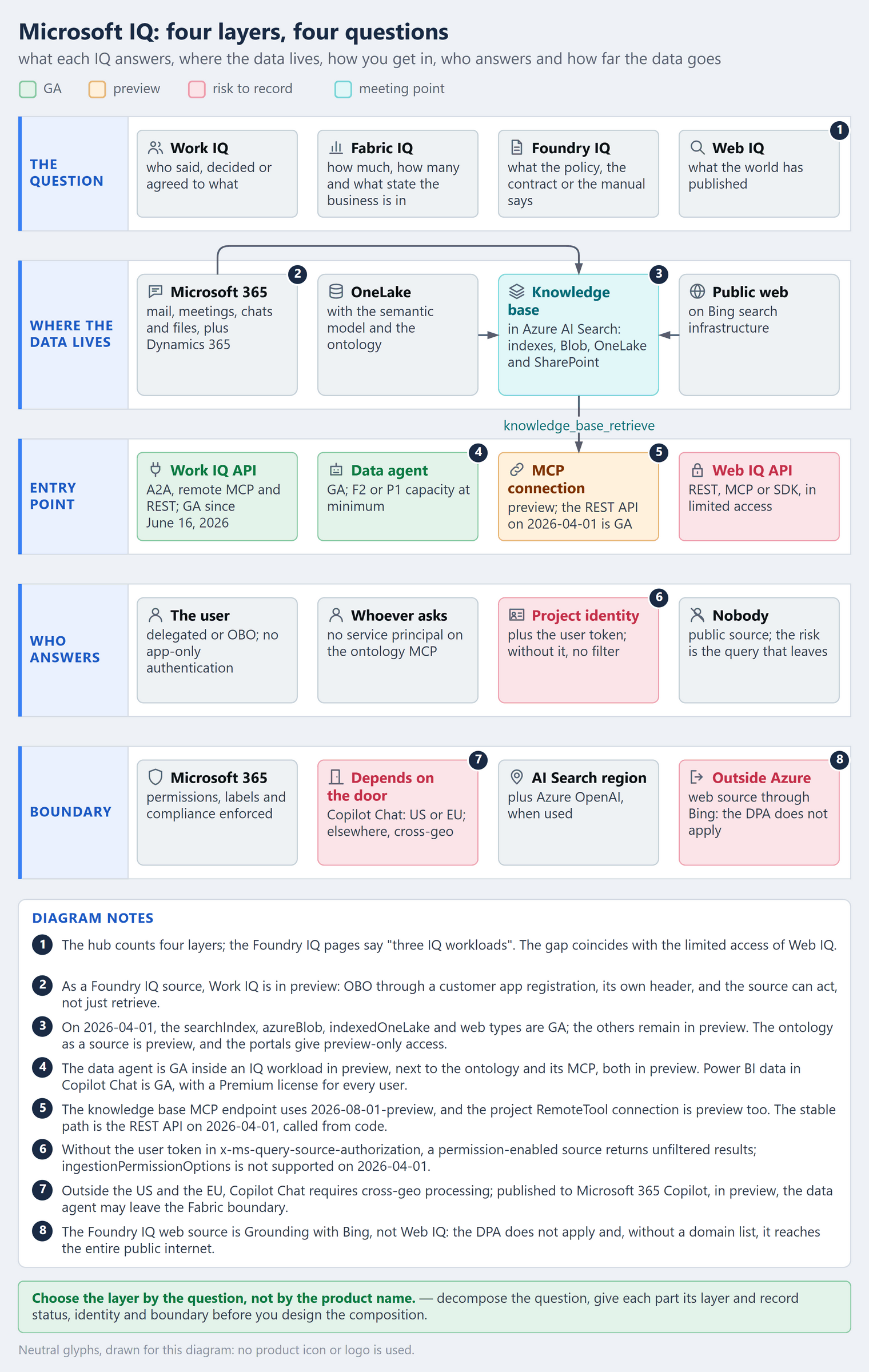
The question before the product Microsoft IQ is the name of a set, not of a product. The documentation presents it as “a unified intelligence layer for enterprise AI”, made of “four interconnected capabilities”: Work IQ, Fabric IQ, Foundry IQ and Web IQ. Each layer answers one kind of question, with its own data home, entry point, status, identity and boundary. The rule fits in one line — choose the layer by the question, not by the product name — and this article is the map; the deep dives into each layer are in the articles linked throughout the text.
What is Microsoft IQ?
The documentation hub describes each layer by the context it gives the agent:
- Work IQ — “live understanding of how employees work, with context on people, collaboration, and workflows”: work in progress across Microsoft 365.
- Fabric IQ — “the live state of the business, so agents understand business entities and their relationships, properties, actions, and rules”: the state of the business, on top of OneLake.
- Foundry IQ — “curated institutional knowledge on the context of policies, authoritative documents, and reusable knowledge bases”: curated knowledge, in reusable bases.
- Web IQ — “fresh, real-world intelligence from across the web”: what the world has published.
Each layer is a product in its own right: “Each IQ workload is standalone, but you can use them together to provide comprehensive organizational context for agents.” Nobody turns on Microsoft IQ; you turn on each layer, in its own service, which bills for what runs underneath — the billing currencies get an article of their own. Agent 365, listed on the same hub, sits outside the four capabilities: governing the agent fleet is another conversation.
Even the count varies: the hub says four, and the Foundry IQ pages say “three IQ workloads”. The gap coincides with Web IQ’s limited access — and it is a reminder that what goes into the architecture is what you can actually buy, with the status the page declares on the day you read it.
The problem it solves
Enterprise agents answer poorly for lack of context, and a company’s context lives in different places, with different owners and permissions. Before the IQ layers, every team built its own bridge: a connector copied mail and files into a vector index, a sync job tried to keep permissions current, a semantic layer was redesigned for the agent, a home-grown RAG handled the manuals and a search API brought in the web. Each bridge had its own pipeline, credential and failure mode.
The IQ layers take those bridges off your hands, each in its own territory. Work IQ queries Microsoft 365 live, with the user’s permissions — the Work IQ article shows the index that goes away. Fabric IQ gives OneLake data a business vocabulary, through the semantic model and the ontology; the data agent entry contract and the price of the ontology refresh cover that layer. Foundry IQ turns each agent’s RAG into a shared base: “Multiple agents can share the same knowledge base.” And Web IQ delivers the web ready for the model’s context.
What the layers do not solve is the choice. The shared name suggests a single product, but a business question rarely fits in one layer: the manager’s fit in four. The name is one; the decision is four — and each one has its own status, identity and boundary.
How it works — step by step
- Decompose the question. “Can I renegotiate with this customer?” becomes four: what their exposure is, what was agreed in the last meeting, what the policy allows and what the press has published about them. Each part has a place where its data lives.
- Map each part to the layer of its data. Microsoft 365 conversations, meetings and files go to Work IQ; business numbers and entities in OneLake, to Fabric IQ; curated policies, contracts and manuals, to Foundry IQ; what is published on the web, to Web IQ.
- Check status per component and per API version. In Foundry IQ, it depends on the REST API version; in Fabric IQ, the data agent is GA inside a workload in preview.
- Define who answers for each part. For each layer, write down whose identity reaches the data: the user, directly or on-behalf-of (OBO); a project’s managed identity; or nobody, when the source is public.
- Choose the composition door. Either the agent calls each layer as a tool, or a Foundry IQ knowledge base brings the sources together. The rule from the Work IQ article applies here: composing through the agent keeps the identity; composing through the catalog swaps the identity.
- Record the boundary of each part. Where the data is processed and under which terms — from the Microsoft 365 boundary to outside the Azure boundary, in the case of the web.
- Date the decision. Status and API versions change between one review and the next; keep the page and the date you read it. The ones in this article were checked on October 3, 2026.
Four questions, one per layer
The fastest way to choose is to ask what the agent needs to know. The table sums up the match; the subsections say what the documentation guarantees in each layer.
| Layer | The question it answers | Where the data lives | Entry point |
|---|---|---|---|
| Work IQ | who said, decided or agreed on what | Microsoft 365, plus Dynamics 365 and Power Platform | Work IQ API: A2A, remote MCP and REST |
| Fabric IQ | how much, how many and what state the business is in | OneLake, with semantic model and ontology | data agent, Copilot Chat and the ontology MCP |
| Foundry IQ | what the policy, the contract or the manual says | knowledge base in Azure AI Search, over indexes, Blob, OneLake and SharePoint | knowledge_base_retrieve, over MCP |
| Web IQ | what the world has published | the public web, on Bing search infrastructure | REST, MCP or SDK |
Work IQ: work in progress
Work IQ understands how people work: mail, meetings, chats, files and, according to the overview, also “business and workflow data from Dynamics 365 and Power Platform”. The door is the Work IQ API: “Work IQ API endpoints include A2A, a remote MCP server, and a REST API. Usage is independent of Microsoft 365 Copilot licensing”. The licensing announcement set general availability — “On June 16, Work IQ API reaches general availability” — with billing in Copilot Credits and a sentence that closes the licensing debate: “There is no separate Work IQ API subscription, SKU, or per-user license.” The identity is always the user’s; endpoints, consent and composition are in the Work IQ article.
Fabric IQ: the state of the business
Fabric IQ brings “three layers of business context into Microsoft IQ: unified data, business intelligence, and operational intelligence”, delivered by two core items, the ontology, in preview, and the semantic model, on top of OneLake. The ontology describes entities, relationships, rules and metrics and can be generated from a semantic model, with DAX measures becoming metrics. Around them, the “IQ (preview) workload” groups Planning, Graph, data agent and operations agent. This layer’s question is about numbers and state: exposure, balance, delinquency, position. The one that usually answers is the data agent — “a generally available feature”, which requires F2 capacity or higher, or P1 or higher.
Foundry IQ: curated knowledge
Foundry IQ is RAG turned into a service, and the FAQ says where it comes from: “Foundry IQ is built on Azure AI Search’s agentic retrieval capabilities. You must create a knowledge base in Azure AI Search to use Foundry IQ.” The knowledge base groups knowledge sources — existing indexes, Blob, OneLake, SharePoint, the web and, in preview, Work IQ itself — behind a single endpoint. The Microsoft Foundry agent queries it through the knowledge_base_retrieve tool, and the connection page is categorical: “This is the only tool currently supported for use with Foundry Agent Service.” The agentic retrieval underneath — query planning, subqueries, reranking — is in the advanced RAG article.
Web IQ: what is out there
Web IQ is “a suite of AI-native APIs” over web pages, news, images and videos, “built on twenty years of Bing search infrastructure”, with access through “REST, MCP (JSON-RPC 2.0), or SDK”. The page advertises 164 ms at p95. But what decides the design is access: Web IQ “is currently available in limited access to select enterprise customers building AI agents and applications at scale”, with priority for organizations working with their Microsoft account team. This layer’s question is external — news, published regulation, market moves — and it brings a boundary decision the other three do not.
Status is not uniform
Asking whether Microsoft IQ is GA has no answer. Status lives in each component and, in Foundry IQ, also depends on the API version. The table is a snapshot of what the pages declared on October 3, 2026.
| Component | Status | What to watch |
|---|---|---|
| Work IQ API (A2A, remote MCP, REST) | GA since June 16, 2026 | billed in Copilot Credits |
| Work IQ as a Foundry IQ knowledge source | preview | API 2026-08-01-preview |
| Fabric IQ workload | preview | groups GA items and preview items |
| Ontology | preview | the old experience retires on January 31, 2027 |
| Power BI semantic model | GA | the base most teams already have |
| Fabric Graph | preview | integrated with the ontology |
| Fabric data agent | GA | F2 or P1 capacity, at least |
| Power BI data in Microsoft 365 Copilot Chat | GA | Premium license for every user |
| Fabric IQ plugin in Copilot Cowork | GA | no extra capacity, F SKU or PPU |
| Data agent published to Microsoft 365 Copilot | preview | the answer can leave the Fabric boundary |
| Ontology MCP | preview | no service principal, due to a known issue |
| Ontology as a Foundry IQ knowledge source | preview | without the role on AI Search, 403 |
| Azure AI Search index in the data agent | preview | carries the user’s identity to the index |
Knowledge base with searchIndex, azureBlob, indexedOneLake and web sources |
GA in 2026-04-01 |
the other source types remain in preview |
| Answer synthesis, reasoning effort above minimal and multi-turn | preview | outside 2026-04-01 |
| Agent connection to the knowledge base, over MCP | preview | endpoint on 2026-08-01-preview |
| Foundry and Azure portals | preview only | “preview-only access to all agentic retrieval features” |
| Web IQ | limited access | priority for organizations working with their account team |
| Grounding with Bing | available to current customers | the Web IQ page: “remains available for existing customers” |
Three readings come out of this table.
Status is per API version. The Foundry IQ page says: “Some Foundry IQ features are now generally available, while others remain in preview. Availability depends on the Search Service REST API version you use. The Microsoft Foundry portal and Azure portal continue to provide preview-only access to all agentic retrieval features.” In 2026-04-01, “the searchIndex, azureBlob, indexedOneLake, and web knowledge source types are generally available. Other knowledge source types remain in preview.” Whoever builds the knowledge base in the portal is in preview, even with a source type that is GA in the API. For production with an SLA, the knowledge base is born in code, on the stable version.
The integrations that go through Foundry IQ are in preview. Work IQ as a knowledge source, the ontology as a knowledge source, the AI Search index inside the data agent and the agent’s own connection to the knowledge base are all in preview. The meeting point in Copilot — Power BI data in Copilot Chat and the Fabric IQ plugin in Cowork — is GA. In the pages read for this article, the most mature path between two layers runs through Microsoft 365 Copilot, not through Foundry.
One component’s GA does not promote its neighbor. The data agent is GA; publishing it to Microsoft 365 Copilot is not. The Work IQ API is GA; using it as a knowledge source is not. The ontology remains in preview and got a new experience — the old one retires on January 31, 2027, as the note in the ontology article records. The architecture review needs one line per component, not per product.
Who answers in each layer
In an enterprise agent, the security question is not whether the data is protected. It is whose identity reaches the data on each call. The four layers answer differently.
| Path | Identity that reaches the data | Detail that decides |
|---|---|---|
| Work IQ API | the user, directly or through OBO | does not accept app-only authentication |
| Work IQ as a knowledge source | the user, through OBO, with the customer’s app registration | its own header, x-ms-query-work-iq-source-authorization |
| Fabric data agent | the user who asks | the asker’s credentials and permissions |
| Ontology MCP | the user | no service principal, due to a known issue |
| Foundry IQ knowledge base | the project’s managed identity, plus the user’s token | without the token, a permission-enabled source returns unfiltered |
| Ontology as a knowledge source | the page describes only the project’s role on AI Search | without the role, 403 in the agent |
| Web source, through Bing or Web IQ | nobody: the source is public | the risk is the query that goes out |
In Work IQ, the rule is simple and strict: delegated, with OBO accepted, and “Application-only authentication isn’t supported.” The API page adds: “Microsoft 365 permissions, sensitivity labels, and compliance policies are enforced automatically.” In Fabric, the data agent “uses the requesting user’s credentials and permissions to enforce least-privilege access”, and Power BI answers in Copilot Chat respect the semantic model’s row-level and object-level security (RLS and OLS). The exception is the ontology MCP: “Due to a known issue, you can’t currently use Service Principal to access the ontology MCP.”
Foundry IQ is where the trap lives. The agent’s connection to the knowledge base uses the project’s managed identity; per-user filtering depends on another token, which your code has to forward in the x-ms-query-source-authorization header. The connection page is explicit: “Without the token, permission-enabled sources return results unfiltered.” And the FAQ sets the limit of what gets filtered: “User-level access controls are only enforced when the knowledge source supports document-level permissions and when those permissions have been explicitly configured for synchronization.” On the stable version, one piece is missing: the migration guide says to remove ingestionPermissionOptions from azureBlob and indexedOneLake sources, because “This property isn’t supported in 2026-04-01.” And enforcing permissions at query time is documented as preview.
The Work IQ knowledge source has rules of its own. Authentication is OBO, through the customer’s app registration; the token goes in a separate header, x-ms-query-work-iq-source-authorization — “not x-ms-query-source-authorization”. The page also carries a warning that changes the nature of the source: “In this preview, a Work IQ knowledge source might use Work IQ capabilities that perform actions, not just retrieve information. Use it with care, limit access to trusted applications and users…” A retrieval source that can act does not go into a shared knowledge base without review.
For the ontology as a knowledge source, the page asks for the Search Index Data Contributor role for the Foundry project on the Azure AI Search resource, and warns that without it “you see a 403 error in the Foundry agent”. It does not say with which identity the query reaches the ontology. Without that answer in writing, test with two users with different permissions before taking RLS-protected data down that path. In the opposite direction, the page on the AI Search index as a data agent source is clear: “the Data Agent sends the user’s identity to the Azure AI Search index.”
The rule from the Work IQ article is still the best shortcut, and the knowledge base sits in the middle of it. A remote source — Work IQ, remote SharePoint, the web — queries the system on the spot, with the user’s token when the source uses one. An indexed source is a copy: the filter only exists if the permissions came in with ingestion and the token arrives with the query.
Where the layers meet
The layers meet in three places, and each meeting point has its own status and identity.
In the agent. The agent calls each layer as a tool — Work IQ through OBO, the Fabric data agent, the Foundry IQ knowledge base — and each platform applies its own permissions. This is the path that keeps the identity, and the Work IQ article shows the tools and the exceptions.
In the Foundry IQ knowledge base. The data of the other three layers reaches it as a source: Work IQ’s, in preview; Fabric’s, through the ontology, in preview, or through indexed OneLake, GA; and the web, GA — but through Grounding with Bing, not Web IQ.
             agent in Foundry Agent Service
                           │
      knowledge_base_retrieve, over MCP (preview)
                           │
           knowledge base in Azure AI Search
   ┌──────────────┬────────┴─────┬──────────────┐
   │              │              │              │
 Work IQ        Fabric         OneLake, Blob  web: Grounding
 remote, OBO    ontology       and index      with Bing
 (preview)      (preview)      (GA)           (GA, no DPA)
The knowledge base’s MCP endpoint uses 2026-08-01-preview, and the project’s connection to it is a RemoteTool, also in preview, authenticated with the project’s managed identity. If you want only the stable knowledge base, the path is the REST API on 2026-04-01, called from your own code.
In Microsoft 365 Copilot. Answers with Power BI data in Copilot Chat are GA, and Copilot “interprets and reconciles data answers with your broader Microsoft 365 context, including your files, chats, and emails.” That is Fabric context meeting work context, inside Copilot. The entry price is on the same page: “Microsoft 365 Copilot Premium license: Required for all users.” Freshness is the model’s: “Answers reflect the data from the last refresh of the semantic model, not real-time data.” And data agents and ontologies do not get in on their own: “Fabric data agents and ontologies can’t answer questions in Copilot Chat without an explicitly published Microsoft 365 agent.” — and publishing the data agent to Microsoft 365 Copilot is in preview.
Between the second and third meeting points there is a wall. The Foundry IQ FAQ says: “you can’t use Foundry IQ knowledge sources in Copilot, and you can’t use Copilot knowledge sources in Foundry IQ.” A knowledge source defined in Foundry does not work as a source in Copilot, and the knowledge configured in Copilot does not get into Foundry. The documented crossing is the agent: the Foundry IQ page shows how to add to Copilot Studio the Foundry Agent Service agent already connected to the knowledge base. Choosing the meeting point is choosing the ecosystem of the answer; what crosses the wall is the agent, not the source.
The boundary of each layer
In banks and insurers, the question that closes the review is how far the data goes. The answer changes from layer to layer — and, in Fabric, it changes with the door.
| Path | How far the data goes | What the page says |
|---|---|---|
| Work IQ | inside Microsoft 365 | permissions, labels and compliance policies enforced automatically |
| Power BI in Copilot Chat | Azure OpenAI in the US or the EU | outside those geographies, requires cross-geo processing |
| Fabric data agent | according to the tenant’s cross-geo settings | does not query a source on a capacity in another region |
| Data agent in Microsoft 365 Copilot | can leave the Fabric boundary and region | Microsoft 365 terms apply |
| Foundry IQ | the Azure AI Search region and, if used, the Azure OpenAI region | availability and billing follow the underlying services |
| Foundry IQ web source | outside the Azure compliance and geo boundary | the DPA does not apply |
| Web IQ | the product page publishes no data terms | limited access; ask your account team for the terms |
In Fabric, the door changes the boundary. For Copilot Chat, “Power BI data answering requires Azure OpenAI processing in the United States or European Union. For Fabric tenants outside these geographies, enable this setting to allow the required cross-geography processing.” A tenant in Brazil only uses the feature with cross-geo processing turned on. The data agent has its own switches — “Enable cross-geo processing and cross-geo storing for AI” — and a region lock: it “can’t execute queries when the data source’s workspace capacity is in a different region than the data agent’s workspace capacity”. Published to Microsoft 365 Copilot, the terms change: “responses returned by Fabric data agents may be sent outside of Fabric’s compliance boundary or geographic region, and processed and/or stored according to the Microsoft 365’s terms…”
In Foundry IQ, the boundary is that of the underlying services: it “is subject to the regional availability and billing of its underlying services: Azure AI Search and, if applicable, Azure OpenAI in Foundry Models”.
The web is where the boundary falls. The Foundry IQ web source uses Grounding with Bing — “Bing Custom Search is always the search provider for Web Knowledge Source” — and the page does not soften it: “The Microsoft Data Protection Addendum doesn’t apply to data sent to Web Knowledge Source. When Customer uses Web Knowledge Source, Customer Data flows outside the Azure compliance and Geo boundary.” Without a domain list, “Web Knowledge Source has unrestricted access to the entire public internet.” The page on the Bing tools in Foundry says what goes out: “the only information sent to Bing is the Bing search query, tool parameters, and your resource key”. No end-user data goes along, but the query is built from what the user asked — and it can carry the customer’s name.
Web IQ is not the same service. The product page sets it apart from Bing — “Web IQ is purpose-built for AI agents and multi-step workflows, while Grounding with Bing is designed for traditional search…” — and adds: “Grounding with Bing remains available for existing customers as an accessible entry point.” It publishes no privacy or compliance terms, and access is limited. In an institution subject to Brazil’s LGPD and the Central Bank’s cloud rules, the web layer goes through the data protection officer and compliance before it goes through architecture.
How to choose
The tree sums up the decision for each part of the question.
Is this part of the question about...
├─ who said, decided or agreed?      ──► Work IQ
├─ how much, how many, what state?   ──► Fabric IQ
├─ what the policy or contract says? ──► Foundry IQ
└─ what the world has published?     ──► web *

Only one part?  Use that layer alone.
More than one?  Compose through the agent when the
                user's identity matters; through the
                knowledge base when the sources are
                documents and indexes.

* Web IQ is in limited access; in Foundry IQ, the web
  source is Grounding with Bing, outside the DPA.
In the relationship manager’s case, the final design looked like this. Exposure came from the Fabric data agent, GA, with RLS per portfolio. The last meeting came from Work IQ, through OBO. The renegotiation policy came from a Foundry IQ knowledge base over the credit team’s documents, on a GA source type and created in code on 2026-04-01; the agent’s connection to it, in preview, went in as a recorded risk. And the news stayed out of the agent until compliance decides on the web source. The agent composes the first three as tools, with the manager’s token on every call. Nobody bought Microsoft IQ. Each part of the question got its own layer, its own status and its own identity.
A use case: the insurance claim
The same tree works outside the bank. At an insurer, the question that holds up the queue is the claims analyst’s: “can I pay this claim?”. On a home insurance policy, with a flood claim filed after a storm, it becomes four:
- Is the policy in force, with the coverage purchased? Term, coverages, premium paid and the policyholder’s history live in OneLake. That is Fabric IQ, through the data agent, GA, with RLS per region.
- What have the broker and the adjuster already said? The adjuster’s report arrived by email, and the inspection was agreed in a meeting. That is Work IQ, through OBO, with the analyst’s permissions.
- What do the policy terms and the claims manual say? Deductible, limits and exclusions for the coverage. That is Foundry IQ, in a knowledge base: with the documents in Blob, the source type is GA on
2026-04-01; on SharePoint, it is preview. - What has the world published about the storm? News, civil defense alerts, emergency decrees. That is the web layer: Web IQ, in limited access, or the Foundry IQ web source, which is Grounding with Bing.
The agent composes the first three as tools. The data agent and Work IQ reach the data with the analyst’s identity; the knowledge base, with the project’s identity plus the analyst’s token in the header. On the policy terms, the token filters nothing, because they apply to every analyst — that is what lets them stay in Blob, on the GA version, where ingestionPermissionOptions is not supported. If the base took in the adjuster’s report, which not every analyst may read, the design would change: per-document permission, which on Blob falls outside the GA version. The agent’s connection to the knowledge base remains in preview and goes in as a recorded risk, as in the manager’s case.
The fourth part waits for compliance. The web query is built from the claim notice and can carry the policyholder’s address, personal data under Brazil’s LGPD; through the Foundry IQ web source, it leaves the Azure boundary. Until the decision, the analyst checks the event outside the agent, as before.
The gain is not a new product. It is an answer in four parts, each with its own source, instead of four systems open side by side. The analyst’s question is one; the layers are four — and the compliance decision comes before the fourth.
In practice: building the claims agent
The case says what goes into the agent; this section shows how to build it, in six steps, in the order in which each depends on the one before. The names — claims-kb, fabric-policies, claims-agent — are examples; commands, roles and API versions come from the official pages listed in the references.
The starting point is the inventory, one row per part of the question:
| Part of the question | Piece in the agent | Who reaches the data | Status |
|---|---|---|---|
| Policy and coverage | data agent over the policies semantic model | the analyst, with the model’s RLS | data agent GA; the Fabric tool in Foundry, preview |
| Adjuster’s report and inspection | Work IQ tool | the analyst, through OBO, via the insurer’s app registration | Work IQ API GA; the tool in Foundry, preview |
| Policy terms | knowledge base over a Blob container | the project’s identity, with the analyst’s token in the header | azureBlob and knowledge base GA on 2026-04-01; the RemoteTool connection, preview |
| Storm | none | — | outside the agent until compliance decides |
The last column calls for a line in the risk register: the agent’s three connections are in preview, even where what sits behind them is GA. Record each one with its page and date.
Step 1 — The policy terms knowledge base
It is the piece that depends on none of the others. The PDFs of the policy terms and the claims manual go into a Blob container, and the knowledge base is created in code, on 2026-04-01 — through the portal, it would be preview. Three identities need roles: the search service’s managed identity needs Storage Blob Data Reader on the storage account and Cognitive Services User on the Microsoft Foundry resource; whoever creates it needs Search Service Contributor and Search Index Data Contributor; whoever tests it needs Search Index Data Reader.
# Token: az account get-access-token --scope https://search.azure.com/.default --query accessToken -o tsv
@search-endpoint = https://<search-service>.search.windows.net
@search-access-token = <token>
@aoai-endpoint = <azure-openai-endpoint>

### 1. Knowledge source: the policy terms container
PUT {{search-endpoint}}/knowledgesources/claims-terms-ks?api-version=2026-04-01
Authorization: Bearer {{search-access-token}}
Content-Type: application/json

{
  "name": "claims-terms-ks",
  "kind": "azureBlob",
  "description": "Home insurance policy terms and the claims handling manual.",
  "encryptionKey": null,
  "azureBlobParameters": {
    "connectionString": "ResourceId=<storage-account-resource-id>",
    "containerName": "policy-terms",
    "folderPath": null,
    "isADLSGen2": false,
    "ingestionParameters": {
      "identity": null,
      "disableImageVerbalization": null,
      "chatCompletionModel": {
        "kind": "azureOpenAI",
        "azureOpenAIParameters": {
          "resourceUri": "{{aoai-endpoint}}",
          "deploymentId": "gpt-5-mini",
          "modelName": "gpt-5-mini"
        }
      },
      "embeddingModel": {
        "kind": "azureOpenAI",
        "azureOpenAIParameters": {
          "resourceUri": "{{aoai-endpoint}}",
          "deploymentId": "text-embedding-3-large",
          "modelName": "text-embedding-3-large"
        }
      },
      "contentExtractionMode": "minimal",
      "ingestionSchedule": null
    }
  }
}

### 2. Ingestion status
GET {{search-endpoint}}/knowledgesources/claims-terms-ks/status?api-version=2026-04-01
Authorization: Bearer {{search-access-token}}

### 3. Knowledge base
PUT {{search-endpoint}}/knowledgebases/claims-kb?api-version=2026-04-01
Authorization: Bearer {{search-access-token}}
Content-Type: application/json

{
  "name": "claims-kb",
  "description": "Deductibles, limits and exclusions of the home insurance coverages.",
  "knowledgeSources": [{ "name": "claims-terms-ks" }],
  "encryptionKey": null
}

### 4. Retrieval test
POST {{search-endpoint}}/knowledgebases/claims-kb/retrieve?api-version=2026-04-01
Authorization: Bearer {{search-access-token}}
Content-Type: application/json

{
  "intents": [{ "type": "semantic", "search": "flood coverage deductible and exclusions" }]
}
Ingestion is done when lastSynchronizationState.endTime has a value and itemsUpdatesFailed is zero; each document’s error shows up in currentSynchronizationState.errors. Creation generates a data source, skillset, indexer and index, and the page asks that they not be edited by hand. On 2026-04-01, retrieval is minimal and extractive: the knowledge base returns the passages, and the agent writes the answer. This is also where the adjuster’s report stays out: per-document permission on Blob depends on ingestionPermissionOptions, which only exists on 2026-08-01-preview.
Step 2 — The policies data agent
RLS comes before the agent. In the semantic model, a mapping table links each analyst to their region, and the security role filters on it with [AnalystEmail] = USERPRINCIPALNAME(). The RLS page has three details that decide whether the filter works: the table stores the UPN, not the Entra ID mail attribute; members are added to the role in the service, on the model’s security page; and RLS does not apply to workspace Admin, Member or Contributor. That is why the analyst gets only Read on the model — which, through the data agent, is enough to query, with no workspace role.
With the model protected, the data agent comes together in four moves:
- Create the data agent and add the semantic model. Each agent takes up to five sources.
- Write the instructions in English, even when the analysts work in Portuguese. They take up to 15,000 characters, and the concepts page is direct: “The Fabric data agent doesn’t currently support non-English languages.” Semantic models do not accept example query pairs, so the weight falls on the instructions — the data agent entry contract details what that changes.
- Publish it with a description. The description helps “other AI systems/orchestrators to effectively invoke the Fabric data agent” — here, the Foundry agent.
- Share the agent and the data, after publishing. Shared before, users with only the default permissions cannot query it; and without the minimum permission on the source, queries “fail or return empty results”.
Four prerequisites of the tool tend to go unnoticed: F2 or P1 capacity, at least; the data agent and the Foundry project in the same tenant; the agent and its sources on capacities in the same region; and no service principal, which the Fabric tool does not accept.
Step 3 — The Work IQ connection
Work IQ takes the longest to set up, because part of it belongs to the tenant, not to the project. In order:
- Billing. The Work IQ API uses usage-based billing, in Copilot Credits, under a plan set up in Copilot Studio; without it, the call returns 403.
- The Work IQ service principal, created once per tenant by a Global Administrator, with the role activated just in time through PIM and deactivated at the end. Skip this step and Work IQ does not even appear in the API permissions search.
- The insurer’s app registration, single tenant, with the delegated
WorkIQAgent.Askpermission and admin consent. It is the only path: “Only Bring your own Entra app (On-Behalf-Of authentication) is supported for Work IQ connections.” - The app secret in Key Vault. The page says to keep it in an approved secret store, never in code or logs, and to rotate it before it expires.
- The connection in the project, created by someone with Foundry Project Manager.
# Once per tenant, with Global Administrator activated through PIM
az ad sp create --id fdcc1f02-fc51-4226-8753-f668596af7f7

# The project connection; the secret comes from the vault, never from code
PROJECT_ENDPOINT="https://<account>.services.ai.azure.com/api/projects/<project>"
TENANT_ID="<tenant-id>"
CLIENT_ID="<app-registration-client-id>"
CLIENT_SECRET="$(az keyvault secret show --vault-name "<vault>" --name workiq-client-secret --query value -o tsv)"

azd ai connection create workiq-conn \
  --project-endpoint "$PROJECT_ENDPOINT" \
  --kind remote-a2a \
  --target https://workiq.svc.cloud.microsoft/a2a/ \
  --auth-type oauth2 \
  --authorization-url "https://login.microsoftonline.com/$TENANT_ID/oauth2/v2.0/authorize" \
  --token-url "https://login.microsoftonline.com/$TENANT_ID/oauth2/v2.0/token" \
  --refresh-url "https://login.microsoftonline.com/$TENANT_ID/oauth2/v2.0/token" \
  --client-id "$CLIENT_ID" \
  --client-secret "$CLIENT_SECRET" \
  --scopes "api://workiq.svc.cloud.microsoft/WorkIQAgent.Ask,offline_access"
Once the connection is created, Foundry displays an OAuth redirect URL, which goes into the app registration under Authentication > Add a platform > Web. The connection’s fields cannot be edited afterwards: if something is wrong, delete it and create it again. The Foundry User role on the project goes to the developer, to the agent’s runtime identity and to each analyst; if “Principal does not have access to API/Operation” shows up, the page says to assign it at the account scope as well. And one warning from the page goes to compliance, next to the web one: called by the agent, Work IQ data “might be processed outside the Azure compliance boundary”.
Step 4 — The agent with the three tools
With the three pieces in place, the agent is a script. It creates the two remaining connections — the knowledge base MCP and the data agent —, mounts the three tools and asks the first question.
# pip install "azure-ai-projects>=2.3.0" azure-identity requests
import os

import requests
from azure.ai.projects import AIProjectClient
from azure.ai.projects.models import (
    FabricDataAgentToolParameters,
    MCPTool,
    MicrosoftFabricPreviewTool,
    PromptAgentDefinition,
    StructuredInputDefinition,
    ToolProjectConnection,
    WorkIQPreviewTool,
)
from azure.identity import DefaultAzureCredential, get_bearer_token_provider

credential = DefaultAzureCredential()
project = AIProjectClient(endpoint=os.environ["FOUNDRY_PROJECT_ENDPOINT"], credential=credential)
project_resource_id = os.environ["FOUNDRY_PROJECT_RESOURCE_ID"]  # /subscriptions/.../accounts/<account>/projects/<project>
search_endpoint = os.environ["SEARCH_ENDPOINT"]  # https://<search-service>.search.windows.net

# Project connections, through Azure Resource Manager (requires connections/write on the project)
arm_token = get_bearer_token_provider(credential, "https://management.azure.com/.default")
arm = {"Authorization": f"Bearer {arm_token()}"}
connections = f"https://management.azure.com{project_resource_id}/connections"

# 1. Knowledge base MCP: the project's managed identity reaches AI Search
kb_mcp = f"{search_endpoint}/knowledgebases/claims-kb/mcp?api-version=2026-08-01-preview"
requests.put(
    f"{connections}/claims-kb-mcp?api-version=2025-10-01-preview",
    headers=arm,
    json={
        "name": "claims-kb-mcp",
        "type": "Microsoft.MachineLearningServices/workspaces/connections",
        "properties": {
            "authType": "ProjectManagedIdentity",
            "category": "RemoteTool",
            "target": kb_mcp,
            "isSharedToAll": True,
            "audience": "https://search.azure.com/",
            "metadata": {"ApiType": "Azure"},
        },
    },
).raise_for_status()

# 2. Published data agent: the GUIDs come from the URL .../groups/<workspace_id>/aiskills/<artifact_id>
requests.put(
    f"{connections}/fabric-policies?api-version=2025-04-01-preview",
    headers=arm,
    json={
        "properties": {
            "category": "CustomKeys",
            "authType": "CustomKeys",
            "credentials": {
                "keys": {
                    "workspace_id": os.environ["FABRIC_WORKSPACE_ID"],
                    "artifact_id": os.environ["FABRIC_DATA_AGENT_ID"],
                }
            },
        }
    },
).raise_for_status()

fabric_id = project.connections.get("fabric-policies").id
workiq_id = project.connections.get("workiq-conn").id  # created in step 3

# In English, like the questions the agent passes on to the data agent
INSTRUCTIONS = """
You help home insurance claims analysts decide whether a claim can be paid.
- Policy status, coverage, premium payments and claim history: use the Fabric tool.
  Ask it in English.
- What the broker and the adjuster said in email, chats and meetings: use Work IQ.
- Policy terms, deductibles, limits and exclusions: use the knowledge base.
  If it has no answer, say "I don't know".
- You have no web access. Ask the analyst to check news, weather alerts and
  emergency decrees outside this agent.
Answer in the language of the question and cite the source of each part.
"""

project.agents.create_version(
    agent_name="claims-agent",
    definition=PromptAgentDefinition(
        model=os.environ["FOUNDRY_MODEL_DEPLOYMENT_NAME"],
        instructions=INSTRUCTIONS,
        tools=[
            MicrosoftFabricPreviewTool(
                fabric_dataagent_preview=FabricDataAgentToolParameters(
                    project_connections=[ToolProjectConnection(project_connection_id=fabric_id)]
                )
            ),
            WorkIQPreviewTool(project_connection_id=workiq_id),
            MCPTool(
                server_label="policy-terms",
                server_url=kb_mcp,
                require_approval="never",
                allowed_tools=["knowledge_base_retrieve"],
                project_connection_id="claims-kb-mcp",  # the name here, not the ID
                headers={"x-ms-query-source-authorization": "{{search_auth_token}}"},
            ),
        ],
        structured_inputs={
            "search_auth_token": StructuredInputDefinition(
                description="Per-user Azure AI Search bearer token",
                required=True,
                schema={"type": "string"},
            )
        },
    ),
)

# The call. In the script, the token belongs to whoever is signed in; in the app, it is the analyst's, obtained through OBO
search_token = get_bearer_token_provider(credential, "https://search.azure.com/.default")()
response = project.get_openai_client().responses.create(
    input="Can I pay claim SIN-48213? Flood after the storm.",
    extra_body={
        "agent_reference": {"name": "claims-agent", "type": "agent_reference"},
        "structured_inputs": {"search_auth_token": search_token},
    },
)
print(response.output_text)
Four details in the script come from the pages and tend to cost an afternoon:
project_connection_idchanges shape. For MCP, it is the connection name; for Fabric and Work IQ, the full ID, whichconnections.get(...).idresolves.- The MCP endpoint version is the one on the Foundry page,
2026-08-01-preview. The retrieval page documents the same endpoint on2026-04-01, where retrieval is always minimal and extractive and returns grounding data only. Either way, theRemoteToolconnection is preview. - Each tool gets its own line in the instructions. That is the Fabric page’s recommendation — its example is “For customer and product sales data, use the Fabric tool” —, and
tool_choiceforces the call when the model hesitates. - The search token goes on every call, even though it filters nothing in the policy terms. The day the base takes in a document with permissions, the filter is already in place; without the token, permission-enabled sources return results unfiltered.
Step 5 — The test with two analysts
The agent is only ready when two analysts from different regions ask the same questions and get different answers where they should. Repeat the call at the end of step 4 signed in as each of them, with az login, without recreating the connections or the agent: DefaultAzureCredential becomes the analyst, and so does the search token.
| Question | Ana (South region) | Bruno (Southeast region) | What it proves |
|---|---|---|---|
| Is the policy for SIN-48213 in force? | answers | does not find the policy | RLS reaches through the data agent |
| What did the adjuster say? | what is in her Microsoft 365 | what is in his | Work IQ runs as the analyst |
| What is the flood deductible? | the same answer | the same answer | the policy terms apply to everyone |
| Was an emergency decree issued? | says it does not check the web | same | the web stayed out of the agent |
If Bruno sees the South region’s policy, check his workspace role first: Admin, Member and Contributor bypass RLS. And test with real accounts, because the Power BI Test as role feature evaluates dynamic RLS with your own identity — USERPRINCIPALNAME() returns your UPN, not the analyst’s. The Work IQ page asks for the same: “Test permission trimming with representative users and restricted content before deployment”.
Step 6 — What stays out, and how it would come in
The storm does not go into the agent; the instructions already send the analyst to check it elsewhere. If compliance approves, it comes in as a web knowledge source in the same knowledge base, with allowedDomains limited to official sites, such as those of civil defense and the weather service. Without a domain list, the source has “unrestricted access to the entire public internet”; the page says it “works best alongside other knowledge sources”; and on 2026-04-01, the knowledge base then needs a model reference. The DPA exit that comes with Grounding with Bing goes into the decision record.
Before opening the agent to the queue, check that:
- the knowledge source finished ingestion with no failures;
- RLS was tested with real accounts from two regions;
- the data agent is published and shared along with the data;
- the app secret is in Key Vault, and Global Administrator was deactivated;
- the risk register lists the three preview connections and the pending decision on the web.
Production best practices
- Decompose the question before choosing the product. One line per part: layer, component, status, identity and boundary.
- Record status per component and per API version, with the page and the date. “Foundry IQ is GA” and “Fabric IQ is preview” are the two most likely wrong sentences in the review.
- Create the knowledge base in code, on the stable version. The portal gives preview-only access; pin the
api-versionand treat a version change as a contract change. - Always forward the user’s token in
x-ms-query-source-authorizationand test with two users with different permissions. Without the token, a permission-enabled source returns unfiltered. - Isolate the Work IQ knowledge source. It can act, not just retrieve; limit access to trusted applications and users.
- Restrict domains on the web source and take the DPA exit to compliance before the first test with real data.
- Review the tenant’s cross-geo settings before turning on Copilot Chat with Power BI data or publishing the data agent to Microsoft 365 Copilot.
- Do not plan a service principal where the page does not accept one. Work IQ is delegated, and the ontology MCP does not accept a service principal.
- Choose the ecosystem of the answer. Copilot and Foundry IQ knowledge sources do not cross; decide where the user will ask.
- Revisit the map at every architecture review. The pages used here were updated between June and October 2026.
What has to be in place
The order below is causal, not chronological: each stage exists because the previous one is in place.
Foundation — every question has a layer and an owner. The questions the agent must answer are written down and decomposed; each part points to a layer, a component and a data owner; each component’s status is recorded with page, date and API version.
It is in place when anyone on the team can point, for each of the agent’s questions, to the layer, the component and the status it rests on.
Production with context — identity and boundary decided per part. Each path has the identity that reaches the data tested with users who hold different permissions; the user’s token goes on every call to the knowledge base; cross-geo, the web source and publication to Microsoft 365 Copilot have gone through compliance.
It is in place when, for each of the agent’s answers, someone can say whose identity read the data and where it was processed.
Scale and efficiency — the map becomes a product. Knowledge bases are shared across agents, with a pinned API version; the decomposition template is part of every new agent’s intake; the status review is part of the architecture cycle.
It is in place when a new agent arrives at the review with its layer map ready, and nobody asks which IQ to buy.
Skipping a stage speeds nothing up: without the decomposed question, the choice goes back to the product name; without identity and boundary decided, scaling means multiplying agents nobody knows how to audit.
Frequently asked questions (FAQ)
Do I need all four layers?
No. “Each IQ workload is standalone”, says the Foundry IQ page. Start from the question the agent must answer; if it fits in one layer, use only that one. Composition is a decision, not a prerequisite.
Are there three IQs or four?
The hub counts four; the Foundry IQ pages, “three IQ workloads”. The gap coincides with Web IQ’s limited access. Design with what you can actually buy.
Does Foundry IQ replace Azure AI Search?
No; it runs on Azure AI Search. “You must create a knowledge base in Azure AI Search to use Foundry IQ.” Availability and billing follow AI Search and, if a model is involved, Azure OpenAI.
Can I use Fabric data in Copilot Chat?
Yes: answers with Power BI data are GA, respect RLS and OLS and require a Microsoft 365 Copilot Premium license for every user — and, outside the US and the EU, cross-geo processing. Data agents and ontologies only get in through a published Microsoft 365 agent, and publishing the data agent is in preview.
Web IQ or Grounding with Bing?
The Foundry IQ web source uses Grounding with Bing, and for it the documentation says the DPA does not apply and the data leaves the Azure boundary. Web IQ is a different service, in limited access, and the product page publishes no data terms. Either way, the decision starts with compliance.
Can I run everything with a service principal?
No. The Work IQ API does not accept app-only authentication, and the ontology MCP does not accept a service principal, due to a known issue. In Foundry IQ, the project’s managed identity connects the agent to the knowledge base, but per-user filtering depends on the user’s token. An agent without a user loses Work IQ and, in Foundry IQ, loses the filter.
Conclusion
Microsoft IQ is a good name for the slide and a bad one for the architecture. Under it there are four layers, each with its own question, its own data home, its own status per component, its own identity and its own boundary. The most expensive mistake is not choosing the wrong layer; it is choosing only one for a question that was four.
The map solves it: decompose the question, give each part its layer and record what the pages guarantee on the day you read them. Choose the layer by the question, not by the product name — and only then design the composition.
Official references
- Microsoft IQ — overview
- Work IQ — overview
- Work IQ API — overview
- Work IQ API — general availability announcement
- Enable Work IQ in the tenant
- Fabric IQ — overview
- Ontology — overview
- Fabric data agent — concepts
- Create a Fabric data agent
- Share the data agent and the data
- Power BI data in Microsoft 365 Copilot Chat
- Fabric IQ in Microsoft 365 Copilot Cowork
- Data agent in Microsoft 365 Copilot
- Ontology MCP server
- Ontology as a Foundry IQ knowledge source
- Azure AI Search index in the data agent
- Row-level security in Power BI
- What is Foundry IQ
- Foundry IQ FAQ
- Connect Foundry IQ to an agent
- Work IQ tool in Foundry
- Fabric data agent tool in Foundry
- Agentic retrieval migration to 2026-04-01
- Blob knowledge source
- Create a knowledge base
- Query a knowledge base
- Work IQ knowledge source
- Web knowledge source
- Grounding with Bing tools in Foundry
- Web IQ
👉 If you are designing an agent that mixes Microsoft 365, Fabric data, documents and the web — especially in a bank or insurer, where the data boundary is a regulatory requirement — start with the map: decompose the question, give each part a layer and record status, identity and boundary before choosing the composition.
Want to talk through Microsoft IQ and agent architecture? Reach me on LinkedIn.