You build an amazing agent, it nails the task in the demo — and the next day it remembers nothing. Every new session starts from scratch: the agent forgets who the user is, what was already decided, and what went wrong last time. Memory is what separates a chatbot that answers questions from an agent that pursues a goal over time. In this article I break down the memory types that matter, how they fit together, and how to implement them in practice — without turning your agent into a platform project.
Context Language models are stateless: each API call is independent and the model doesn’t “remember” the previous one. All the continuity you see in an agent is memory engineering layered on top of a stateless model.
What is agent memory?
Agent memory is the ability to capture, store, and retrieve relevant information across turns and across sessions, injecting it back into the context at the right moment. It doesn’t live inside the model — it lives in your orchestration: you decide what to keep, where to keep it, and what to bring back on each call.
Unlike simply stacking the whole history into the prompt (expensive and bounded by the context window), good memory is selective: it keeps what has lasting value and retrieves only what’s relevant to the current task.
The problem it solves
Without memory you hit three walls:
- Cross-session amnesia — the agent knows nothing about yesterday. No preferences, decisions, or user context.
- Context-window overflow — the obvious workaround (“send the whole history”) doesn’t scale: the window is finite and every token costs. Long conversations simply don’t fit.
- Cost and latency — resending tens of thousands of tokens every turn is expensive and slow, even with prompt caching.
In a real consumption analysis, one agentic tool piled up ~195 million input tokens over 638 calls — more than 300k tokens per call. Much of it was resent history that could have become retrievable memory instead of raw context.
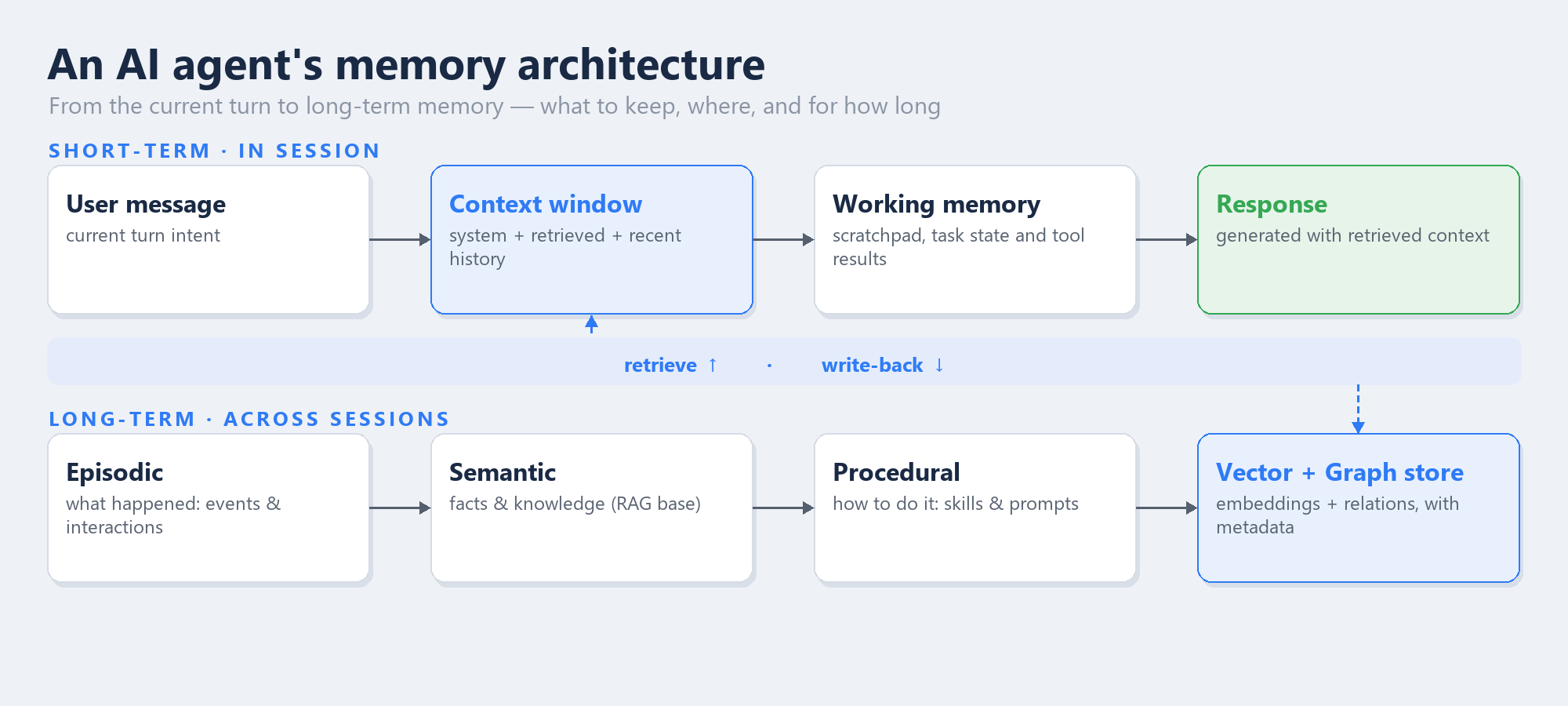
Short-term lives in the session; long-term persists across sessions — linked by a retrieval and write-back loop.
The memory types that matter
Think in two layers.
Short-term (within the session)
- Context window — the system prompt, instructions, and recent history of the current turn. Volatile and limited.
- Working memory — the “scratchpad” of the task in progress: intermediate state, tool results, current plan. Gone when the session ends.
Long-term (across sessions)
- Episodic — what happened: events, past interactions, “last time the deploy failed for lack of RBAC.” Great for continuity and personalization.
- Semantic — facts and knowledge: user preferences, business rules, documentation. This is the foundation of RAG.
- Procedural — how to do it: skills, reusable prompts, and procedures the agent learned to execute.
Rule of thumb: short-term is managed by the window; long-term lives in a vector store (similarity search) often combined with a graph store (relationships between entities).
How it works — step by step
The pattern is a retrieve → use → write loop:
- Retrieve — each turn, turn the user’s intent into a query and fetch the top-k most relevant chunks from long-term storage (vector similarity + recency/metadata filters).
- Assemble the context — inject the retrieved content + working memory + current question into the window, keeping stable content at the start (great for prompt caching) and variable content at the end.
- Reason and act — the model answers or calls tools, updating working memory.
- Write back — at the end of the turn/session, distill what has lasting value (summaries, new facts, task outcome) and persist it as embeddings in the store. Don’t store everything — store what you’ll want to retrieve later.
- Forget on purpose — apply expiration, deduplication, and summarization policies so the store doesn’t become an infinite dump.
        [ User question ]
                  |
                  v
        query -> retrieval (top-k) --------------------+
                  |                                    |
                  v                                    |
   [ Window: system + retrieved + short history ]     | (retrieve)
                  |                                    |
                  v                                    |
        [ Model + tools ]                              |
                  |                                    |
                  v                                    |
        [ Response ]                                   |
                  |                                    |
                  v                                    |
        distill (summary/facts) -> write-back ---> [ Vector + Graph store ]
Implementing it in the Microsoft Agent Framework
The Microsoft Agent Framework (and Semantic Kernel) already ship the abstractions for a thread (short-term) and a memory store (long-term), so you don’t reinvent the plumbing. The idea is to plug in a vector store and a component that runs the retrieve/write loop automatically.
1. Short-term — the thread carries the session history:
from agent_framework import ChatAgent

agent = ChatAgent(chat_client=client, instructions="You are a solutions architect.")
thread = agent.get_new_thread()  # keeps the current turn's history

await agent.run("Let's design the ingestion architecture.", thread=thread)
await agent.run("And how about the cost?", thread=thread)  # remembers the previous turn
2. Long-term — wire a vector store as a context provider:
from agent_framework import ChatAgent
from agent_framework.mem0 import Mem0Provider  # long-term memory provider

agent = ChatAgent(
    chat_client=client,
    instructions="Solutions architect with cross-session memory.",
    context_providers=Mem0Provider(user_id="eron"),  # auto retrieve + write
)

# Today's session: the provider retrieves the user's memories and injects them,
# and at the end writes new facts ("prefers Databricks for batch") for tomorrow.
await agent.run("Pick up where we left off on the lakehouse project.")
3. Store on Azure — for production, use a managed vector store: Azure AI Search (hybrid search: vector + keyword + semantic ranker), Cosmos DB with vector search, or Databricks Vector Search when the knowledge already lives in the Lakehouse. Generate embeddings with a catalog model (e.g., text-embedding-3-large) and keep metadata (user, timestamp, source) to filter at retrieval time.
Retrieval strategies (where quality is won or lost)
- Vector relevance + recency — combine semantic similarity with a time-based boost; recent tends to matter more.
- Hybrid search — vector + keyword avoids missing exact terms (names, codes, SKUs).
- Progressive summarization — instead of storing full transcripts, distill the session into a short summary; retrieve the summary, not the raw text.
- Metadata filters — scoping by
user_id, project, or tenant is what keeps memory safe and relevant in multi-user scenarios.
Best practices for production
- Write sparingly — memory is not a log. Persist facts and summaries with reuse value, not every message.
- Forget on purpose — TTL, deduplication, and compaction keep the store from growing unbounded and polluting retrieval.
- Isolate by identity — always filter retrieval by
user_id/tenant. Memory leaking across users is a security incident, not a UX bug. - Govern what goes in — apply content safety and avoid persisting sensitive data (PII) without need and legal basis.
- Measure retrieval — evaluate retrieval precision/recall as you would a search system; bad memory is worse than no memory.
- Stable at the prompt’s start — keep fixed content up front to match prompt caching and cut cost.
Frequently asked questions (FAQ)
Is agent memory the same as RAG?
Not exactly. RAG is a knowledge-retrieval technique (typically semantic memory over a document base). Agent memory is broader: it also includes episodic (what happened) and procedural (how to do it), plus short-term session state.
Do I need a dedicated vector database?
To start, no. An in-memory thread already covers short-term. For long-term in production, a managed vector store (Azure AI Search, Cosmos DB, Databricks Vector Search) delivers scale, filters, and hybrid search without you running infrastructure.
How do I stop memory from “poisoning” the agent with stale info?
With forgetting policies: TTL, summarization, and deduplication, plus a recency boost at retrieval. Treat memory as a dataset that needs curation — not an append-only log.
Where does short-term end and long-term begin?
Short-term is what fits and makes sense in the current session’s context window. When the session ends (or the history grows too large), you distill what matters and promote it to long-term.
Conclusion
Memory is what turns a reactive agent into a partner that evolves with the user. The trick isn’t to store everything — it’s to store the right thing, retrieve the relevant thing, and forget the irrelevant thing, all within a simple retrieve-and-write-back loop. Frameworks like the Microsoft Agent Framework already provide the abstractions; your architecture job is to choose the memory types, the store, and the retrieval/forgetting policies.
👉 If you’re designing agents that need to remember — especially in multi-user, regulated scenarios — memory is the architecture decision that separates the demo from the product. Want to talk memory and retrieval in agents? Reach me on LinkedIn.