Every agent over Microsoft 365 that I have reviewed in recent years had the same plumbing. A connector copied mail, chat and files into a project storage account; a pipeline cut everything into chunks, generated embeddings and loaded a vector index; a nightly job kept it in sync; and permissions came last, re-created by hand in the search code. The demo always worked. The problem showed up later: someone left a SharePoint group at ten in the morning and the agent kept quoting that group’s documents until the overnight sync. The index was behind, and the lag was exposure. At the next meeting, the compliance question was not about the model. It was where the copy lives.
From index to identity Microsoft Work IQ takes that plumbing off your hands: there is no index of yours to maintain, and the answer comes back trimmed by the permissions of whoever asks. The price is architectural and almost nobody reads it before switching it on: there is no application-only authentication, every call runs as a person and tenant policy blocks writes by default. This article is about the trade of the index for identity — and about what happens to that identity when the agent also talks to Foundry, to Microsoft Fabric data agents and to Databricks Genie.
What is Microsoft Work IQ?
The documentation defines Work IQ as “a workplace intelligence layer that enables agents to access and reason over organizational and business data, context, and tools”. In practice, it is three service endpoints and a local CLI: A2A for agent-to-agent conversation, remote MCP for tool clients and REST for anyone who wants question and answer. The CLI is configured as a local MCP server on the developer’s machine (workiq mcp, over stdio), for IDEs and coding assistants, and does not count among the service endpoints. The reach covers mail, calendar, files, people, chat and sites, and the page also includes business and workflow data from Dynamics 365 and Power Platform.
The contrast is with the RAG you build. In RAG, the index is yours: you decide what goes in, when it refreshes and how permissions are trimmed, and you answer for each of those decisions. In Work IQ, the API page sums up the trade in one sentence: “No need to manage vector stores, data sync jobs, or custom compliance enforcement.” The result comes back “automatically permission-trimmed and policy-enforced”. But look closely at the overview: the layer “continuously builds a semantic understanding across Microsoft 365 and external systems”. The index still exists. What changes is that there is no index of yours — and that is very different from there being no index at all.
The product is organized in four fronts — “Combining chat, context, tools, and workspaces” — and the workspaces front deserves the designer’s attention: “SharePoint Embedded working storage gives agents a persistent space within your Microsoft 365 tenant boundary”. The agent’s working memory stays inside the tenant, not in a storage account of yours. Remote MCP, in turn, “collapses hundreds of operations into just 10 generic tools”: there are 10 generic tools, and new workloads add paths, not tools. That design deserves an article of its own. In the Fabric documentation, Work IQ is one of the four layers of Microsoft IQ, alongside Foundry IQ, Web IQ and Fabric IQ: “Work IQ provides context on how employees work”. The map of all four also gets an article of its own.
The problem it solves
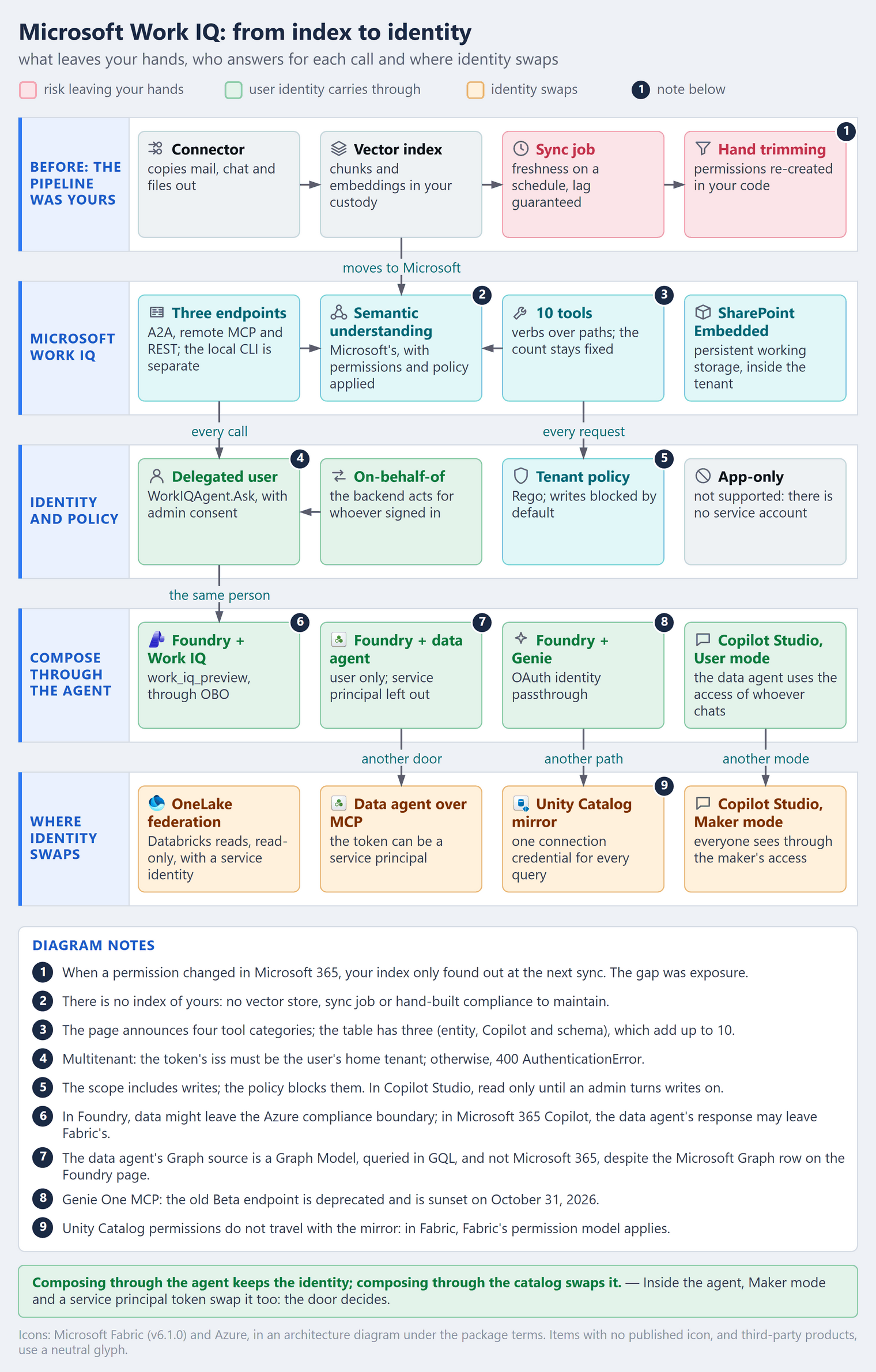
RAG over Microsoft 365 fails less in the model and more in the plumbing. There are four pieces you end up operating forever: the connector, which copies content out of Microsoft 365; the vector index, with chunks and embeddings in your custody; the sync job, which sets freshness on a schedule and therefore guarantees lag; and permission trimming, the SharePoint ACL re-created in your code. Each piece is a risk of yours. The copy widens the surface of sensitive data, the lag turns access revocation into an exposure window, and hand trimming drifts from the real permission at the first edge case: a nested group, a sharing link, a sensitivity label.
That was the limit that showed up in the article on RAG or text-to-SQL: the vector index does not inherit the source’s permissions, and someone has to rebuild them. Here the question moves. Work IQ does not help you rebuild permissions; it removes the copy, and with it the index, the sync and the trimming. What is left is the question the index was hiding: on whose behalf is the agent reading?
How it works — step by step
- Enable Work IQ in the tenant. The service comes before any consent: “An organization administrator must enable Work IQ in your organization before these permissions can be used”.
- Register the app and request the delegated scope. There is a single scope,
api://workiq.svc.cloud.microsoft/WorkIQAgent.Ask, with no application version and with admin consent required. If there are users from another tenant, register the app as multitenant from the start. - Get the user’s token — or exchange it through OBO. A client with a user in front uses the delegated token; a backend that receives the call from a front end does OBO (on-behalf-of) and carries on as whoever signed in.
- Pick the endpoint by client. A2A for an agent that delegates to another agent; remote MCP for a tool client; REST for an orchestrator that only wants question and answer; the CLI for the developer’s machine.
- Let permissions and policy do their work. The answer comes back trimmed by the user’s permissions in Microsoft 365, and every tool request goes through tenant policy, which holds back create, update and delete until the administrator allows them.
- Measure consumption per agent. Usage is billed in Copilot Credits, “independent of Microsoft 365 Copilot licensing”: whoever already has a license also pays when the call comes from a custom or third-party agent. The billing currencies of Work IQ, Fabric and Foundry get an article of their own.
What leaves your hands — and what stays
| Piece | In the RAG you build | In Microsoft Work IQ |
|---|---|---|
| Content copy | a connector exports to a storage account of yours | no copy of yours; reads happen in Microsoft 365 |
| Index | vector store, chunks and embeddings of yours | semantic understanding kept by Microsoft, in the tenant |
| Freshness | scheduled sync job, lag guaranteed | kept by Microsoft; no job of yours |
| Permissions | ACL re-created in the search code | answer trimmed by permissions and policy |
| Working memory | project database or storage | SharePoint Embedded, inside the tenant |
| Identity | service account with broad read access | the user, always; app-only is not supported |
What does not leave your hands is exactly what the index let you hide: who the user is, what they can see and what the agent can do on their behalf. Work IQ applies the permission that exists; it does not fix the wrong permission. If the legal team’s site is shared with the whole company, so is every employee’s agent. The sharing hygiene that hand trimming used to mask becomes visible — and becomes yours.
Identity is the price: no app-only, OBO instead
The most important sentence in the documentation fits on one line: “Application-only authentication isn’t supported.” There are no client credentials, no service account, no nightly job reading everyone’s mailbox. What exists is delegation: “On-behalf-of (OBO) flows are supported.” and “Requests run in the context of the signed-in user.” The permissions table confirms it from the Entra side: WorkIQAgent.Ask has an empty application column.
That changes the design in three ways. First, every agent that includes Work IQ runs with a person behind it: an autonomous agent triggered on a schedule has nobody to borrow the identity from. Second, the backend becomes an identity intermediary: it receives the token from the front end, exchanges it through OBO, and the trail shows the user, not the app. Third, multitenant has its own rule: in parent and child organizations, the token’s iss must be the user’s home tenant — “Work IQ enabled in both tenants isn’t enough” —, and the app must be registered as AzureADMultipleOrgs; otherwise, the call returns 400 AuthenticationError.
In A2A, the protocol version goes in the header: “The A2A-Version: 1.0 header is required to use v1.0 method names (SendMessage). Omitting it defaults to v0.3.” This is the documentation’s example, with the time zone set to São Paulo:
POST https://workiq.svc.cloud.microsoft/a2a/
Authorization: Bearer <user delegated token>
Content-Type: application/json
A2A-Version: 1.0

{
  "jsonrpc": "2.0",
  "id": "<request-guid>",
  "method": "SendMessage",
  "params": {
    "message": {
      "role": "ROLE_USER",
      "messageId": "<message-guid>",
      "parts": [{ "text": "Summarize the decisions from the last credit committee meeting." }],
      "metadata": {
        "Location": { "timeZoneOffset": -180, "timeZone": "America/Sao_Paulo" }
      }
    }
  }
}
The article on A2A covers the protocol; the point here is a different one: the delegator is an agent, but the one who answers is the user. And the agent’s own identity, the subject of the article on Entra Agent ID, does not appear on the Work IQ API pages as an alternative: what they accept is the user, directly or through OBO.
Writing is another conversation: tenant policy decides
One detail contradicts the hasty read-only reading. The scope grants “read and write access to Microsoft 365 resources that are accessible to Work IQ agents and scoped to the signed-in user”. What holds writes back is not OAuth; it is a policy layer: “A separate tenant policy layer evaluates each tool request and blocks mutation operations by default.” The administrator allows them per scenario — “Administrators can enable supported mutation scenarios through tenant policy” —, and the engine behind that policy is based on Rego. In Copilot Studio, the same rule shows up on the product side: “Microsoft 365 Work IQ is read only unless an administrator explicitly turns on write operations”. For the design, the consequence is direct: the policy belongs to the tenant, and a write scenario needs an owner before it exists, not after the first incident. How to write that policy gets an article of its own.
Composing with Foundry, Fabric and Databricks
Work IQ will rarely be alone. The credit committee question combines the meeting minutes, which live in Microsoft 365, the portfolio number, which lives in a Fabric lakehouse, and the risk model, which lives in Databricks. The good news is that each platform has an agent that answers in place, with the identity of whoever asks: Work IQ in Microsoft 365, the data agent in Fabric and Genie in Databricks. The bad news is that each one also has a door where identity swaps.
The rule: compose through the agent, not the catalog
The rule that ties this section together: composing through the agent keeps the identity; composing through the catalog swaps the identity. When the orchestrator calls another agent with the user’s token, each platform applies its own permissions. When you bring the data together in a catalog — federation, mirror, copy —, the query starts running with the connection’s credential. And even inside the agent there are two exceptions: Maker mode and the service principal token.
user ── delegated token ──► agent in Foundry
                              ├── OBO ─────────► Work IQ ──────► Microsoft 365, as the user
                              ├── user ────────► data agent ───► OneLake, as the user
                              └── passthrough ─► Genie ────────► Unity Catalog, as the user

catalog ── connection credential ──► federation or mirror ──► data, as the connection
Foundry: three tools, all delegated
In Foundry, Work IQ comes in as the work_iq_preview tool, still in preview: “Authentication uses On-Behalf-Of (OBO) so the request runs in the context of the signed-in user”. When you build the toolbox, “Work IQ Chat connects through an A2A endpoint”, and the other options — Copilot Chat, Teams, Word, Outlook Calendar, Outlook Mail, the Microsoft 365 user profile, SharePoint and OneDrive — go through MCP. The setup happens once: a Global Administrator provisions the Work IQ resource service principal in the tenant (it is not an identity for the agent to use) and grants consent for WorkIQAgent.Ask, with the role activated “just in time through Microsoft Entra Privileged Identity Management (PIM)” and deactivated afterwards.
The Fabric data agent comes in through the Fabric tool, with two locks: “Service principal authentication isn’t supported for the Fabric data agent”, and the data agent and the project sit in the same tenant, with the sources on capacities in the same region. Genie comes in through the Azure Databricks Genie tool, in Public Preview, with authentication “Automatically set to OAuth identity passthrough” and a custom OAuth app registered in the Databricks account. In Foundry, all three are delegated: the composed agent is OBO end to end.
There is a second path from Foundry to Microsoft 365: the remote SharePoint knowledge source, which uses the Copilot Retrieval API — “Unlike indexed knowledge sources, remote SharePoint knowledge sources query live data directly at retrieval time.” In preview, it covers SharePoint only, is billed through the Microsoft 365 Copilot license and has a limit of 200 requests per user per hour. It is good for retrieving documents; for mail, calendar and chat, the path is Work IQ.
Fabric: the data agent does not read Microsoft 365
This is where the most likely confusion lives. The Fabric data agent combines up to five data sources, “in any combination”, and is “a generally available feature”; it “strictly enforces read-only access” and “uses the requesting user’s credentials and permissions to enforce least-privilege access”. Among the preview sources there is one called Graph — and it is the Fabric Graph Model, queried in GQL, for “Relationship-rich data exploration and graph analytics”. It is not the Microsoft Graph of Microsoft 365. The Fabric tool page in Foundry describes the permission for that source as “Delegated access to the Microsoft 365 content requested by the signed-in user”, but the Fabric sharing page calls the same row “Microsoft Graph in Fabric”, with read on the graph item. Read it as a Fabric graph item: Microsoft 365 context comes in through Work IQ, at the agent layer.
In Copilot Studio, the data agent has two modes. In User mode, it answers with the credentials of whoever chats. In Maker mode, with those of whoever set it up: “Everyone who uses the agent sees data through the maker’s access.” In an agent that also uses Work IQ, the answer mixes identities: the mail comes through the user, the number comes through the agent’s maker. In a bank, that is the difference between an assistant and a leak. The data agent MCP server, useful for plugging Fabric into any tool client, opens the same question through another door: “The token can represent either a user identity or a service principal”.
Published to Microsoft 365 Copilot, in preview, the data agent shows up in the Agent Store and runs under the Copilot orchestrator, which “uses the chat context, user intent, and its own model’s reasoning to shape the final response”. The page warns that “some level of change is inevitable”. In FSI, the data agent’s number may come back rewritten, and the contract from the article on the data agent applies twice over.
And what if the idea is to bring Microsoft 365 into the lakehouse? The documented path is the copy through the Microsoft 365 connector in Data Factory, which requires approval in Privileged Access Management: “A member of the data access approver group needs to approve the request in the Privileged Access Management before the data extraction can proceed.” The connection uses a service principal. It is the old plumbing under another name: useful for batch analysis, and exactly what Work IQ exists to avoid on the agent’s path.
Databricks: Genie answers in place
In Databricks, the equivalent is Genie — “Genie Agents were formerly known as Genie Spaces”. Through Foundry, the connection uses identity passthrough. Over MCP, the current endpoint is Genie One, system.ai.genie_one_mcp, where “Unity Catalog permissions are enforced on every request”; the previous Beta endpoint is deprecated and will be sunset on October 31, 2026. It accepts OBO, with the ai-gateway OAuth scope, and also service principals, for automated workloads. In Copilot Studio, also in Public Preview, Genie uses the Power Platform connection, and across tenants a service principal is mandatory. The catalog doors swap identity: Databricks federation with OneLake reads with a managed identity or a service principal — “Data access is read-only.” —, and the Unity Catalog mirror in Fabric uses a single credential, “The credential used to create the connection to Unity Catalog of this catalog mirroring is used for all data queries”, without carrying the permissions along: “Unity Catalog policies and permission aren’t mirrored in Fabric”. There is no documented direct integration between Databricks and Work IQ; they meet in the agent.
| Door | Where the data lives | Identity that reaches the data |
|---|---|---|
| Work IQ over A2A, MCP or REST | Microsoft 365 | the user, directly or through OBO |
Foundry with work_iq_preview |
Microsoft 365 | the user, through OBO |
| Foundry with a data agent | Fabric | the user; service principal is not supported |
| Foundry with Genie | Databricks | the user, through OAuth identity passthrough |
| Copilot Studio with a data agent, User mode | Fabric | whoever chats |
| Copilot Studio with a data agent, Maker mode | Fabric | whoever set it up, for everyone |
| Data agent MCP server | Fabric | user or service principal |
| Genie One MCP | Databricks | OBO or service principal |
| Genie on Power Platform, across tenants | Databricks | service principal required |
| OneLake federation in Databricks | Fabric | managed identity or service principal |
| Unity Catalog mirror in Fabric | Databricks | the connection credential |
Two compliance boundaries
Composing also adds boundaries. The Work IQ tool in Foundry warns that “data might be sent outside the Azure compliance boundary”; the data agent in Microsoft 365 Copilot warns that “responses returned by Fabric data agents may be sent outside of Fabric’s compliance boundary or geographic region”. For anyone who answers to LGPD and to the rules of the Brazilian Central Bank, every arrow in the composed agent is a transfer to document before it becomes a line of code.
Where the documentation needs a careful read
| What the page says | Where | How to read it |
|---|---|---|
| four tool categories, with three in the table | MCP overview | entity, Copilot and schema add up to the 10; the fourth is not described |
| four broad OAuth permissions | MCP overview | the permissions page lists a single scope, WorkIQAgent.Ask |
| read and write scope | permissions | writes are held back by tenant policy, not by the scope |
| Graph source with Microsoft 365 content | Fabric tool in Foundry | on the Fabric pages, it is the graph item, in GQL |
| no preview label | API pages | the Foundry page lists the same API as (preview); work_iq_preview and the Copilot Studio integration are in preview |
None of these divergences blocks the design, but each one becomes an audit question. Write down the page and the date you read it: these pages change within weeks, and the architecture review needs to know which version applied.
Production best practices
- Design the agent with a user in front. If the use case is a job with no person, Work IQ is not the path; do not work around it with a generic human account.
- Do OBO in the backend and carry the user into the audit trail of every call.
- Decide multitenant at app registration, with
AzureADMultipleOrgs, and treat400 AuthenticationErroras a design error, not a network one. - Clean up sharing before switching it on. The agent sees what the user sees; the site open to the whole company becomes an answer.
- Give every write scenario an owner in tenant policy; blocked by default is the right state to start from.
- Use the data agent in User mode. Maker mode is the exception, with a written justification and an access review.
- Send a user token to the data agent MCP server whenever there is a person in the flow.
- Move off the Genie Beta endpoint to
system.ai.genie_one_mcpbefore October 31, 2026. - Document the compliance boundary of every arrow in the composed agent.
- Keep the batch path separate. Bringing Microsoft 365 into the lakehouse is a copy with PAM approval: another pipeline, with another owner.
- Measure Copilot Credits per agent, not per tenant.
What has to be in place
The order below is causal, not chronological: each stage exists because the previous one is in place.
Foundation — identity arrives whole. Work IQ is enabled, consent for WorkIQAgent.Ask was granted with a role activated on demand, the backend does OBO and the multitenant registration is decided. No piece of the agent depends on a service account.
It is in place when every call to Work IQ shows up in the audit with the name of a person — and none with the name of an app.
Production with context — every door keeps the identity. The composition with Foundry, the data agent and Genie is mapped door by door; the data agent runs in User mode; the data agent MCP server receives a user token; and each compliance boundary was reviewed by whoever answers for LGPD.
It is in place when the table of doors and identities of your agent fits on one page and no row says “the connection credential” without a justification.
Scale and efficiency — the platform becomes a product. Copilot Credits consumption is measured per agent; write scenarios are allowed by policy, with an owner and a review; the batch path has its own pipeline and owner; and the preview pages are part of your review cycle.
It is in place when a new agent is born from a pattern that already brings OBO, User mode and a credit budget, without anyone rediscovering the traps.
Skipping a stage does not speed anything up: without identity arriving whole, composing only multiplies the problem; without the doors mapped, scaling multiplies doors nobody reviewed.
Frequently asked questions (FAQ)
Does Work IQ replace Azure AI Search?
For Microsoft 365 content read by an agent, it takes the index off your hands. For your own corpus — contracts in a storage account, a product knowledge base —, the index is still yours, and Azure AI Search is still where it belongs.
Do I need a Microsoft 365 Copilot license?
Not for the API: usage is “independent of Microsoft 365 Copilot licensing” and is billed in Copilot Credits. Foundry tools that go through a connector and the remote SharePoint knowledge source may require a license for each user.
Can I run a nightly job with a service principal?
No. “Application-only authentication isn’t supported.” If there is no user, the use case belongs to another path: batch, with a copy and an approval.
Does the Fabric data agent read my mail?
No. The Graph source of the data agent is the Fabric Graph Model, in GQL. Mail, calendar and chat come in through Work IQ, at the agent layer.
Is Work IQ in preview?
The API pages carry no preview label, but the Foundry page lists the same API as (preview), and the work_iq_preview tool and the Copilot Studio integration are in preview. Plan by the integration you will use, not by the API.
Is there a direct integration between Databricks and Work IQ?
There is no documented direct integration. They meet in the agent: Foundry calls Work IQ through OBO and Genie through identity passthrough, and each platform applies its own permissions.
Conclusion
Microsoft Work IQ is not one more connector. It is the end of the plumbing you kept up to read Microsoft 365: the index, the sync and the hand trimming leave your hands. What stays is the question they were hiding — on whose behalf? — and now it must have an answer: always a person.
When the agent also talks to Fabric and Databricks, the rule extends: composing through the agent keeps the identity; federation, mirror, Maker mode and service principal swap it. The safe design is not the one with the fewest doors. It is the one that knows, door by door, whose identity reaches the data.
Official references
- Microsoft Work IQ — overview
- Work IQ API — protocols, authentication and billing
- Work IQ permissions
- Work IQ MCP — overview
- Work IQ MCP — tool reference
- Work IQ MCP — policy and governance
- Work IQ in Copilot Studio
- Work IQ tool in Microsoft Foundry
- Fabric data agent tool in Microsoft Foundry
- Remote SharePoint knowledge source
- Data agent in Microsoft Fabric — concepts
- Data agent data sources
- Data agent sharing and permissions
- Data agent as a tool in Copilot Studio
- Data agent MCP server
- Data agent in Microsoft 365 Copilot
- Microsoft 365 connector in Data Factory — overview
- Microsoft 365 connector in Data Factory — copy
- Microsoft IQ in the Fabric IQ overview
- Azure Databricks mirroring security in Fabric
- Genie Agents
- Genie in Microsoft Foundry
- Genie One MCP
- Azure Databricks and Power Platform
- Genie in Copilot Studio
- OneLake federation in Azure Databricks
👉 If you are taking agents to Microsoft 365 — especially in a bank or an insurer, where every answer has to say on whose behalf it read —, design identity before the prompt: OBO in the backend, the data agent in User mode and a table of doors and identities reviewed by compliance.
Want to talk through Work IQ, data agents and identity in composed agents? Reach me on LinkedIn.