The demo is always the same and it always works. Someone points the agent at a lakehouse, asks “what was quarterly revenue by region” in English, and the answer comes back formatted, with the right table, in four seconds. The room approves. Three weeks later the pilot has seven sources that had to go in and only five that fit, a director asking why the report is cut off at twenty-five rows, and an analyst in São Paulo discovering that the same question in Portuguese comes back worse than in English. None of that is a defect. It is all documented — it just was not on the slide.
The fine print A data agent is not a search box on steroids. It is a component with an entry contract: a set of conditions that have to be true before it answers anything, and that no prompt, instruction or insistence will renegotiate. Knowing that contract is the difference between designing a solution that fits the product and discovering the limit once the pilot has already become a commitment to the business.
What is the Fabric data agent entry contract?
The Fabric data agent is a generally available Microsoft Fabric artifact that turns a natural-language question into a query over your data. It is not a copilot: a copilot comes preconfigured and helps you write code inside the product; the data agent is an item you configure, publish and share, and that other systems can invoke from outside.
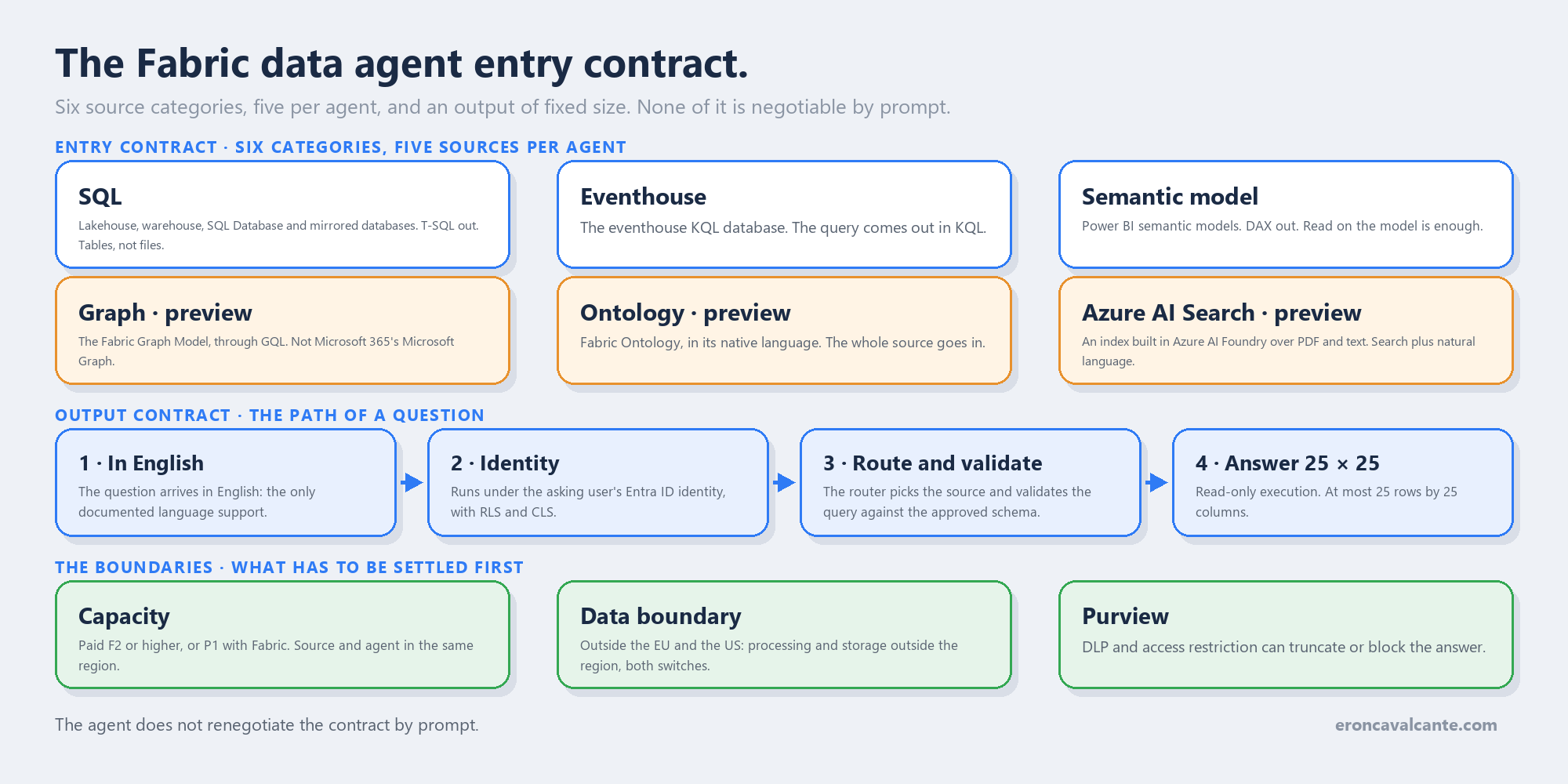
The entry contract is what it demands from the environment before it exists, and what it hands back afterwards. Four blocks:
- Data surface — which sources it accepts, how many, and how granularly you choose what it sees.
- Output shape — how much it returns per answer, in which language, and in which mode of operation.
- Identity and permission — which identity the query runs under, and the minimum permission each source requires.
- Boundary — what leaves your capacity’s region, and what governance can stop.
This article is the direct sequel to the vector index does not inherit the table’s permission, where the Fabric data agent appeared as a governance route in the choice between RAG and text-to-SQL. There the question was which route has the right permission model. Here it is the question that comes before: what has to be true for that route to work at all.
The problem it solves
The problem is one of sequence. Almost every data agent design I meet in the field starts from the wrong question — what questions will the agent answer? — when the question that orders the project is what does it accept, and what can it hand back?.
Getting that backwards produces three kinds of expensive, predictable rework:
- The architecture draws eight sources. The product accepts five. Someone will have to consolidate, and consolidating sources is a data engineering project, not a configuration tweak.
- The use case is an operational report. The answer is capped at twenty-five rows and twenty-five columns. The agent was designed for conversation, not extraction — and extraction was exactly what the business asked for.
- The audience is Brazilian. Documented support is for English. That does not stop a question in Portuguese, but it changes what you can promise about quality, and it has to be written into the design.
None of those three is a technical surprise. All three are documentation read afterwards instead of beforehand.
How it works — step by step
- Confirm the capacity. You need a paid F2 or higher Fabric capacity, or a Power BI Premium P1 or higher capacity with Fabric enabled. There is no data agent on an improvised capacity.
- Turn on the tenant switches. The Copilot and Azure OpenAI switch is mandatory. If your capacity’s region sits outside the European Union data boundary and outside the United States — Brazil’s case — the switches for processing and for storing outside the geographic region are mandatory too. Both, not one.
- Pick the sources. Up to five, in any combination across the six categories. Five semantic models is valid; two models, one lakehouse and one KQL database is valid too.
- Select the schema inside each source. On a SQL source you pick tables, views and functions. In a lakehouse those are tables, not files: a CSV or JSON has to be ingested first. Graph and ontology have no schema selection — the whole source goes in.
- Give it context. Agent instructions for routing, per-source instructions for query generation, and up to 100 example queries per source. The semantic model is the exception: examples are not supported there, and configuration happens on the Power BI side, in Prep for AI.
- Choose the runtime. Standard is the GA runtime and the default for production. Preview carries orchestration and routing changes before GA — and it is the only one that enables configurations such as topics and schema object descriptions. The runtime does not change which sources you can add, and model upgrades land on both equally.
- Publish. Publishing generates a read-only version, which is what everybody else consumes; you keep editing the draft without affecting current users. The description you write at publish time becomes the tool description advertised over MCP.
- Share the agent and the data. Sharing the agent is not enough: whoever asks needs permission on the source, because the query runs under their identity.
- Evaluate before calling it done. The evaluation SDK, in preview, runs a set of questions with expected answers and writes two tables — the summary and the step-by-step.
The six categories, and why five is the number that matters
The source list is where the documentation confuses people the most, and it pays to go to the right page. The per-resource page is the authoritative and most current one:
| Category | Artifact | Generated language |
|---|---|---|
| SQL | Lakehouse, Data Warehouse, SQL Database, Mirrored Databases | T-SQL |
| Eventhouse | Eventhouse KQL database | KQL |
| Semantic model | Power BI semantic models | DAX |
| Graph (preview) | Graph Model | GQL |
| Ontology (preview) | Fabric Ontology | ontology-native |
| Azure AI Search (preview) | Azure AI Search index | natural language + search |
Three readings that change a design:
First: “SQL” is a category, not a source. Lakehouse, warehouse, SQL Database and mirrored databases — Azure SQL, Cosmos DB, Snowflake — all come in through the same T-SQL door, via the SQL Analytics Endpoint. That stretches what fits inside the limit of five far more than the naive reading suggests.
Second: unstructured content does come in. The Azure AI Search index is a supported source, in preview, described as an index built in Azure AI Foundry over PDFs, text files and other enriched documents. You configure the search type, how many documents are retrieved per query — the recommendation is 3 to 20 — and the description that helps routing. Citations are automatic when the index carries a URL or file path field. Worth recording: I published the opposite here on 1 September, having read a table-of-contents rename as a feature removal. The article was corrected in both languages before this one shipped.
Third: it is not Microsoft Graph. The graph category is the Graph Model of Graph in Microsoft Fabric, queried with GQL — a labelled property graph inside Fabric. It is not the Microsoft 365 Microsoft Graph API. The confusion has a documented origin: the concepts page uses the bare name “Microsoft Graph”, and the sharing page calls it “Microsoft Graph in Fabric”. If your design planned to ask about email and calendars, that is a different product.
And five is not a licensing limit you can buy your way past. It is the artifact’s ceiling. If you need eight sources, the options are to consolidate upstream, split into two agents and orchestrate outside, or revisit the scope of the use case.
Twenty-five rows by twenty-five columns
This is the limit that sinks the most projects, because it never shows up in a demo — it shows up when someone tries to use the agent for what it is not.
The documentation is literal: responses are capped at a maximum of 25 rows and 25 columns, because the agent is designed for conversational insight, not for returning a complete dataset. And there is a second-order effect almost nobody anticipates: the conversation history contaminates the next question. If you asked “show all rows for this year” and got twenty-five, the follow-up may be answered over that already-truncated slice rather than over the whole dataset. The official recommendation for that case is to start a new chat session.
Add the rest of the output contract to it:
| Limit | Value | What it rules out |
|---|---|---|
| Sources per agent | 5 | A design with many origins and no consolidation |
| Rows × columns per answer | 25 × 25 | Extraction, operational reporting, export |
| Language | English | Promising equivalent quality in Portuguese |
| Query type | read-only | An agent that writes, fires a notebook or a job |
| Example queries per source | 100 | Teaching the agent by sheer volume of examples |
| Model choice | not configurable | Swapping in an LLM of your own |
| Region | same as the source capacity | Source in one region, agent in another |
That last row deserves emphasis because it fails quietly on paper and loudly in production: the agent cannot execute a query when the source workspace’s capacity is in a different region from the agent workspace’s capacity. A lakehouse in one region and the agent in another is not a latency question. It is a query that does not run.
Read-only, incidentally, is structural and not a setting you relax: it generates only read queries in SQL, DAX and KQL, and it does not trigger anomaly detection, notebooks or any write workflow — even where the eventhouse has those integrations available.
English only, and what that means in practice
The documented sentence is that the agent does not currently support non-English languages, and that for optimal performance questions, instructions and example queries should be in English.
That is not an interface language block. It is a declaration of quality scope, and it has practical consequences in three places that stay under your control:
- Agent instructions and per-source instructions are written by you. Write them in English.
- The example queries are yours. In English.
- The table and column descriptions — including the ones coming from Prep for AI on the semantic model — feed query generation. In English.
What remains in Portuguese is the end user’s question, and that is precisely the part you do not control. In a bank or an insurer in Brazil, this turns into a communication requirement: the agent answers, but the design does not promise parity. I have watched that point become a trust crisis for not having been said in the first meeting.
The identity belongs to the asker, and so does the permission
Here the product gets it right, and the mechanism is worth understanding because it is the main governance argument in favour of this route.
There is no Azure OpenAI key to manage: Fabric uses a Microsoft-managed Azure OpenAI Assistant and handles authentication for you. Data access, on the other hand, runs under the Microsoft Entra ID identity of whoever asks, with their permissions. The agent reads schema and runs queries only where the user has access, and it honours RLS and CLS.
The minimum permission per source is documented, and the semantic model detail tends to surprise people:
| Source | Minimum permission to query via the agent |
|---|---|
| Power BI semantic model | Read on the model — no workspace role, no Build |
| Lakehouse | Read on the item, plus table access where enforced |
| Warehouse | Read, with SELECT on the relevant tables |
| KQL database | Reader role on the database |
| Ontology | Read on the ontology and on the source bound to it |
| Graph in Fabric | Read on the graph item and the underlying data |
Below that, the query fails or returns empty — and returning empty is the dangerous behaviour, because it looks like an answer.
Above all of that sits a precedence order the product declares: organizational intent (tenant policies), then role-based intent (workspace governance), then developer intent (your instructions and examples), and last user intent (the question). When layers conflict, the higher one wins. An instruction that tries to bypass read-only mode or reach a source outside scope is refused or redirected — that is not a behavioural promise, it is declared precedence.
Then there is the Purview layer: DLP on the Data Warehouse is generally available, and access restriction policies are in preview for KQL database, SQL Database and warehouse. The practical effect is that an answer can come back truncated or blocked by policy, and the user will see an incomplete answer without knowing why. That belongs in the agent’s communication, not only in the design.
The full path, the way I draw it on a whiteboard:
question (in English)
     │
     ├─ user identity in Entra ID  ── not the agent's identity
     │
     ├─ precedence: organization > role > developer > user
     │
     ├─ routing across the added sources (max. 5)
     │      ├─ SQL            → NL2SQL   → T-SQL
     │      ├─ eventhouse     → NL2KQL   → KQL
     │      ├─ semantic model → NL2DAX   → DAX
     │      ├─ Graph Model    → NL2GQL   → GQL
     │      ├─ ontology       → ontology-native
     │      └─ AI Search      → search over the Foundry index
     │
     ├─ validation: the query only touches the approved schema
     │
     ├─ read-only execution, with the user's RLS and CLS
     │
     └─ answer: max. 25 rows × 25 columns
            └─ Purview DLP and access restriction may truncate
Two retirements that have already passed
If you designed an integration before August, check the calendar: 26 August 2026 was the date of two retirements that affect this agent.
The first is the Azure OpenAI Assistants API, deprecated on that date, with migration to the Microsoft Foundry agents service. The second is a consequence of the first: the Fabric data agent integration with Copilot in Power BI was retired the same day, because that was the orchestration layer holding it up.
The agent itself was not retired. What changed is where it is consumed from. The paths still standing: the native Fabric experience, Microsoft Foundry, Copilot Studio, Microsoft 365 Copilot and the MCP endpoint — which is the one that matters to whoever is building.
Publishing the agent turns it into an MCP server exposing a single tool: the agent itself. The endpoint is predictable:
https://api.fabric.microsoft.com/v1/mcp/workspaces/{WorkspaceId}/dataagents/{DataAgentId}/agent
Three traps on that surface. First: the URL only works after you publish — hand-building it against a draft agent returns an error even when the URL is correct. Second: it is not plain REST. The client has to follow the MCP flow — initialize, tools/list, tools/call — and the server does not support dynamic client registration or client identity metadata, so the client must obtain a Fabric token through its own flow and attach it to every request. Third, and this is the one the risk team will want in writing: consumed over MCP, the answer may leave Fabric’s compliance boundary and geographic region, falling under the terms of the MCP client you used. The same caveat applies to Foundry, Copilot Studio and Microsoft 365 Copilot.
When the documentation contradicts itself
The method is worth recording, because this topic has a trap in it. Two pages of the same documentation disagree today:
- The per-resource page lists Azure AI Search as a source and calls the graph category
Graph Model / GQL. - The concepts page, older, still writes “Microsoft Graph” in the flow and still lists, under limitations, that the agent does not support unstructured data such as .pdf, .docx or .txt files.
Both statements on the concepts page are residue. The rule I adopted and recommend: in a conflict, the per-resource page wins, because it is the one the product team updates on every surface change. And there is an objective signal to decide with — the revision date in the page footer. Concepts is from May; per-resource is from late August, revised in September.
Curiously, the prerequisite list on the creation, sharing and evaluation pages still enumerates a warehouse, a lakehouse, a semantic model, a KQL database, a mirrored database or an ontology — without the Azure AI Search index. It is the same lag, in the same place: the supporting text trails the surface.
Production best practices
- Read the contract before designing the use case. Five sources, 25 × 25, English and read-only are architectural premises, not implementation details.
- Treat the limit of five as a budget. Group under the SQL category whenever you can: four different databases already mirrored into Fabric spend less of the budget than they appear to.
- Do not promise extraction. If the business needs the complete list, the deliverable is a report, an export or a pipeline — and the agent is there to explain the number, not to produce the spreadsheet.
- Write every piece of configuration in English and record in the architecture document that questions in Portuguese are supported without declared parity.
- Pin the standard runtime in production and keep the preview on a mirror agent, so you can evaluate an orchestration change before it reaches GA.
- Publish with a description written for machines. It is read by orchestrators and MCP clients to decide when to call the agent. A vague description becomes bad routing.
- Check the region before adding a source. Source capacity and agent capacity in different regions will not execute.
- Share the agent and the data together. Whoever gets the link without permission on the source gets an empty answer, not an access error.
- Evaluate with your own set and read the steps table. The summary tells you whether it was right; the
_stepstable tells you which way it went. They answer different questions.
The skeleton of an evaluation fits in a few lines, and it is the lowest barrier to entry for stopping the guesswork about quality:
from fabric.dataagent.evaluation import evaluate_data_agent

# Two tables come out of this: <table_name> with the summary,
# <table_name>_steps with the step-by-step reasoning.
evaluation_id = evaluate_data_agent(
    df,                              # columns: question, expected_answer
    "AgentEvaluation",
    table_name="demo_evaluation_output",
    data_agent_stage="production",   # or "sandbox"
)
What has to be in place
The order below is causal, not chronological. Each stage depends on the previous one being true, and none of them has a deadline.
Foundation — authority over the data. The capacity is paid F2 or higher, the tenant switches are on with the decision about processing and storage outside the region taken in writing, the sources the agent will see sit in the same region as its capacity, and each consumer’s permission on the source has been checked — not permission on the agent, permission on the data.
It is in place when a user without access to the table gets an empty result by design, and someone can explain why without opening a ticket.
Production with context — semantics turning into decisions. The instructions, schema descriptions and example queries exist, are in English, and were written by someone who knows the business. The semantic model has been through Prep for AI. The agent is published, with a description an orchestrator can read, and the draft evolves separately from the published version.
It is in place when the same question, asked by two people from different areas, is routed to the right source with no extra instruction.
Scale and efficiency — the platform as a product. There is a versioned evaluation set, the steps table is consulted when someone complains, the production runtime is standard with a preview mirror, and MCP consumption went through a data boundary review before it existed in production.
It is in place when an orchestration change in the product is caught by your evaluation before it is caught by your users.
Frequently asked questions (FAQ)
Can the 25-row limit be raised?
Not by configuration. The cap belongs to the product and exists to keep the answer conversational. When you genuinely need the complete set, the path is a direct query on the source, a report or a pipeline — with the agent explaining the result rather than producing the file.
Does the Fabric data agent read PDFs?
Not directly. It does not open .pdf, .docx or .txt. The documented path is to index that content in Azure AI Search, with the index built in Azure AI Foundry, and add the index as a source. The difference matters: what comes in is the index, and the permission that counts there is the index’s.
So can I really ask in Portuguese?
You can, and an answer usually comes back. What the documentation states is that non-English languages are not supported and that optimal performance is in English. In an enterprise design that means: do not promise quality parity, and keep all configuration in English.
Do I need workspace permission to use a semantic model?
No. Interacting with a semantic model through the agent only requires Read on the model. Workspace roles and Build permission are not required for that path — Build is still needed to modify the model or use Prep for AI. And RLS and CLS keep applying.
Can the agent write to the data?
No. It generates read queries only and does not trigger notebooks, jobs or anomaly detection. If your case requires action, the data agent is the query step inside a larger flow — the action belongs to another component.
What is the difference between the standard and preview runtimes?
Standard is GA and changes rarely; preview receives orchestration, routing and query-generation changes ahead of GA, and it is the only place where configurations such as topics and schema object descriptions live. The runtime does not change which sources you can add, and language model upgrades land on both.
What exactly was retired on 26 August 2026?
The Azure OpenAI Assistants API and, as a consequence, the Fabric data agent integration with Copilot in Power BI. The agent remains available through the Fabric experience, Foundry, Copilot Studio, Microsoft 365 Copilot and the MCP endpoint.
Conclusion
A data agent is not judged by the answer it gives in a demo. It is judged by what it accepts and what it can hand back — and those two lists are short, public and not negotiable by prompt.
Five sources, twenty-five rows by twenty-five columns, English, read-only, same region, the asker’s identity. Whoever reads that list first designs a solution that fits. Whoever reads it later discovers the contract once it has already become a commitment — and at that point the conversation stops being technical.
In the previous article the conclusion was that the index does not inherit the table’s permission. This is the step before it, in the same idea: before arguing about what the agent inherits, check what it accepts.
Official references
- Add a data source to Data Agent
- Fabric data agent concepts
- Create a Fabric data agent
- Data agent sharing and permission management
- Configure Fabric data agent tenant settings
- Fabric data agent runtime
- Data agent as a Model Context Protocol server
- Evaluate your data agent
- Connect an Azure AI Search index
- Add a Power BI semantic model
- Migrate to the new Foundry Agent Service
👉 If you are designing a data agent on Fabric — especially in a bank or an insurer, with an audience that asks in Portuguese, read the entry contract before you close the scope.
Want to talk through data agents, product limits and governance on Fabric? Reach out on LinkedIn.