Note (Oct 3, 2026) — the ontology has a new experience. The documentation now calls the item described here the old experience. A new item created in the interface already uses the new experience; the old one can still be created through the API and CI/CD, and “The old experience of ontology retires on Jan 31, 2027.” In the new experience the graph loads no data by default: materialization is opt-in, and Microsoft says this replaces “the earlier framing that presented every ontology as having an automatically materialized instance graph”. The bill now has three meters: Ontology Discovery, at 1,000 CU-seconds per definition read, with automatic re-reads roughly every 20 minutes while the interface stays open; Ontology Logic and Operations, at the child item’s rate; and Ontology AI, with dynamic consumption. The definition became TMDL and goes into Git; named versions arrived — which the FAQ still denies — along with TTL, RDF and OWL import and DAX measures as metrics. What still holds: the overview says consumers can query the live bound source, yet the binding page still asks for a manual refresh to see new rows, and a schema change makes the materialized graph re-ingest all bound data. Wherever there is a graph, freshness is still a cost decision. The diagram, the step-by-step, the JSON definition and the meter table below describe the old experience, so the references now point to the old experience pages; the new design is in the current overview.
The demo was flawless: Customer, Contract, the relationship between them, a question in Portuguese and the graph tracing the whole path. The data team left the room convinced they had watched the bank’s vocabulary turn into software. Two weeks later, in a real workspace, the same question returned a number nobody recognised: it was Tuesday’s number. The new rows had been in the lakehouse since six in the morning, and the graph did not know they existed. The obvious fix — scheduling the refresh every hour — is precisely the expensive one: in this item, every refresh reprocesses everything.
From diagram to item The ontology has left the slide. In Microsoft Fabric it is a workspace item, with a REST API, a definition in files, a child item that is created alongside it without anyone asking and — the part almost nobody reads before switching it on — its own meters on the capacity bill. It stopped being a drawing and became something you deploy, version and pay for.
What is the Fabric IQ ontology?
It is the item that brings the company’s vocabulary into Fabric. The documentation defines it as the piece that “digitally represents the enterprise vocabulary and semantic layer that unifies meaning across domains and OneLake sources”, built from three constructs: entity types (Customer), properties (name, email) and relationships (Customer places Order). The page carries the warning that applies to everything else: “This feature is in preview”.
Fabric IQ is not a new engine: it is “a grouping of related Fabric items”, and only two of them are exclusive to it: Planning and the ontology.
The FAQ draws the line with the neighbour that does the heavy lifting:
“Ontology provides a semantic layer for your enterprise vocabulary that unifies meaning across domains and OneLake sources. […] [Graph in Microsoft Fabric] is a graph solution that offers native graph storage and compute for nodes, edges, and traversals over connected data.”
Meaning on one side; storage and compute on the other. Keep that separation in mind: it comes back when the bill arrives, and it comes back inverted.
The problem it solves
The problem is old and it is not technical: the same word means different things in different systems. Active customer in the CRM is not active customer in the credit engine, and neither of them is the one in the report that goes to the committee. The ontology moves the definition up a floor: the concept now exists above the table, declared once, and the table becomes the source of the concept, not its definition.
That was the thesis of the article on ontology and governed data, published here in August. That one was about meaning agreed between people. This one is about the artifact, the bill and what it does not do.
What made this urgent is that the consumer changed: the reader of the vocabulary is now an agent. The query layer dispatches the question to each source’s engine — “such as GQL for Graph in Microsoft Fabric and KQL for Eventhouse” — and, on top of it, the NL2Ontology layer converts natural language into a structured query. The agent asking how many contracts expire this month does not need to know which table that lives in. It needs Contract to be defined, bound to real data and up to date.
That last adjective is the whole article.
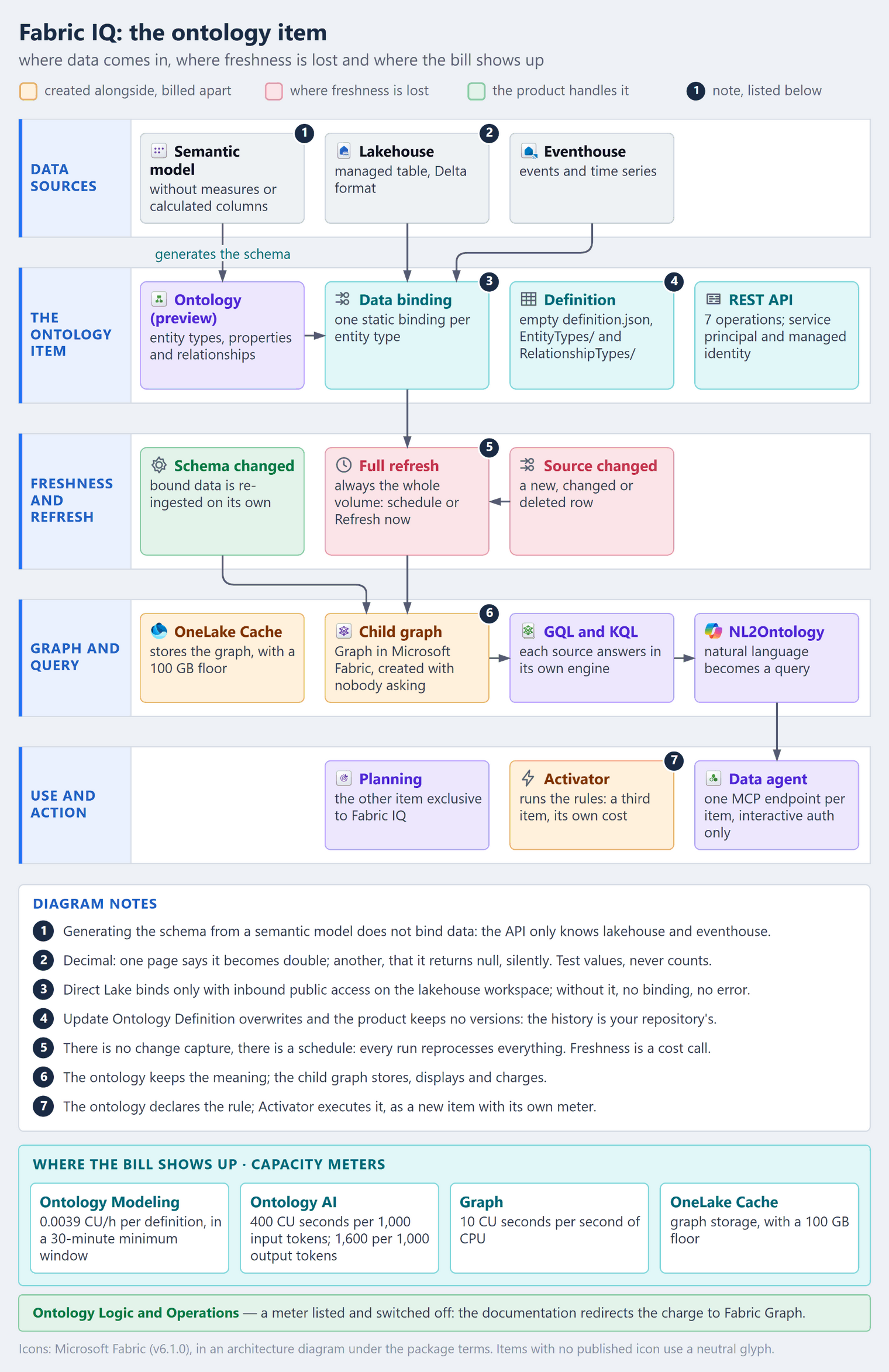
How it works — step by step
- Create the item in the workspace, through the interface or with
Create Ontology. Without you asking, a second item is created alongside it: “When you create an ontology item, a managed Graph item is created automatically.” - Declare entity types and properties — or generate the skeleton from a semantic model and adjust time series, keys and relationship binding by hand.
- Declare the relationship types. A relationship without data is allowed but, without a binding, it “isn’t visualized in the entity type details”.
- Bind each entity to a source: a managed lakehouse table or an eventhouse.
- Let the child graph ingest. Every node or edge keeps the lineage of its source.
- Query with GQL, with KQL, in natural language or through an agent over MCP.
- Decide when to re-ingest. A change at the source does not show up on its own — and this is where the cost lives.
The item is real: REST API, a definition in files and a child graph
This is what changes the conversation with engineering. The ontology has seven operations in the REST API — Create Ontology, Get Ontology, List Ontologies, Update Ontology, Delete Ontology, Get Ontology Definition and Update Ontology Definition —, and creation and the definition operations accept a service principal and a managed identity, not just a user. Creating requires the contributor role on the workspace; touching the definition, “read and write permissions for the ontology”. Vocabulary becomes code, with a pipeline and nobody clicking.
The definition is a package of files — “Ontology items support the JSON format” —, and the root file does not hold the model: “The DefinitionDetails file name is definition.json. It is an empty definition.” The content lives in the directories:
definition.json                             required · empty definition
.platform                                   required · platform details
EntityTypes/{ID}/definition.json            the concept
EntityTypes/{ID}/DataBindings/              one JSON file per binding
EntityTypes/{ID}/Documents/
EntityTypes/{ID}/Overviews/
EntityTypes/{ID}/ResourceLinks/
RelationshipTypes/{ID}/
RelationshipTypes/{ID}/Contextualizations/
That format works around a limitation the FAQ admits in so many words: “No, versioning isn’t currently available.” There is no versioning in the item — but the definition comes out whole through Get Ontology Definition and goes back whole through Update Ontology Definition, with a service identity. The versioning the product does not have, your repository does. Just read the fine print on the write: “The update overrides the current definition.” It overwrites; it does not merge.
That leaves the piece that ties the rest together: what holds the data is not the ontology but the child item, which “is responsible for storing and displaying data”. The vocabulary lives in one item; the data, in another — and the bill, as we will see, follows the data.
The refresh is full, and freshness became a cost decision
The heart of the matter begins with the documentation disagreeing with itself. The overview carries the same note twice — under Data binding and under Ontology graph —, and the binding page repeats it a third time:
“Any updates in upstream data sources (like new rows) need to be manually refreshed before they’re visible in the ontology item.”
In the same overview, however, every node or edge “follows a scheduled data refresh”. Manual or scheduled? The entity details page settles it, and the answer is better than either side:
| What changed | What happens | Who triggers it | Where it costs |
|---|---|---|---|
| The schema: property, type, relationship | the system “re-ingests all currently bound data” | the system itself | Ontology Modeling window and Graph CPU |
| The source: new, changed or deleted row | nothing — “the graph doesn’t know about these changes unless you explicitly inform it” | you, by schedule or button | Graph CPU, in full, on every refresh |
Informing the graph is simple: the ... menu of the graph model in the workspace, Schedule, Refresh now. The same panel accepts “a recurring refresh schedule for the graph model”. Scheduling exists; what does not exist is change capture. The problem is not the trigger, it is the granularity — and the warning on the same page shows how big it is:
“We recommend batching updates for refresh instead of refreshing the graph after every individual change, as the graph does a full refresh each time. This approach has cost implications for the Graph in Microsoft Fabric item.”
Every refresh is full. There is no incremental refresh and no merge of new rows: to show today’s data, the graph re-ingests everything that is bound, and pays CPU for it. The same goes for the schema: adjusting the model one property at a time, over an afternoon, means paying for the whole re-ingestion on every adjustment.
REFRESH CADENCE         FULL RE-INGESTIONS PER DAY        MAXIMUM LAG
once a day                           1                       ~24 h
every 4 hours                        6                       ~4 h
every hour                          24                       ~1 h
on demand                      unpredictable        until someone remembers

incremental pipeline    cost ∝ rows that changed          × runs
ontology refresh        cost ∝ EVERYTHING that is bound   × runs
In a normal pipeline, raising the frequency costs in proportion to the delta. Here it costs in proportion to the whole volume, every time. Freshness stopped being a scheduler parameter and became a cost decision — and a cost decision needs an owner before the first bill, not after it.
The bill: four meters, and the graph is the one charging
The billing page says it without hedging: “Billing for ontology (preview) is in effect”. Preview, billing live, four meters:
| Meter | How it measures | Rate | Detail |
|---|---|---|---|
| Ontology Modeling | per definition, in windows of at least 30 minutes opened by a create, update or delete | 0.0039 CU per hour | no double billing in overlapping windows |
| Ontology Logic and Operations | per minute | 0.666667 CU per minute | “This meter is not currently in effect.” |
| Ontology AI | per 1,000 tokens | 400 CU seconds on input, 1,600 on output | classified as a background job |
| OneLake Cache | storage for the graph cache | the OneLake Cache rate | shows up as Graph cache storage |
Ontology Modeling counts definitions — entity types, relationships, properties and bindings —, and the window bills the whole model: in the official example, with 1,000 definitions, editing one property costs 1,000 × 0.5 h × 0.0039 = 1.95 CU hours. A second operation fifteen minutes later extends the metering to 45 minutes, not 60. Batched change comes out cheaper than one-off change, by construction.
The meter that matters most is the one switched off, because of what it redirects: “Ontology users are only billed for logic and operations according to their underlying Fabric Graph usage.” Ingestion, refresh and graph queries fall on Graph, with a different yardstick:
“Graph operations are billed based on CPU uptime. Each second of uptime incurs 10 CU-seconds in cost. Each session of CPU uptime is rounded up to minutes.”
Add the storage: “a minimum of 100 GB”, at the OneLake Cache rate. In Microsoft Fabric Capacity Metrics, the operation shows up as Graph general operations — and, when the ontology page teaches you to contain consumption, it points at the child: “you can edit or disable the Graph item schedule in your workspace.”
This is where the FAQ’s separation comes back inverted. In the design, the ontology is the meaning and Graph is the engine. On the bill, the engine is the one charging, and anyone who watches only the meter with Ontology in its name sees a fraction of the bill.
The AI meter scales along a different axis. A request with 2,000 input tokens and 500 output tokens costs 1,600 CU seconds, and an F64 could handle “over 3,456 of these requests each day”. That cost rises with what gets asked; the re-ingestion cost, with what is bound — whether anyone asks or not.
Where binding actually reaches
The overview promises binding to “lakehouse tables, eventhouse streams, and Power BI semantic models”. On screen, however, only two options appear: lakehouse table and eventhouse. The rules that decide the design:
- Managed tables only, “not external tables that show in the lakehouse but reside in a different location.”
- No column mapping: “The ontology graph does not support delta tables with column mapping enabled.” It switches on by itself when a column name contains characters such as a comma, semicolon, braces, parentheses, newline, tab,
=or a space —Contract Valueis enough — and in the delta tables of semantic models in Import mode. - One static binding per entity, sourced from OneLake. Time series accept several, from eventhouse and from lakehouse.
- String or integer key, and property names of 1 to 26 characters, unique across all entity types.
Generating from a semantic model — the favourite pilot shortcut — tightens the rules:
| Semantic model mode | Generates entity type binding | Query through the binding |
|---|---|---|
| Import | Not supported | Not supported |
| DirectQuery | Not Supported | Not supported |
| Direct Lake | only with inbound public access enabled on the lakehouse workspace | “Supported (without measures and calculated columns)” |
Read the Direct Lake condition all the way to the closing parenthesis:
“Supported ONLY when backing lakehouse is in a workspace with inbound public access enabled (otherwise, the ontology item is created successfully but that entity type has no data bindings)”
Created successfully — and with no binding. The item and the entities are there; you find out when the query comes back empty. In my world, this is not an edge case:
In banks and insurers in Brazil, a lakehouse workspace with inbound public access enabled is almost non-existent. The default is closed — precisely the scenario in which generation fails silently.
And, even on the happy path, measures and calculated columns do not make it across: the business logic accumulated in them stays in the semantic model.
Where the documentation contradicts itself
Preview documentation moves, and at different speeds. Three divergences change the design:
| Topic | One page says | The other says | What to do |
|---|---|---|---|
| Semantic model as a source | overview: binding to “Power BI semantic models” | binding page and API schema: lakehouse and eventhouse only | treat the model as a source for generation, not for binding |
Decimal type |
generation page: Graph does not support it, and the property comes back null in every query | binding page, more recent: lakehouse decimal becomes double |
test with a known value |
| Definition format | format reference: JSON only, with no mention of generation | creation via API: with no definition, you get generation 2, whose example is TMDL | choose the generation on purpose |
The first has a plausible explanation. The API’s binding schema only knows LakehouseTableDataBindingProperties and EventhouseTableDataBindingProperties. Generating the schema from the semantic model is one thing; binding data to it is another, and the overview seems to conflate the two.
The second is the one I would take to the first meeting of any pilot in financial services. With Decimal columns, says the generation page, “you see null values returned for those properties on all queries” — and the note beside it says what is at stake: “Decimal is a fixed-precision numeric type that is most commonly used for representing monetary values.” Balance, limit, premium, exposure: all Decimal. The binding page, updated later, accepts decimal as a source for double and decimal(p, s) as a source for string, and no text reconciles the two. Test with values, not with row counts: a null in a property does not break the query, it comes back silently.
The third is for anyone who thinks in platforms. Creation via API warns: “If definition is omitted, the created ontology uses generation 2.” The item’s generation property tells you which one you got, and the generation 2 example uses model.tmdl, database.tmdl and namespaces/default.tmdl — TMDL, the semantic model format. The format reference article mentions neither generation nor TMDL. Whoever automates has to choose the generation on purpose: the default is not the documented format.
Rules and agents: the ontology declares, others execute
Rule is an ontology construct; action is not. The ontology declares the rule on the entity — in the glossary, something like “If temperature ≥ 80°F” —, but what executes it is another item: “Rules in ontology (preview) rely on Fabric Activator and are subject to Fabric Activator costs.” And more: “By default, ontology rules are saved to a new Fabric Activator item.” Declare a rule in the vocabulary and you have gained a third item in the workspace, with its own bill.
Action has no glossary entry and is not among the key concepts on the rules page: it is a step in the builder and what the rule triggers afterwards, such as “send Teams alert”. The boundary is clean: the ontology declares what is true and what deserves attention; Activator executes what happens next.
The same holds for agents. The ontology does not act: it serves meaning, including as an MCP server, with one endpoint per item:
https://api.fabric.microsoft.com/v1/mcp/dataPlane/workspaces/<workspace-ID>/items/<ontology-item-ID>/ontologyEndpoint
The page requires a paid F2 capacity or higher (or P1 and above, with Fabric enabled) and documents only interactive authentication: “Select Allow and sign in with your credentials”. Service principal, which the item’s REST API accepts, does not appear — nor does the list of tools the server exposes. The absence is information: you get to know the catalogue by connecting, not by reading.
Production best practices
- Write down the cadence before switching it on. Start from the lag the business tolerates: with full refresh, the most demanding concept sets the pace — and the cost — of the whole graph.
- Batch schema changes. Every edit opens a modelling window and triggers a complete re-ingestion.
- Monitor the Graph item, not just the ontology one. In Capacity Metrics, the relevant spend is Graph general operations, and the Graph schedule is what you adjust when capacity gets tight.
- Version the definition outside the product. Pull with
Get Ontology Definitionand promote withUpdate Ontology Definition, always the complete package, because the write overwrites. - Choose the generation on purpose. Omitting the definition at creation produces generation 2.
- Prepare the source before modelling. Managed table, columns with no spaces or special characters, string or integer key.
- Check the binding after generating, entity by entity. Without inbound public access, the item is created successfully and with no binding.
- Test monetary properties with a known value. A row count does not prove the number came back.
- Treat a rule as an Activator item, with its own owner and budget.
What has to be in place
The order below is causal, not chronological: each stage exists because the previous one is standing.
Foundation — authority over the vocabulary. Concepts have a declared owner, name and key; the definition lives in a repository and is promoted through Update Ontology Definition with a service identity; and the source restrictions are known before the first design.
It is in place when you can recreate the whole ontology in an empty workspace from the repository, without anyone redrawing anything on screen.
Production with context — freshness has an owner and a price. The graph cadence is declared and approved by whoever pays for the capacity; the Graph item’s consumption is tracked separately; schema changes go in as batches; and monetary properties have been validated with values, not with counts.
It is in place when the question “how old is this number?” has a declared answer — and anyone who wants to shorten it knows what that costs.
Scale and efficiency — the platform becomes a product. A new concept is born from a pattern, with a naming convention, an inherited cadence and a value test before promotion; rules land in an Activator with an owner; and the workspace’s network posture is checked in the pipeline, not in someone’s memory.
It is in place when a new concept reaches production without anyone having to remember which workspace has inbound public access enabled.
Skipping a stage speeds nothing up: without the repository, the cadence has nothing to govern; without the cadence, scaling only multiplies the bill.
Frequently asked questions (FAQ)
Is the Fabric ontology RDF or OWL?
No page in the set mentions RDF, OWL or SPARQL — neither to confirm nor to deny; the FAQ itself has only four questions. It is an absence from the documentation, not an announced decision. What is documented is a definition in JSON — or TMDL, in the generation 2 example — and queries in GQL, KQL and natural language.
Can you version the ontology?
Not in the product: “No, versioning isn’t currently available.” Outside it, yes: export and rewrite the definition through the API, knowing that the write overwrites.
Is the ontology already billed while in preview?
It is. “Billing for ontology (preview) is in effect”, with logic and operations billed through the underlying Fabric Graph. Preview, here, speaks to maturity, not to being free.
Conclusion
What matters is not that the ontology looked good in the demo; it is that it became an item — REST API, definition in files, service identity, child item and meter — and entered the territory where deployment, code review and budget live.
And the price of that promotion shows up in the least glamorous place: every re-ingestion is full. There is a schedule; there is no change capture. Whoever treats freshness as configuration will discover the bill in the capacity report. Whoever treats it as an architecture decision chooses the lag the business tolerates and pays for it with eyes open.
The ontology holds the vocabulary. The graph issues the bill — and that is where your capacity dashboard should be pointed.
Official references
- What is ontology (preview) in Microsoft Fabric — new experience
- What is ontology (preview) in Microsoft Fabric — old experience
- Fabric IQ overview
- Entity type details and graph refresh — old experience
- Ontology billing and capacity usage — old experience
- Bind data to the ontology — old experience
- Generate an ontology from a semantic model — old experience
- Rules in ontology — old experience
- Ontology MCP server
- Ontology glossary
- Ontology frequently asked questions
- Ontology item REST API
- Ontology item definition format — old experience
- Graph in Microsoft Fabric — pricing and capacity units
👉 If you are taking the Fabric IQ ontology to production — especially in a bank or an insurer, where the lakehouse workspace almost never has inbound public access enabled and every property that matters is monetary, give the refresh cadence an owner before the first concept and test every binding with real values.
Want to talk through ontology, data freshness and graph cost in Fabric? Reach me on LinkedIn.