An agent forwards a request to another agent, the connection drops, and nobody knows whether the work finished. Retrying could duplicate an action; giving up could abandon a running task. Even when the response arrives, the most important question remains: who authorized that specialist to access the data? Connecting two agents is easy. Operating delegation requires one contract for the work and another for trust.
The delegation boundary
What is A2A?
Agent2Agent (A2A) is an open protocol for communication between independent agents, including agents built with different vendors and frameworks. They expose capabilities, exchange messages, and track work without revealing internal memory, private reasoning, or tool implementations. The released specification is 1.0.0: the data model, operations, and bindings such as JSON-RPC, gRPC, and HTTP/REST are separate layers.
MCP is not the protocol A2A was built to replace. The official comparison separates agent collaboration from access to tools and resources:
| Decision | MCP | A2A |
|---|---|---|
| What am I integrating? | Tools, resources, and prompts | An agent with its own capabilities |
| What do I expose? | An interface for using those capabilities | A contract for interaction and work |
| Example | Look up an invoice | Investigate a billing discrepancy |
Do not reduce the difference to “MCP is synchronous, A2A is asynchronous.” MCP already documents experimental tasks in revision 2025-11-25. The decision concerns responsibility and contracts, not just duration.
The problem it solves
Imagine a support workflow that must explain a charge. A specialist agent gathers invoices, applies rules, and returns an assessment. The coordinator does not need to understand every internal query; it needs to know what it may request, how to track it, and what to accept as the result.
Without that contract, every integration invents discovery, states, cancellation, and response formats. A2A standardizes part of this exchange. It does not select the right specialist, guarantee the assessment’s quality, or authorize a refund. Those decisions remain with the application and the responsible systems.
How it works — step by step
- Define the outcome. Specify scope, permitted data, output format, deadline, and acceptance criteria. “Solve the problem” is not an operational contract.
- Discover the specialist. Retrieve the Agent Card from a known address, an approved registry, or private configuration.
- Check compatibility and identity. Verify version, binding, modalities, optional capabilities, and authentication. An advertised skill does not grant permission to use it.
- Send the minimum necessary. Use a Message with the objective and relevant context. Do not move secrets or the entire conversation for convenience.
- Track the right response. The server may return a direct Message or a Task with a lifecycle. For tasks, record identifiers and use the supported tracking mechanisms.
- Validate before continuing. Check the final state and Artifacts, apply acceptance criteria, and record the decision. Only then deliver the answer or authorize another action.
Agent Card: discovery is not approval
The Agent Card describes identity, skills, interfaces, authentication requirements, and capabilities. The conventional discovery path is /.well-known/agent-card.json, but platforms can use custom paths.
A curated registry is different from letting the model follow any URL found in a response. In production, approve providers and destinations, validate HTTPS, and review card changes. A declared capability is selection information; it is neither evidence of trustworthiness nor an authorization policy.
Streaming and push notifications must also be advertised and supported. A client should not assume every capability simply because an endpoint says “A2A.” The protocol does not prescribe a universal API for discovery registries either.
The task outlives the connection
In the official lifecycle, a simple interaction can end with a Message, without a Task. When work needs tracking, the task receives an identifier; contextId groups related interactions, while taskId identifies the task in continuation messages.
The names below follow the conceptual guide; their serialized representation depends on the schema version:
| State or signal | What the coordinator should do |
|---|---|
submitted / working |
Track progress; acceptance does not mean completion |
input-required |
Obtain the missing information and continue the task |
auth-required |
Resolve authorization through a secure flow, outside conversation text |
completed |
Check the result; completion does not equal approval |
failed, canceled, rejected |
Close that unit of work and decide on a new action |
A task in a terminal state cannot restart. Refining its result requires another interaction, potentially a new task within the same context. Cancellation should not be treated as a rollback of effects already produced in the business system.
If the stream drops, recover the state with Get Task, where applicable, instead of immediately resending the request. For operations with external effects, maintain a business key and application-level deduplication. Protocol identifiers do not replace the source system’s transaction.
Push notifications are optional and may be delivered more than once. The specification requires authentication and recommends idempotent processing. Also verify that a notification belongs to an expected task.
Identity must cross every boundary
Three questions are distinct: who calls the coordinator, who authenticates to the specialist, and who executes the tool. Sharing a contextId answers none of them.
The specification requires authorization on every operation, including reading and listing tasks. Knowing an identifier must not grant access to someone else’s work. Enforcement must happen before a query reveals that a resource exists.
In Microsoft Foundry, A2A authentication distinguishes shared identity from individual authentication. A key, agent identity, or project managed identity does not, by itself, preserve each user’s permissions. OAuth identity passthrough serves the individual scenario, with consent and scopes.
That still is not transitive authorization for every tool the specialist uses. Each data integration must check the effective identity and enforce its own controls.
The same applies to the response: an Artifact is work output, not a trusted instruction. Validate schema, origin, and evidence; do not turn text returned by another agent into permission to execute an action. This is the practical continuation of guardrails and evaluation: protecting the input does not remove the need to evaluate the path.
In Foundry, separate protocol from implementation
There are two sides: calling a remote endpoint with the A2A tool and exposing a Foundry agent for incoming calls. Configuring one does not configure the other.
The incoming A2A documentation records these conditions:
| Aspect | Foundry incoming endpoint |
|---|---|
| Maturity | Preview, not recommended for production workloads |
| Versions | 1.0 and 0.3; new integrations should target 1.0 |
| Transport in 1.0 | JSON-RPC; no HTTP+JSON or gRPC in this version |
| Modality | Text only; no files or other modalities |
| A2A streaming | Not supported |
| Agent | Requires the responses protocol; prompt agents support it |
Do not confuse streaming the coordinator’s response with streaming over the remote A2A connection. They are different segments.
There is also a compatibility trap: without version selection, the Foundry endpoint serves 0.3 by default. For a direct 1.0 integration, use the card at agentCard/v1.0 or select A2A-Version: 1.0 as appropriate for the client. If you also send a2a-version in the query string, the values must match.
Direct access to the card and incoming endpoint requires Microsoft Entra ID and permission on the target, such as Foundry Agent Consumer. For least privilege, scope the role to the required agent. A GA Python SDK does not make every feature it exposes GA: the tool example uses A2APreviewTool.
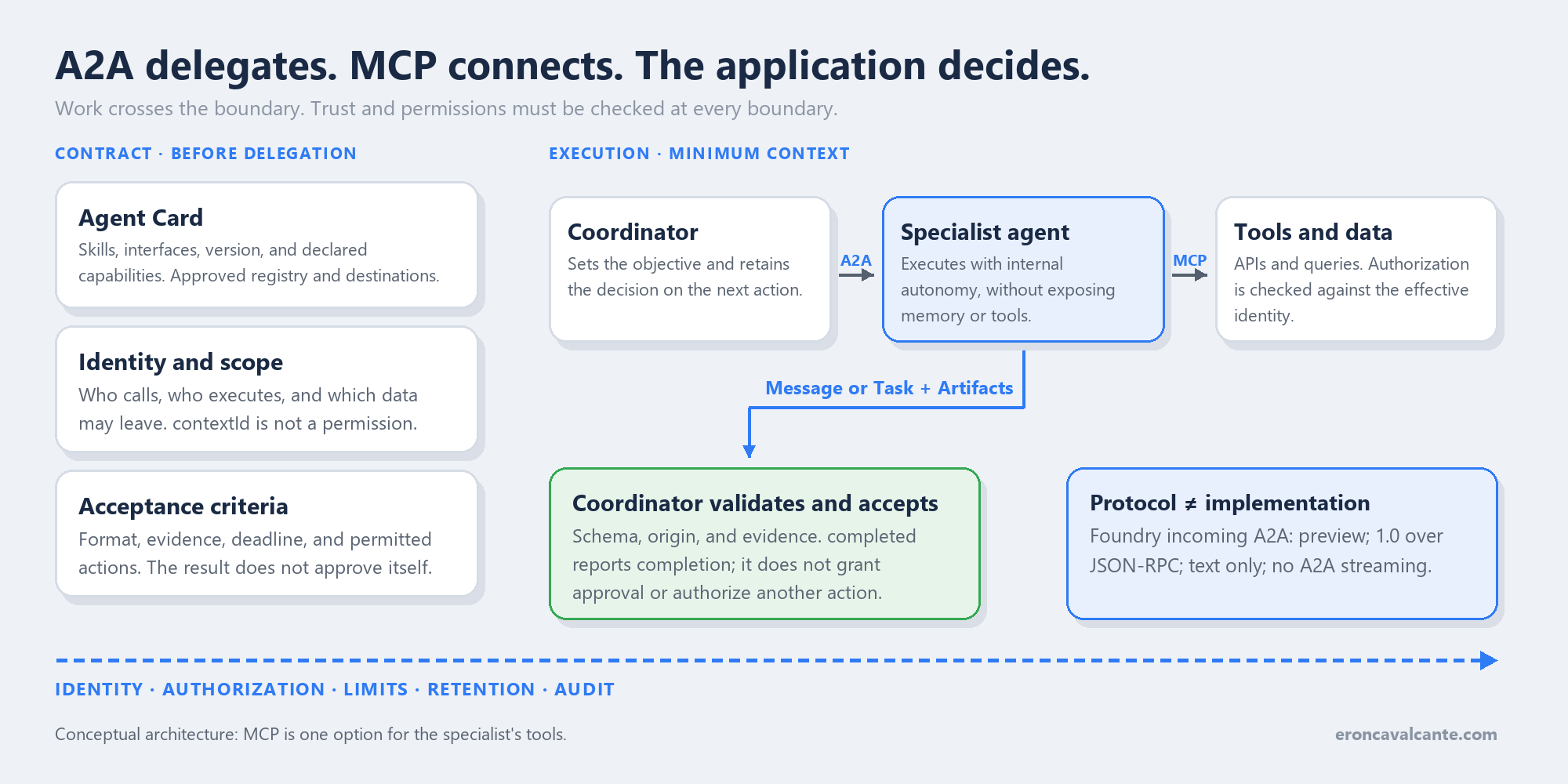
The conceptual architecture is broader than Foundry’s incoming endpoint:
Coordinator -- A2A --> Specialist -- MCP --> Tools
     ^                    |
     +-- result/state ----+
     |
validation + acceptance + decision on the next action
Deploy and test an A2A agent in Microsoft Foundry
This lab creates a managed prompt agent, not a Python container. The script configures the agent in Azure; Foundry hosts execution. It uses fictional data only, without financial tools. This is preview, and model calls incur consumption charges.
1. Prepare the project, model, and environment
In new Foundry, create a project and deploy a model through Discover → Models → Deploy. Check regional availability and quota. Copy the project endpoint and the deployment name, not just the catalog name.
Use Python 3.11+, Azure CLI, and Foundry User on the project to create the agent. Provisioning the project/model requires additional permissions; this role does not authorize RBAC assignments. In a lab directory, run:
az login
az account set --subscription "<subscription-id>"
python -m venv .venv
.\.venv\Scripts\python.exe -m pip install azure-ai-projects==2.3.0 azure-identity==1.25.3 a2a-sdk==1.0.2 httpx==0.28.1
$env:FOUNDRY_PROJECT_ENDPOINT = "https://<account>.services.ai.azure.com/api/projects/<project>"
$env:FOUNDRY_MODEL_NAME = "<deployment-name>"
$env:FOUNDRY_AGENT_NAME = "a2a-demo-billing"
2. Save the complete code
Save it as a2a_foundry.py. deploy creates a version and routes 100% of endpoint traffic to it; running it again creates another version. Use a dedicated lab name. call authenticates the Azure CLI user, checks the card, and sends an A2A 1.0 message without streaming.
"""Create a managed prompt agent or call its preview A2A 1.0 endpoint."""

import argparse
import asyncio
import os
import re
from urllib.parse import urlsplit

import httpx
from a2a.client import A2ACardResolver, ClientConfig, create_client
from a2a.helpers import new_text_message
from a2a.types.a2a_pb2 import Role, SendMessageRequest, TaskState
from azure.ai.projects import AIProjectClient
from azure.ai.projects.models import (
    A2AProtocolConfiguration,
    AgentCard,
    AgentCardSkill,
    AgentEndpointConfig,
    FixedRatioVersionSelectionRule,
    PromptAgentDefinition,
    ProtocolConfiguration,
    ResponsesProtocolConfiguration,
    VersionSelector,
)
from azure.identity import AzureCliCredential
from google.protobuf.json_format import MessageToJson


def settings():
    endpoint = os.environ["FOUNDRY_PROJECT_ENDPOINT"].rstrip("/")
    name = os.environ.get("FOUNDRY_AGENT_NAME", "a2a-demo-billing")
    url = urlsplit(endpoint)
    if (
        url.scheme != "https"
        or not (url.hostname or "").endswith(".services.ai.azure.com")
        or url.username or url.password or url.port not in (None, 443)
        or url.query or url.fragment
        or not re.fullmatch(r"/api/projects/[A-Za-z0-9_-]+", url.path)
    ):
        raise ValueError("Use the HTTPS project endpoint from public Azure Foundry.")
    if not re.fullmatch(r"a2a-demo-[a-z0-9-]+", name):
        raise ValueError("Use an isolated lab agent name starting with a2a-demo-.")
    return endpoint, name


def deploy(endpoint, name, model):
    if not model.strip():
        raise ValueError("FOUNDRY_MODEL_NAME must be a deployed model name.")
    with (
        AzureCliCredential() as credential,
        AIProjectClient(
            endpoint=endpoint,
            credential=credential,
            allow_preview=True,
            retry_total=0,
        ) as project,
    ):
        version = project.agents.create_version(
            agent_name=name,
            draft=False,
            definition=PromptAgentDefinition(
                model=model,
                instructions=(
                    "Explain fictional billing discrepancies and ask for missing "
                    "evidence. Do not claim to access accounts or issue refunds. "
                    "This demonstration has no tools or real customer data."
                ),
                tools=[],
            ),
        )
        print(f"Created agent version: {version.name}:{version.version}")
        agent = project.agents.update_details(
            agent_name=name,
            agent_endpoint=AgentEndpointConfig(
                version_selector=VersionSelector(
                    version_selection_rules=[
                        FixedRatioVersionSelectionRule(
                            agent_version=version.version,
                            traffic_percentage=100,
                        )
                    ]
                ),
                protocol_configuration=ProtocolConfiguration(
                    responses=ResponsesProtocolConfiguration(),
                    a2a=A2AProtocolConfiguration(),
                ),
            ),
            agent_card=AgentCard(
                version=version.version,
                description="Educational billing specialist; fictional data only.",
                skills=[
                    AgentCardSkill(
                        id="explain-billing",
                        name="Explain a fictional billing discrepancy",
                        description="Suggest checks; never execute financial actions.",
                    )
                ],
            ),
        )
        if agent.state != "enabled":
            raise RuntimeError(f"The agent endpoint is not enabled: {agent.state}")
        print(f"A2A base: {endpoint}/agents/{name}/endpoint/protocols/a2a")


def validate_card(card, base_url):
    expected = urlsplit(base_url)
    if not card.supported_interfaces:
        raise ValueError("The Agent Card has no supported interfaces.")
    for interface in card.supported_interfaces:
        target = urlsplit(interface.url)
        path = target.path.rstrip("/")
        if (
            interface.protocol_version != "1.0"
            or interface.protocol_binding != "JSONRPC"
            or target.scheme != expected.scheme
            or target.netloc != expected.netloc
            or not (path == expected.path or path.startswith(expected.path + "/"))
        ):
            raise ValueError("Unexpected Agent Card interface; no call was sent.")


async def call(endpoint, name):
    base_url = f"{endpoint}/agents/{name}/endpoint/protocols/a2a"
    with AzureCliCredential() as credential:
        token = credential.get_token("https://ai.azure.com/.default").token
        async with httpx.AsyncClient(
            headers={"Authorization": f"Bearer {token}", "A2A-Version": "1.0"},
            timeout=httpx.Timeout(120.0),
            follow_redirects=False,
        ) as http:
            card = await A2ACardResolver(
                httpx_client=http,
                base_url=base_url,
                agent_card_path="agentCard/v1.0",
            ).get_agent_card()
            validate_card(card, base_url)
            client = await create_client(
                agent=card,
                client_config=ClientConfig(
                    streaming=False,
                    httpx_client=http,
                    supported_protocol_bindings=["JSONRPC"],
                ),
            )
            try:
                request = SendMessageRequest(
                    message=new_text_message(
                        "Fictional example: an invoice rose from 100 to 120. "
                        "Which evidence should I check before drawing a conclusion?",
                        role=Role.ROLE_USER,
                    )
                )
                received = False
                async for event in client.send_message(request):
                    received = True
                    print(MessageToJson(event))
                    state = None
                    if event.HasField("task"):
                        state = event.task.status.state
                    elif event.HasField("status_update"):
                        state = event.status_update.status.state
                    if state in (
                        TaskState.TASK_STATE_FAILED,
                        TaskState.TASK_STATE_CANCELED,
                        TaskState.TASK_STATE_REJECTED,
                    ):
                        raise RuntimeError(f"A2A task ended: {TaskState.Name(state)}")
                if not received:
                    raise RuntimeError("The A2A endpoint returned no events.")
            finally:
                await client.close()


if __name__ == "__main__":
    parser = argparse.ArgumentParser()
    parser.add_argument("action", choices=("deploy", "call"))
    args = parser.parse_args()
    project_endpoint, agent_name = settings()
    if args.action == "deploy":
        deploy(project_endpoint, agent_name, os.environ["FOUNDRY_MODEL_NAME"])
    else:
        asyncio.run(call(project_endpoint, agent_name))
3. Deploy and expose the endpoint
.\.venv\Scripts\python.exe a2a_foundry.py deploy
The script enables responses and a2a, publishes the Agent Card, and prints the address. In the current agent model, there is no separate Agent Application to create. The selector chooses the served version; publishing to Teams/M365 is a different workflow.
The SDK requires allow_preview=True. The card’s version follows the agent version; the protocol is selected separately through agentCard/v1.0.
4. Authorize the consumer
The author with Foundry User can already test. For another consumer, an administrator authorized to assign RBAC runs the following. Use the project’s Resource ID and the user’s object ID, not an application’s client ID.
$projectId = "<project-ARM-resource-id>"
$callerId = "<consumer-user-object-id>"
az role assignment create `
  --assignee-object-id $callerId `
  --assignee-principal-type User `
  --role "eed3b665-ab3a-47b6-8f48-c9382fb1dad6" `
  --scope "$projectId/agents/$env:FOUNDRY_AGENT_NAME"
This is Foundry Agent Consumer, scoped to the lab agent. Assigning it does not remove broader permissions that already exist.
5. Call and interpret the response
With the correct consumer authenticated through az login, run:
.\.venv\Scripts\python.exe a2a_foundry.py call
The output is SDK JSON containing a Message or Task. A working task is not finished; retain its ID for tracking. The code stops on failure, cancellation, or rejection and does not print tokens.
401 indicates authentication; 403, target access; 404, an incorrect name/path or A2A not enabled. Also check RBAC propagation, deployment, and version. When finished, remove only the lab agent and unnecessary role assignments; preserve shared resources.
The example was exercised with real SDKs and simulated local transports, without provisioning or running workloads in an Azure subscription.
Production best practices
- Start with one necessary specialist, not an agent network. If a tool solves the problem, avoid another operational boundary.
- Test contract failures: revoked credentials, another user’s task, an out-of-schema response, and an interrupted connection.
- Bound delegation: deadline, total cost, number of agents called, and forwarding depth. Prevent cycles.
- Protect callbacks and file references, where supported. Validate destinations against SSRF and authenticate senders.
- Observe the entire unit of work: correlate context, task, call, and artifact; measure time to an accepted result, not just HTTP latency.
- Define retention and recovery. The server must document how long tasks and artifacts remain available. Do not indiscriminately log tokens or sensitive data.
These controls are implementation decisions supported by A2A’s enterprise guidance, not guarantees automatically delivered by the protocol.
What has to be in place
Foundation
Approved specialists, their owners, and the data they may access are defined. The effective identity is known at every integration.
It is in place when a valid credential without the required permission cannot read another user’s task.
Production with context
Objectives have boundaries; outputs have schemas and evidence; interruptions and requests for input are handled explicitly.
It is in place when a dropped connection does not accidentally trigger a second business action.
Scale and efficiency
Cost, deadlines, forwarding, and retention have limits. The accepted result, including rework, is the unit of measurement.
It is in place when a new delegation must justify its cost and can be stopped by policy.
The order is causal, not chronological.
Frequently asked questions (FAQ)
Do I need A2A for every multi-agent system?
No. Internal orchestration with components in the same runtime may be sufficient. A2A makes sense when you need an interoperable contract between independent agents.
Does A2A share agent memory?
It does not require that. The protocol supports collaboration with opaque execution. Send only the context needed and permitted for the task.
Can a completed task ask for more information?
It should not return to an active state. A terminal task stays terminal; further refinement starts another interaction, related through context.
Can I assume all A2A features are available in Foundry?
No. Check integration direction, version, transport, and capabilities. The documented incoming endpoint is in preview, accepts text, and does not offer A2A streaming.
Conclusion
A2A makes delegation understandable across systems; it does not make it trustworthy by decree. The card describes, identity authorizes, the task records, and the application accepts. MCP can keep connecting tools. When those responsibilities are explicit, connecting agents stops being message forwarding and becomes an operation someone can govern.
Official references
- A2A 1.0.0 specification
- A2A and MCP
- Discovery and Agent Cards
- Task lifecycle
- Tasks in MCP 2025-11-25
- A2A tool in Foundry
- Incoming A2A in Foundry
- A2A authentication in Foundry
- Create a project and deploy a model
- Foundry Python SDK
- Current agent publishing model
👉 If you are connecting agents — especially across teams, platforms, and data domains, treat delegation as a production boundary.
Want to discuss A2A, MCP, and agent governance? Reach out on LinkedIn.