The person who built the agent resigned. Offboarding runs on Sunday, disables the account, revokes the sessions — and on Monday the agent that reconciles payments stops working, because it ran on her credential. The opposite scenario is worse: it keeps working. Someone registered a generic application months ago, the secret is still valid, and there is not a single line in the directory saying who to ask. In neither case is the agent the problem. The problem is that nobody was ever required to declare, inside the directory, who answers for it.
Named accountability
What is Microsoft Entra Agent ID?
Microsoft Entra Agent ID reached general availability with identity constructs built for agents instead of borrowing the ones that exist for people and for applications. The documentation is blunt about why borrowing fails:
Microsoft Entra Agent ID exists because service principals lack the governance infrastructure AI agents need. There’s no enforced sponsorship, no agent-aware audit entries, and no blueprint-managed lifecycle.
Assigning a regular user account to the agent is the other familiar shortcut, and official guidance labels it not recommended: Conditional Access policies written for humans do not apply correctly, ID Protection detections are degraded, and governance processes can remove the agent’s access by mistake.
| Construct | What it is | Detail that changes the design |
|---|---|---|
| Agent identity | The identity an agent uses to authenticate and access resources | Has no credentials of its own |
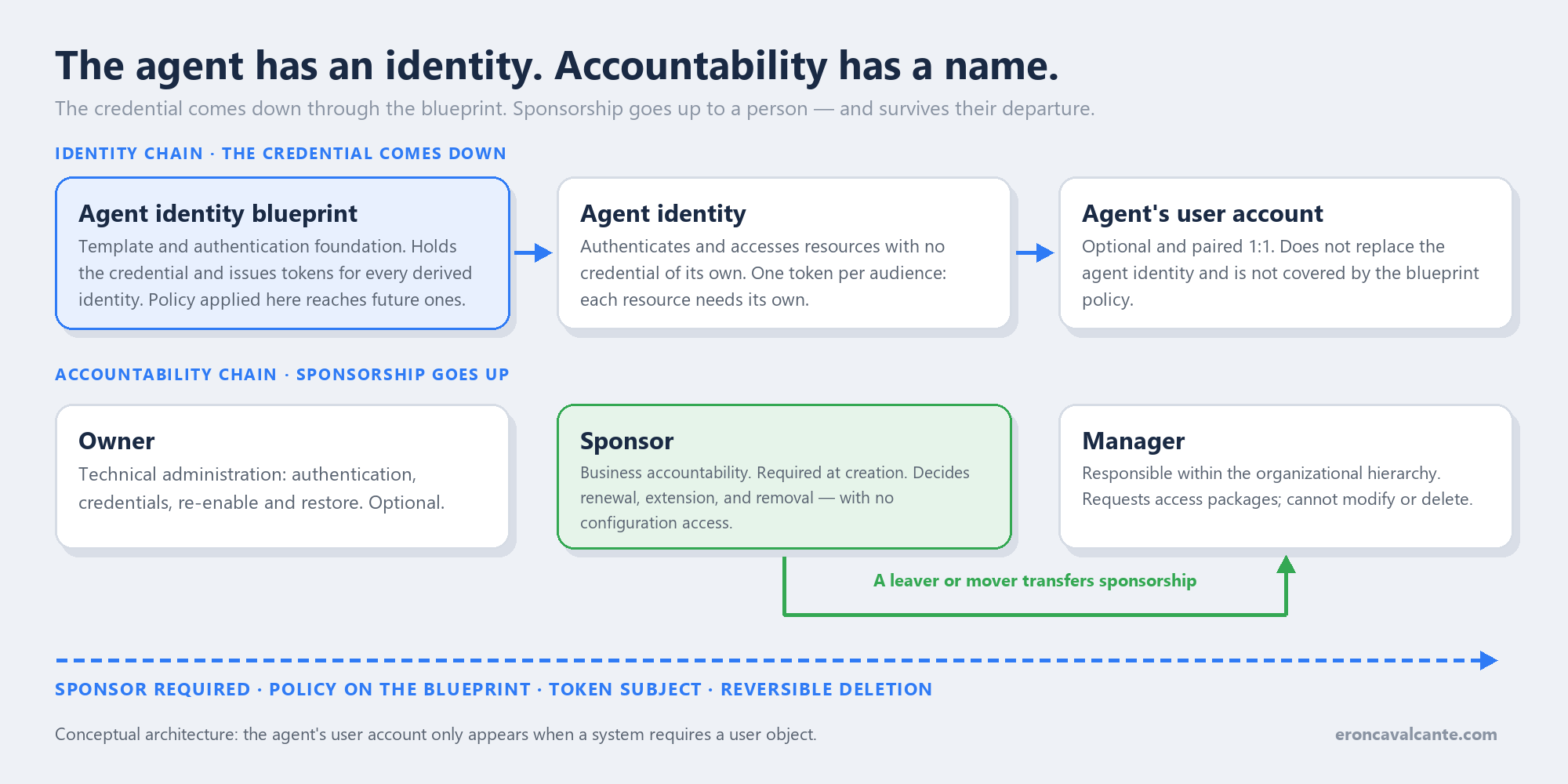
| Agent identity blueprint | Object in Microsoft Entra ID acting as template and authentication foundation | Holds the credential and issues tokens for every derived identity |
| Blueprint principal | Records the blueprint’s presence in a tenant | It is what lets the blueprint acquire tokens and appear in audit logs |
| Agent’s user account | Optional account paired 1:1 with an agent identity | Does not replace the agent identity; both coexist |
The problem it solves
The problem is not authentication; an application secret already did that. It is that the agent outlives whoever created it, changes behavior without changing code, and accumulates access without anyone having to justify it. When someone asks “do we still need this one?”, there is no field in the directory holding the answer — there is a conversation.
That is the gap the design closed. A sponsor is required at creation for agent identities and blueprints, and it is not a decorative label: it is the person or group who decides renewal, extension, and removal. Without a sponsor, the object is not born.
How it works — step by step
- Create the blueprint. It is the template and the authentication foundation. Configure the credentials and the policies that should apply to the whole class of agents there.
- Name the sponsor. It is a creation requirement. In delegated requests with no explicit sponsor, the caller automatically becomes one; in app-only requests, the creating service must provide one.
- Derive the agent identities. Each instance gets a distinct identity. A blueprint owner can create them with delegated permission —
AgentIdentity.Create.All,AgentIdentity.ReadWrite.All, orAgentIdentity.ReadWrite.ManagedBy— with no admin role. - Pick the authentication flow. An interactive agent acts on-behalf-of the user with delegated permissions; an autonomous agent uses its own identity through client credentials.
- Decide whether a user account fits. Only when the agent needs systems that require a user object — mailbox, calendar, Teams channel.
- Write the policy where the token points. Conditional Access is evaluated whenever a token is issued or refreshed, and it targets that token’s subject.
Blueprint and identity: where the credential lives
This separation is the most important technical point and the least intuitive. The agent identity has no credential. What holds the secret or certificate is the blueprint, and it is the blueprint that acquires tokens on behalf of every derived identity. Rotating a credential stops being a hunt for secrets scattered across pipelines and becomes an operation on one object.
The side effect is a good one: a policy applied to the blueprint reaches every derived identity, including ones that do not exist yet. Scaling from ten to three hundred agents does not multiply the policy surface.
blueprint  ──holds credential──►  token
    │
    ├── agent identity A ──► resource 1 (one audience)
    ├── agent identity B ──► resource 2 (another audience)
    └── agent identity C ──► agent's user account (optional, 1:1)
Each token has exactly one subject and one audience. An agent that talks to three resources requests three tokens, each with its own permissions — and each request goes through Conditional Access.
In Foundry, the identity comes provisioned
Nobody registers anything by hand to build an agent in Microsoft Foundry. When you create the first agent in a project, Foundry provisions a default blueprint and a default identity on its own, and that blueprint’s credential is federated with the project’s managed identity — there is no stored secret to rotate later. It is the best version of what the previous section described.
The detail that bites comes next: while it is unpublished, the agent shares the project identity with every other agent in development. The documentation calls this a broader blast radius, and it is literal — in the directory, five agents under construction are a single subject. You cannot apply policy to one, audit another, and say which of them touched storage.
Publishing fixes that and breaks something at the same time. A published agent gets its own blueprint and identity, with a new agentIdentityId, and the RBAC assignments do not carry over. The agent that worked in development starts getting denied in production, with an error that does not look like permissions: it looks like a broken agent.
| Stage | Identity used | What to redo |
|---|---|---|
| Unpublished | Shared project identity | Nothing — but nobody can tell one agent from another |
| Published | Its own, new agentIdentityId |
Reassign the RBAC roles on every target resource |
Two constraints close the picture. Agent identity authentication currently covers MCP and A2A; other tools still run on keys or OAuth passthrough, and that is checked in each tool’s documentation. And the token audience has to be the downstream service, not the MCP server URL — the wrong audience fails even with correct RBAC.
The inventory is what stitches it together: in the Entra admin center, under Agent ID > All agent identities, Foundry agents, Copilot Studio agents, and the rest of the tenant show up in the same place where Conditional Access, identity protection, and governance are applied. Foundry provisions; Entra governs.
Configuring it in practice
The first step has no command: the agentIdentityId is read in the Azure portal, under Overview > JSON View — on the project resource while the agent is unpublished, and on the agent application resource once it is published. It is the same identifier that goes into everything below.
With it in hand, the identity gets a role on the target resource like any other service principal:
az role assignment create \
  --assignee "<agentIdentityId>" \
  --role "Storage Blob Data Contributor" \
  --scope "/subscriptions/<id>/resourceGroups/<rg>/providers/Microsoft.Storage/storageAccounts/<account>"
The connection is where the audience comes in — and where designs usually fail:
PROJECT_ENDPOINT="https://<account>.services.ai.azure.com/api/projects/<project>"
azd ai project set "$PROJECT_ENDPOINT"

azd ai connection create my-mcp-connection \
  --kind remote-tool \
  --target https://<mcp-server-endpoint> \
  --auth-type agentic-identity \
  --audience "<entra-audience>"
--auth-type agentic-identity authenticates with the agent identity; project-managed-identity uses the project’s, for when every agent should share the same level of access. The audience is the identifier of the downstream service — https://storage.azure.com for Storage, for instance — never the MCP server URL. The wrong audience returns a valid token that the destination refuses, and the error does not look like a permission problem.
After publishing, the agentIdentityId is a different one. Run the check with the new identifier before blaming the agent’s code:
az role assignment list --assignee "<agentIdentityId>" --scope "<resource>" --output table
An empty list is the signature of the trap: the agent was published and the roles stayed on the shared project identity.
Owner, sponsor, and manager
The administrative model separates technical administration from business accountability, and the separation is deliberate: the sponsor decides about the agent without gaining the power to configure it.
| Role | Required | Can | Cannot |
|---|---|---|---|
| Owner | No | Edit authentication, manage credentials, add owners and sponsors, re-enable and restore | — |
| Sponsor | Yes, at creation | Disable, change sponsors, soft-delete, request access packages | Change configuration, re-enable, restore |
| Manager | No | Request access packages for the agent’s user account | Modify or delete the agent |
Two limits show up early in a large tenant: identity, blueprint, and principal accept up to 100 sponsors, with no more than five groups; the agent’s user account accepts five. And not every group qualifies — dynamic membership groups (security or Microsoft 365) and Microsoft 365 assigned membership groups are allowed; role-assignable groups and assigned membership security groups are not.
One product decision deserves attention: holding an Agent ID admin role does not make you a sponsor automatically. The official rationale is avoiding overburdening administrators with direct responsibility for individual agents. Accountability does not scale by job title.
When the sponsor leaves the company
This is where the title of this article meets its answer. Microsoft Entra ID Governance shipped three Lifecycle Workflows tasks for the sponsorship lifecycle:
- Send email to manager about sponsorship changes
- Send email to cosponsors about sponsor changes
- Transfer agent identity sponsorships to manager
All three are mover and leaver tasks and appear only under templates of those categories. They are not a dashboard alert: they are the same machinery that already moves and offboards people, now aware that there is an agent on the other side of the relationship. The stated goal is preventing orphaned agents.
sponsor changes teams or leaves
        │
        ├── notify manager and cosponsors
        └── transfer sponsorship to the manager
                 └── agent continues with a named business owner
Check the licensing before designing on top of this: governing agent identities requires Microsoft 365 E7 (which includes Agent 365 and Microsoft Entra Suite) or a Microsoft Agent 365 license paired with at least Microsoft Entra ID P1 or Microsoft 365 E3.
The token subject decides the policy
This is the part that breaks designs that look correct. A Conditional Access policy does not target “the agent”. It targets the subject of the token being issued — and the subject changes with the access pattern.
| Access pattern | Token subject | Where the policy targets |
|---|---|---|
| On behalf of a user (OBO) | The signed-in user | Users and groups, not agent identities |
| As an application (client credentials) | The agent identity | The agent identity or the blueprint |
| As a user (agent’s account) | The agent’s user account | The user account, not the agent identity |
Two practical consequences. First: if your agent serves users through OBO and you wrote the policy targeting agent identities, it is not being evaluated where you think. Second: targeting the blueprint covers every derived identity, present and future, but it does not cover the agents’ user accounts — those need their own policy.
There are ready templates for the common scenarios: autonomous agent, agent on behalf of a user, and blocking high-risk agent identities. Conditional Access for agents requires Microsoft Entra ID P1 or P2 plus a Microsoft Agent 365 license per user, with licensing enforcement still to come; network controls depend on Microsoft Entra Internet Access.
What is already running does not have to start over
None of this forces a fleet rewrite. There are documented paths to migrate custom app registrations and Copilot Studio agents; outside the Microsoft ecosystem, the patterns for non-Microsoft agents cover sidecar and federation, with guides for AWS, GCP, and n8n. On the code side, the Auth SDK sidecar is a companion container that handles token acquisition, validation, and downstream calls — identity logic leaves the agent. Deletion has cascade cleanup and soft-delete, which matters when someone disables the wrong agent on a Friday.
Two notes on direction: registry experiences are converging on Microsoft Agent 365 as the single place for discovery, with Entra remaining the identity foundation; and the portal wizard for creating blueprints is still in preview — build through API or infrastructure as code whatever has to be reproducible.
Production best practices
- One blueprint per class of agent, not per agent. The blueprint is where policy lands; one per instance dismantles the advantage.
- Prefer a group over a person as sponsor on critical agents. A dynamic group survives a departure; a personal name does not.
- Only create an agent’s user account when a system requires a user object. It doubles the surface: mailbox, license, and a separate Conditional Access policy.
- Write the policy from the flow, not from the org chart. Find out first who the token subject is on each call.
- Test the departure before it happens: simulate the sponsor’s offboarding and confirm the agent still has a named owner.
- Treat the network as an independent layer. Strong identity does not replace private endpoint isolation; the two add up.
What has to be in place
Foundation
Every agent in production has its own identity — neither a generic service principal nor a person’s account. The sponsor is filled in and the required licensing is contracted.
It is in place when an agent inventory answers “who is accountable for this one?” without opening a conversation.
Production with context
The token subject is known for each access pattern, and the Conditional Access policy targets where it sits. Agents’ user accounts have their own policy.
It is in place when offboarding the sponsor triggers a sponsorship transfer, not a service outage.
Scale and efficiency
Policies live on the blueprint and reach future identities. Access is granted through access packages with justification, and deletion is reversible inside the soft-delete window.
It is in place when adding the three-hundredth agent adds no new policy.
The order is causal, not chronological.
Frequently asked questions (FAQ)
Do I have to migrate every agent at once?
No. There are specific guides for custom app registrations and for Copilot Studio agents. Start with the ones that touch sensitive data or run unsupervised — those are the most expensive to leave orphaned.
Does the agent identity hold a secret?
No. It authenticates with tokens issued by the blueprint, which holds the credential. That is why rotation and revocation are operations on the blueprint.
Does a blueprint policy cover everything?
It covers every agent identity derived from it, including future ones. It does not cover the agents’ user accounts, which require their own policy.
Can any group be a sponsor?
No. Dynamic membership groups, security or Microsoft 365, and Microsoft 365 assigned membership groups qualify. Role-assignable groups and assigned membership security groups are not accepted.
Conclusion
An agent in production is a worker with no badge and no boss until someone decides otherwise. Microsoft Entra Agent ID turned that decision into a required field: the blueprint holds the credential, the agent identity carries the context, the sponsor answers for the purpose, and the workflow guarantees the answer still exists after the person leaves. It is less glamorous than the conversation about model capability, and it is what separates a pilot from an auditable operation. When I wrote about delegation between agents, the conclusion was that identity has to cross every boundary. Now it has somewhere to live.
Official references
- What is Microsoft Entra Agent ID
- What’s new in Microsoft Entra Agent ID
- Fundamental concepts
- Administrative relationships: owners, sponsors, and managers
- Agent identities, service principals, and applications
- Plan your agent identity architecture
- Agent ID best practices
- Agent identity design patterns
- Sponsor tasks in Lifecycle Workflows
- Governing agent identities
- Access packages for agent identities
- Conditional Access for agents
- How to target agent identities in Conditional Access
- Agent OAuth flows: on-behalf-of
- Agent OAuth flows: autonomous apps
- Agent identity concepts in Microsoft Foundry
- Authenticate MCP servers in Microsoft Foundry
👉 If you already run agents in production — especially the ones that operate without human supervision, start by asking who answers for each of them.
Want to talk about agent identity, Conditional Access, and governance? Reach me on LinkedIn.