The incident I see most often in data pipelines with CI/CD does not happen during the deploy. The pull request was reviewed, the tests ran, and bundle deploy went green in staging and then in production. Weeks later, an incompatible change to bronze — the streaming table that reads from a Kafka topic with 24 hours of retention — requires a full refresh, and someone runs it. The table is truncated, the checkpoints are removed and the stream starts over from the beginning; for Kafka, the beginning is yesterday. The deploy shipped the right code; the history that only lived in the table did not come back. In the retrospective, nobody argues about the YAML. The question is what else lives only in production.
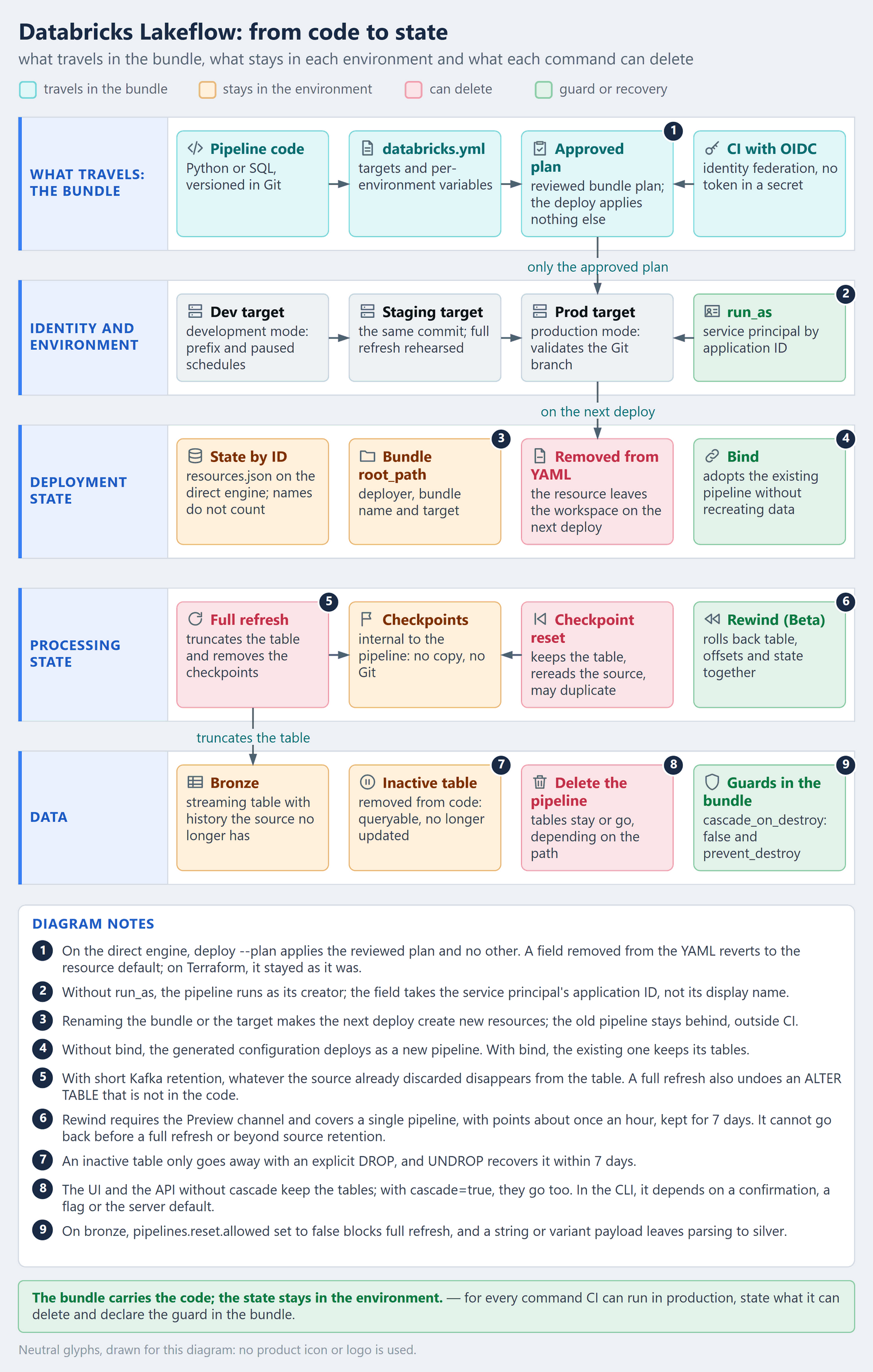
From code to state Databricks Lakeflow, together with Declarative Automation Bundles (the new name of Databricks Asset Bundles), handles the half of data CI/CD that looks like software: the pipeline becomes code, the code goes through review and the same commit reaches dev, staging and production. The other half does not travel. The record of what each deploy created, the checkpoints of each flow, the tables and the identity that runs the pipeline belong to the environment: code travels and state stays. The rule fits in one line — the bundle carries the code; the state stays in the environment — and this article is about what it implies: the four states the bundle does not carry, what each CI command can delete and the guards you declare before the first production deploy.
What is pipeline as code in Databricks Lakeflow?
The name changed twice in a short time, and that gets in the way even of search. The product formerly known as Delta Live Tables is now Lakeflow pipelines, and the migration page leaves no doubt: “there is no migration required to use Lakeflow pipelines: your code will still work”. Lakeflow pipelines extend and are interoperable with Apache Spark Declarative Pipelines, the open declarative framework in Spark, with compatibility beginning in Apache Spark 4.1. In Python, import dlt gives way to from pyspark import pipelines as dp; the old names still work, but the recommendation is to move to the new ones. And DLT has not fully disappeared: the classic SKUs on the invoice still begin with DLT.
Packaging changed its name too: Declarative Automation Bundles used to be called Databricks Asset Bundles. The documentation defines them as “an infrastructure-as-code (IaC) approach” and as “a feature of the Databricks CLI”: you describe jobs, pipelines and other resources in YAML, next to the code, and the CLI deploys everything to the workspace of each environment. The source-controlled pipeline page draws the line clearly: “A bundle is not a separate extract, transform, load (ETL) framework or an alternative to Lakeflow pipelines. It is a packaging and deployment format”. Lakeflow says what the pipeline does; the bundle says how it ships.
The skeleton comes ready. databricks pipelines init generates a databricks.yml at the root, with the bundle name and the targets; the pipeline definition under resources/; a sample job; and the transformations under src/, in a transformations folder. Each target — dev, staging, prod — points to a workspace, a deployment mode and the values that change from one environment to the next.
The deployment engine changed as well. Bundles created with CLI 1.3.0 and above use the direct engine by default, instead of Terraform, and starting with CLI 1.14.0, bundles still on Terraform “are automatically migrated to the direct engine after a deploy whose dry-run conversion comes back clean”. You can opt out with bundle.engine: terraform, but the recommendation is to migrate, because the Terraform engine “will soon be disabled”. Along the way, the deployment state file changes format — from terraform.tfstate to resources.json — and that matters again later.
The problem it solves
Application CI/CD rests on an assumption that data does not meet: that the environment can be rebuilt from the repository. A stateless API comes back up from its image; a streaming pipeline does not. The Lakeflow production readiness checklist asks for what you expect from software engineering — the pipeline “defined and deployed through a bundle, not hand-clicked into existence in the UI” and “at least a dev and a prod target (ideally dev, staging, and prod)” — and the bundle delivers that. What it does not deliver is whatever was never in Git.
There are four states, and each environment has its own:
- Deployment state — the record, by ID, of which resources that bundle created in that workspace.
- Processing state — the checkpoints of each streaming flow, which say how far the source has been read.
- Data — the streaming tables and materialized views, with history the source may no longer have.
- Identity and environment — who runs the pipeline, which catalogs and permissions exist, which runtime channel is in use and how long the source retains data.
In the medallion architecture, bronze is the layer that keeps the raw history the source no longer keeps — and that is where the problem hurts. What Git does not keep, the deploy does not restore.
How it works — step by step
- Start from the bundle, not the UI.
databricks pipelines initcreates the project from scratch. For a pipeline that already exists,databricks bundle generate pipelinegenerates the configuration anddatabricks bundle deployment bindties the bundle resource to the existing pipeline. Without the bind, deploying the generated configuration “creates a new resource rather than updating the existing one”. - Parameterize what changes per environment. The catalog and the Kafka address come in as bundle variables and reach the code through the pipeline
configuration. The bundle conversion page is precise: “Pipeline parameters apply to SQL source code only.” In Python, the value comes fromconfigurationand is read withspark.conf.get(). - Develop in the dev target, in development mode. The mode prefixes resources with
[dev <user>], marks pipelines asdevelopment: true, pauses schedules and triggers and disables the deployment lock. The prefix separates each developer’s resources; the tables go to whatever catalog and schema the target declares. - Plan before you apply.
databricks bundle plan“displays the actions which will be performed on resources that would be deployed, without making any changes”, and with-o jsonthe plan becomes a CI artifact. On the direct engine,databricks bundle deploy --plan plan.jsonapplies that plan and no other: these are the “replayable plans”, ensuring “that only approved actions reach production”. - Promote to prod in production mode. Production mode validates that pipelines are marked
development: falseand, if the target declares a Git branch, that the deploy comes from it. The pipeline runs as a service principal, declared inrun_asby application ID. CI authenticates through workload identity federation (OIDC): in the GitHub Actions example,DATABRICKS_AUTH_TYPE: github-oidcplus a federation policy on the service principal, with no access token stored as a secret. The conversion page also asks for a human gate: “Gate the production deploy behind a manual approval (for example, a second job that requires a GitHub Environment approval, or a separate stage in Azure DevOps) so a person explicitly approves each promotion.” - Run production from a job or the API. Updates “started from Jobs or the Pipelines API” use automatic retry and restart. The UI Run now, for non-continuous pipelines, uses the debugging behavior, which “Disables pipeline retries so you can immediately detect and fix errors.” The button is for development; production runs on the scheduler.
The four states the bundle does not carry
Each state has a command that changes it and a question the production review has to answer before the first deploy.
1. Deployment state: the bundle only knows what it created
The bundle tracks what it created by ID, in state stored in the workspace file system: “Resource names are not used to correlate between a bundle deployment and a resource instance”. Three consequences follow. First, a resource that leaves the configuration leaves the workspace — “If a resource is removed from the bundle configuration, it is removed from the target workspace if it was previously deployed.” Second, the identity of a deployment is the bundle root_path, which defaults to ~/.bundle/${bundle.name}/${bundle.target} and combines the deployer, the bundle name and the target; do not confuse it with the root_path of the pipeline resource, which points to the code folder. Third, the association with a resource “can only be forgotten if you change the bundle name, the bundle target, or the workspace”. Renaming the bundle or the target makes the next deploy create new resources, and the old pipeline stays in the workspace, outside CI control.
To bring an existing pipeline into the bundle, the path is bind, and the page guarantees what matters: “Bind does not recreate data” — the pipeline keeps its tables, with nothing to recompute. The direct engine changes two things here. The state moves from terraform.tfstate to resources.json, and the engine “only records local configuration in its state file”. And a field removed from the YAML changes meaning: on Terraform, “removing a set field from your databricks.yml leaves the corresponding value unchanged in the platform”; on the direct engine, the removal “reverts the value to the resource’s default”. The rule on the page holds for any engine: “To persist a value, set it explicitly in your configuration rather than relying on the previously deployed value.”
2. Processing state: the checkpoint is not yours
Each flow that writes to a streaming table has a checkpoint, and the recovery page is direct: “These checkpoint locations are internal to the pipeline and are not accessible to the users.” You do not copy a checkpoint from staging to production, and you do not keep checkpoints in Git. What you control is when one gets removed.
A full refresh “truncates the streaming table, removes all checkpoint data, and restarts the streaming process with new checkpoints for every flow writing to the table.” And it is not a rare event. The page lists what requires one: renaming a column without column mapping, narrowing a type (from BIGINT to INT), moving from legacy partitioning to clustering, changing the source table, source type or topic, recreating the source Delta table, touching aggregation keys and functions, joins or deduplication — and when “CDC logs have become unavailable due to retention expiration”. A good share of bronze and silver refactoring falls on that list.
| Operation | Table | Checkpoint | With a short-retention source |
|---|---|---|---|
| Full refresh | truncated and reprocessed | removed | whatever the source already discarded disappears from the table |
| Checkpoint reset | kept | removed for the selected flows | rereads the source and can write duplicates |
| Rewind (Beta) | back to an earlier version | rolled back with it, with offsets and state | fails if the source already discarded the data |
The first row is the opening incident, and the updates page describes it without euphemism: “Records no longer present in the Kafka source are dropped from the target table.” The full refresh page generalizes — “A full refresh does not reprocess data unless your source retains the full historical dataset” — and offers a checkpoint reset as an alternative, with a warning: “this may lead to duplicate data being written to the target table.”
Rewind, in Beta, changes the conversation about rolling back data. It “restores table versions, streaming source offsets, and operator state together, so replay does not skip records or write duplicates.” The pipeline creates rewind points “about once an hour” and keeps them for 7 days. The limits, though, are architectural: it requires the Preview channel and the pipelines.rewind.betaEnabled configuration; it “cannot restore a pipeline to a point before a full refresh”; it covers a single pipeline, without coordinating other pipelines or external readers; it does not restore code, configuration, tags or Unity Catalog grants; and it fails if the source did not keep the data — the page gives the example of “a Kafka topic that keeps one day”. It does not start anything on its own either: “Rewind does not start the pipeline”.
For schema changes, ALTER TABLE on streaming tables, also in Beta, offers “metadata-only” operations: no full refresh, no checkpoint reset and no re-ingestion. But the change lives in the environment, not in the code — “A full refresh regenerates the streaming table from the pipeline source code, so column changes made with ALTER TABLE are not preserved.” If the change is not repeated in the code, the next full refresh undoes it.
3. Data: removing it from code does not delete it, and deleting depends on the path
Removing a table definition from the pipeline does not delete the table. On the Unity Catalog page, “Tables can become inactive if their definition is removed from a pipeline”, and “You can still query inactive tables, but the pipeline no longer updates them. To clean up materialized views or streaming tables, explicitly DROP the table.” A mistaken DROP can be undone: “You can recover dropped tables within 7 days by using the UNDROP command.” If you prefer the legacy behavior, set pipelines.dropInactiveTables to true: the inactive entry leaves Unity Catalog on the next update, and the data only comes back, within 7 days, if the definition returns to the pipeline. Changing the default catalog or schema without fully qualified names has a similar effect: the table is created in the new location, and the old one becomes inactive.
Deleting the pipeline is a different conversation. In the default publishing mode — pipelines created before February 5, 2025 may be in the legacy mode — the tables are retained by default and can be queried, but not updated until they move into an active pipeline. The outcome depends on the path:
| Path | What happens to the tables |
|---|---|
| Delete in the UI | kept, by default |
API without cascade |
kept, by default |
API with cascade=true |
deleted with the pipeline |
databricks pipelines destroy |
the tutorial asks for confirmation to delete the tables and views the pipeline manages |
bundle destroy without cascade_on_destroy |
the server default applies, and the page does not state it |
| Pipeline removed from the YAML | the pipeline goes away on the next deploy; the page does not say what happens to the tables |
The two paths that are safe by default, with the rule written down, are the UI and the API without cascade. The CLI paths depend on a confirmation, a flag or a default the page does not state. That is why the guard goes into the bundle: cascade_on_destroy set to false, which the reference describes as the way to “retain the datasets on destroy”, available on the direct engine from CLI 1.12.0.
Moving a table between pipelines is also a state operation. With ALTER STREAMING TABLE … SET TBLPROPERTIES("pipelines.pipelineId"="<id>"), a streaming table moves to another pipeline without a full refresh — on Databricks Runtime 16.3 or above, and 17.2 to move across workspaces. The page requires whoever runs the command to be the run-as user of both pipelines and the owner of both, the destination to use the default publishing mode and the command to run from the workspace of the source pipeline.
And what I wrote about federation or ingestion applies: when you decide to ingest, you become the owner of state that used to belong to the source. The bronze streaming table is that state.
4. Identity and environment: the same YAML in another world
run_as exists to “separate the identity used to deploy a bundle job or pipeline from the one used by the job or pipeline workflow to run”. Without it, “the pipeline runs as the user who created the pipeline”, and production comes to depend on one person’s account. The bundle conversion page gives the reason to change it: “so runs don’t break when someone leaves the team or changes roles”.
Three details only show up on the first production deploy. If the identity that deploys differs from the one declared in run_as, “only jobs and pipelines are supported” in the bundle. service_principal_name takes the application ID of the service principal, not its display name. And the page warns that non-admins can only set run_as to their own email.
Outside the YAML, the environment carries the rest: Unity Catalog catalogs and grants, the service principal and the CI federation policy, the Kafka topic retention, the runtime channel. Staging with seven days of retention and production with one day make the same full refresh end in two different ways. The same command has different consequences in each environment, because the state is different.
Guards declared in the bundle
The way out is not to ban full refreshes. It is to declare in the bundle what each environment allows, and the rule I bring to review fits in one sentence: declare what destroy deletes — and, with it, what full refresh and reset can delete. An orders bundle that reads from Kafka, with the guards on the production target:
# databricks.yml
bundle:
  name: pedidos

variables:
  catalog:
    description: Catalog for this environment
  kafka_servers:
    description: Kafka servers for this environment

resources:
  pipelines:
    pedidos_pipeline:
      name: pedidos-pipeline
      catalog: ${var.catalog}
      schema: pedidos
      serverless: true
      root_path: src/pedidos_pipeline
      libraries:
        - glob:
            include: src/pedidos_pipeline/transformations/**
      configuration:
        kafka_servers: ${var.kafka_servers}

targets:
  dev:
    mode: development
    default: true
    variables:
      catalog: dev
      kafka_servers: kafka-dev.example.internal:9093

  prod:
    mode: production
    variables:
      catalog: prod
      kafka_servers: kafka-prod.example.internal:9093
    run_as:
      service_principal_name: <application-id>
    resources:
      pipelines:
        pedidos_pipeline:
          cascade_on_destroy: false  # CLI 1.12.0+, direct engine
          lifecycle:
            prevent_destroy: true    # CLI 0.268.0+
from pyspark import pipelines as dp


@dp.table(
    comment="Orders bronze: Kafka payload as a string, parsed in silver",
    table_properties={"pipelines.reset.allowed": "false"},
)
def pedidos_bronze():
    # Kafka authentication options omitted
    return (
        spark.readStream.format("kafka")
        .option("kafka.bootstrap.servers", spark.conf.get("kafka_servers"))
        .option("subscribe", "pedidos")
        .load()
        .selectExpr("CAST(key AS STRING) AS key", "CAST(value AS STRING) AS value", "timestamp")
    )
Two decisions live in these files. The flexible bronze follows the full refresh page, which, for short-retention sources, says to stream raw data into a streaming table and “Use flexible column types (variant or string, for example)”: parsing happens in silver, and changing silver does not force a rebuild of bronze. And pipelines.reset.allowed “Controls whether a full refresh is allowed for this table”: set to false, full refresh is no longer allowed for bronze.
# existing pipeline: generate the configuration and bind before the first deploy
databricks bundle generate pipeline --existing-pipeline-id <pipeline-id>
databricks bundle deployment bind pedidos_pipeline <pipeline-id> --target prod

# production routine: validate, plan, review and apply only the approved plan
databricks bundle validate --target prod
databricks bundle plan --target prod -o json > plan.json
databricks bundle deploy --target prod --plan plan.json --fail-on-active-runs
A few flags deserve attention in the CI review. --fail-on-active-runs makes the deploy “Fail if there are running jobs or pipelines in the deployment.” --force exists to “Force-override Git branch validation” and has no place in production. --force-lock “should only be used if the previous deployment crashed or was interrupted and left a stale lock file.” And bundle destroy, which “permanently deletes a bundle’s previously-deployed jobs, pipelines, and artifacts”, runs into prevent_destroy: “You can use the lifecycle setting to prevent specific resources from being destroyed.”
Where the documentation needs a careful read
| What the page says | Where | How to read it |
|---|---|---|
| deleting the pipeline keeps the tables | Unity Catalog in pipelines | true for the UI and the API without cascade; the bundles tutorial warns that pipelines destroy deletes the tables and views the pipeline manages |
cascade_on_destroy left unset uses the server default |
bundle resources | the page does not say what the default is, and the field requires the direct engine; declare false |
| the rename is non-breaking | bundles FAQ | it refers to the bundles rename; the DLT rename has its own effects, such as the new import and the classic SKUs that still carry DLT in the name |
storage holds checkpoints and tables |
bundle resources | the properties reference marks the field as legacy; with Unity Catalog, checkpoints are internal |
| rewind requires the Preview channel | rewind | once rewind is on, the pipeline only returns to the Current channel when Current gets a runtime that supports rewind |
ALTER TABLE is metadata-only |
schema evolution | the change does not survive a full refresh unless it is in the code |
run_as example deploying to /Shared |
run-as | the FAQ asks for production deploys as a service principal, to a team-owned path, outside /Workspace/Shared |
None of these gaps blocks the design, but each one becomes a question in the production review. Write down the page and the date you read it: the rewind page is dated 29/09/2026, and the Unity Catalog in pipelines page was updated on 30/09/2026.
Production best practices
- Declare
cascade_on_destroy: falseandprevent_destroyon the production target. The server default is not written down; your guard is. - Protect bronze. A flexible payload, as string or variant, and
pipelines.reset.allowedset tofalseon tables whose source does not retain history. - Do not rename the bundle or the target without a bind plan. The association with the resources is lost, and the old pipeline is orphaned.
- Bring existing pipelines in with generate and bind. Generate alone creates a new resource on deploy.
- Run production as a service principal, deployed to a team-owned path. No production pipeline on one person’s account, and no deploys to
/Workspace/Shared. - Apply only the approved plan.
bundle planbecomes an artifact, a person approves it, and the prod deploy uses--plan. - Use fully qualified names so the table is not created somewhere else when the default catalog or schema changes.
- Rehearse full refresh and checkpoint recovery in staging. The full refresh page asks for it: “Test the operation in a development or staging environment.”
- Guarantee retention at the source. “Ensure the source system retains enough historical data to replay the stream.” Kafka retention is an architecture decision, not an infrastructure detail.
- Record what is not in Git, per environment: source retention, runtime channel, grants, service principal and federation policy.
- Run production from the job or the API, with automatic retry; the UI Run now is for development.
- Migrate to the direct engine while rereading removed fields. On direct, a removed field goes back to the resource default.
What has to be in place
The order below is causal, not chronological: each stage exists because the previous one is in place.
Foundation — code has a single path. The pipeline is created and changed through the bundle; dev, staging and prod are targets of the same repository; CI authenticates with OIDC and applies only approved plans; production runs as a service principal.
It is in place when nobody changes the production pipeline without a commit, and every prod deploy points to a commit and an approved plan.
Production with context — state has an owner. Every production streaming table has its source and retention documented; cascade_on_destroy, prevent_destroy and pipelines.reset.allowed are declared where they matter; full refresh and checkpoint recovery have been rehearsed in staging.
It is in place when, for every production streaming table, someone can say in a minute where it comes back from and how much history is lost.
Scale and efficiency — guards are born in the template. The team template already carries the guards, the service principal and the deploy path; the direct engine is the default; rewind goes into the runbook when it leaves Beta.
It is in place when a new pipeline reaches production with the guards declared without anyone remembering them in review.
Skipping a stage does not speed anything up: without a single path for code, state changes outside CI; without an owner for state, scaling means multiplying tables nobody knows how to restore.
Frequently asked questions (FAQ)
Is Lakeflow a new product that requires a migration?
No. It is the new name of Delta Live Tables, and the page is direct: “there is no migration required”. The code keeps working; the old Python API names are still accepted, but the documentation recommends the new ones, such as from pyspark import pipelines as dp.
Do I need to leave Terraform?
New bundles already start on the direct engine since CLI 1.3.0, and starting with 1.14.0 bundles on Terraform migrate on their own after a deploy with a clean conversion. You can stay with bundle.engine: terraform, but the page warns that it “will soon be disabled”. Plan the migration and reread the fields you removed from the YAML.
Does the bundle carry the checkpoints?
No. Checkpoints are internal to the pipeline and stay in the environment. The deploy does not trigger a full refresh either: “Full refreshes must be triggered explicitly.” The risk lies with whoever runs the command — and with which flag.
Does deleting the pipeline delete the tables?
It depends on the path. In the UI, no, by default. Through the API, only with cascade=true. Through bundle destroy, it depends on cascade_on_destroy — and, with no value declared, a default the page does not state applies. Declare false in production.
Is there a rollback?
For code, yes: revert the commit and deploy again. For data, rewind, in Beta, rolls back tables, offsets and state together, up to 7 days, but not before a full refresh and not beyond the source retention. The two rollbacks are independent: rewind does not restore code, and the deploy does not restore data.
Can I move a table between pipelines without a full refresh?
Yes, with pipelines.pipelineId in ALTER STREAMING TABLE, on Databricks Runtime 16.3 or above. It is a state operation, done in the environment and outside the bundle, and it requires the same identity to be the run-as user and the owner of both pipelines.
Conclusion
Databricks Lakeflow with bundles solved the half of data CI/CD that looks like software: the pipeline is code, goes through review and reaches every environment the same way. The other half is state, and it does not travel. The deployment record, the checkpoints, the tables and the identity belong to each environment, and the right command in the wrong environment deletes what Git never kept.
The answer is not to fear the full refresh. It is to make every possible loss explicit in the bundle itself, before it happens: for every command CI can run in production, state what it can delete — and declare the guard in the bundle before the first deploy.
Official references
- Declarative Automation Bundles — overview
- Databricks CLI bundle commands
- Direct deployment engine
- Bundle deployment modes
- Bundle resources
- Bundle configuration
- Run identity (run_as)
- Bundles FAQ
- Tutorial: pipeline with bundles
- CI/CD with GitHub Actions
- Lakeflow pipelines — overview
- What happened to Delta Live Tables
- Source-controlled pipeline
- Convert a pipeline to a bundle
- Production readiness checklist
- Run a pipeline update
- Full refresh for streaming tables
- Recover a pipeline from streaming checkpoint failure
- Rewind and replay a pipeline
- Streaming table schema evolution
- Unity Catalog in pipelines
- Move tables between pipelines
- Pipeline properties
👉 If you are taking Lakeflow pipelines to production — especially in a bank or an insurer, where bronze is often audit evidence —, declare the guards before the first deploy: cascade_on_destroy: false, prevent_destroy, pipelines.reset.allowed on bronze and a service principal in run_as.
Want to talk through data CI/CD, bundles and state in Lakeflow? Reach me on LinkedIn.