The team discovers it can query the production SQL Server straight from Databricks — no pipeline, no load window, no data engineering team in the way. Two weeks later there are seven foreign catalogs, an executive dashboard pointing at the transactional database, and a DBA asking why OLTP load doubled at nine in the morning. Nobody ran a wrong command. What was missing was a decision about what that access actually was: an exploration or a production system. Federation is an excellent architectural capability — and a terrible default data access strategy.
The real boundary Federating and ingesting are not competing strategies; they answer different questions. Federation optimizes time to the first answer. Ingestion optimizes cost, latency, and predictability of the thousandth answer. The decision is not about tool preference: it is about how many times that query will run, who pays for the compute, and what happens when the source goes down.
What is Lakehouse Federation?
Lakehouse Federation is the Databricks query federation platform. It provides governed, read-only access to external data through Unity Catalog foreign catalogs, with automatic query pushdown and fine-grained access control at the table level. You register two objects: a connection — the securable object holding the path and credentials for the external system — and a foreign catalog, which mirrors the remote database inside Unity Catalog. The resulting hierarchy is connection → foreign catalog → schema → table, and from there the remote table behaves like any other catalog object.
The contrast with the alternative matters. An ingested table is a governed copy, materialized in Delta, with history, layout optimization, and storage cost. A foreign table is no copy at all: it is a pointer with a governance contract. The data stays where it always was, and every query is a round trip to the source.
There is also a distinction many people miss, and it changes the math:
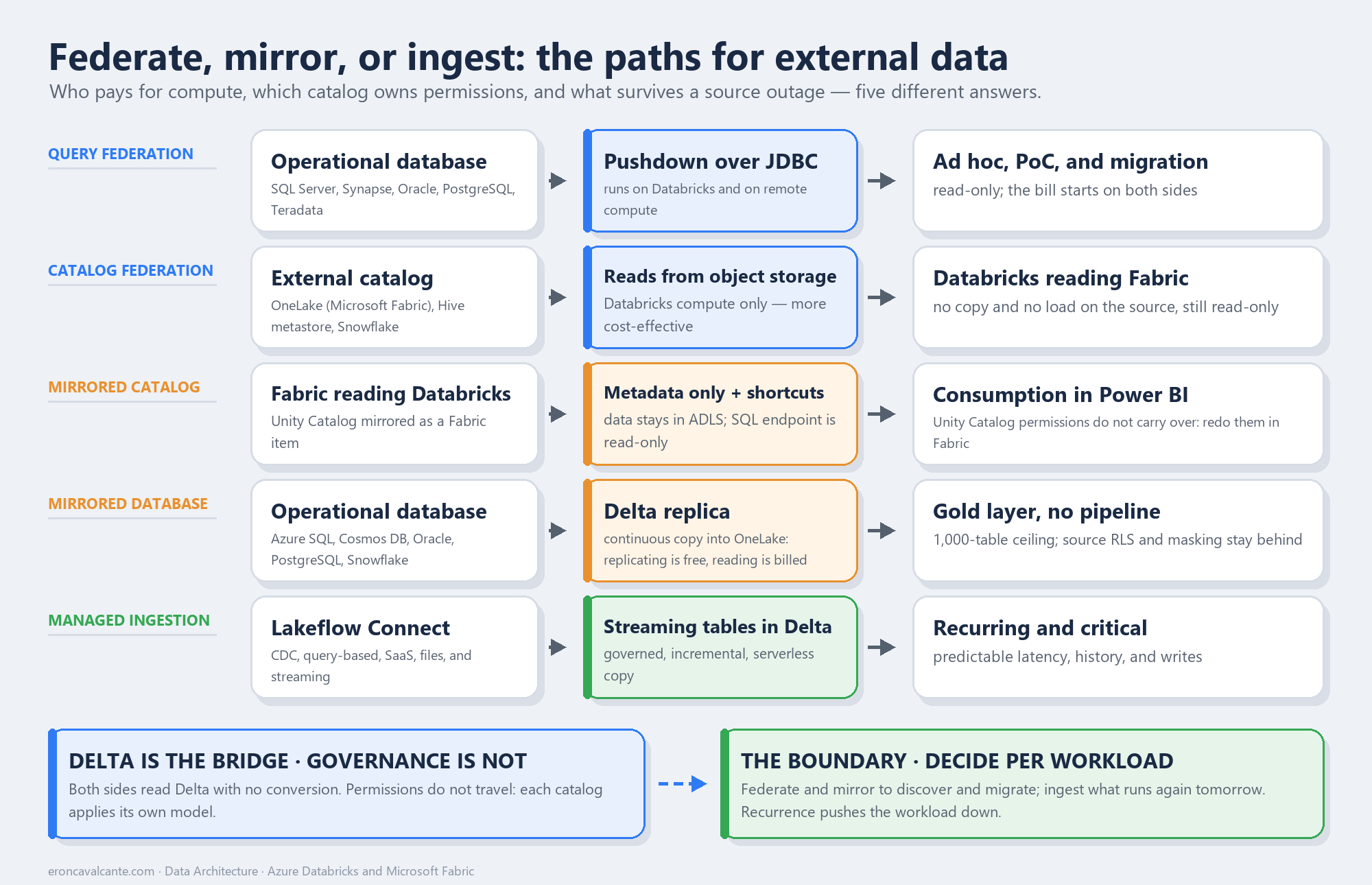
- Query federation — Unity Catalog queries are pushed down to the external database over JDBC. The query runs both in Databricks and on remote compute. This is the mode used for MySQL, PostgreSQL, Oracle, Teradata, SQL Server, Azure Synapse, Redshift, Snowflake, BigQuery, Salesforce Data 360, and Databricks-to-Databricks.
- Catalog federation — queries access tables directly in object storage, running only on Databricks compute. The documentation is explicit: this mode is more cost-effective and more performance-optimized than query federation. It is the path for legacy or external Hive metastores, Snowflake, and OneLake.
In both cases access is read-only. If you need to write, the path is the Spark Data Source API — not federation.
The problem it solves
Federation solves the opportunity cost of waiting. Before it, answering “how many delinquent contracts exist in the core banking system?” required a pipeline, modeling, a load window, and an approval. The Databricks documentation lists the scenarios where it is the right choice: on-demand reporting, proof-of-concept work, the exploratory phase of new ETL pipelines or reports, and supporting workloads during incremental migration.
Notice what that list has in common: these are low-recurrence, high-uncertainty workloads. None of them says “corporate dashboard with three hundred concurrent users.” And the documentation settles the question when the source supports both options: “Databricks recommends ingestion using Lakeflow Connect managed connectors because they scale to accommodate high data volumes and lower query latency” — choose federation for ad hoc reporting or proof-of-concept work on your pipelines.
The four mistakes I see most often in the field:
- Federating OLTP and calling it an analytics layer. Every dashboard refresh becomes load on the transactional system, which was never sized for analytical scans.
- Ignoring whose compute is being spent. In query federation, part of the work runs on the remote database — and that bill never shows up on your Databricks dashboard.
- Assuming uniform pushdown. What gets pushed varies by connector and by compute type. One innocent
ILIKEdrags the whole table across the network. - Confusing federation with guaranteed availability. Yes, the data is live. It is also fragile: maintenance, a lock, or an outage at the source takes your report down with it.
How it works — step by step
- Classify the workload before choosing the technology. Ask how many times a day the query runs, how many users depend on it, and what the impact of a source outage would be. High recurrence and high criticality point to ingestion.
- Prepare the compute. Federation requires Databricks Runtime 13.3 LTS or above with Standard or Dedicated access mode, or a Pro/Serverless SQL warehouse on version 2023.40 or above.
- Create the connection with secrets, never plaintext. Use
CREATE CONNECTIONreferencing the workspace secret scope. This requires theCREATE CONNECTIONprivilege on the metastore. - Create the foreign catalog. With
CREATE CATALOGon the metastore and ownership of the connection (orCREATE FOREIGN CATALOGon it), the remote database is mirrored into Unity Catalog. - Grant privileges as you would on any catalog.
BROWSEis granted to all account users by default;Data Readergrants read. Governance lives on the Unity Catalog side, and the connection to the source uses the credentials defined in the connection — not the end user’s. - Validate the plan before releasing it. Run
EXPLAIN FORMATTEDand read what will actually be sent to the remote database. - Decide the boundary and document it. If the query moved from exploratory to recurring, promote it to an ingestion pipeline. Federation that quietly became production is silent technical debt.
CREATE CONNECTION core_banking TYPE sqlserver
OPTIONS (
  host '<hostname>',
  port '<port>',
  user secret('<scope>','<user-key>'),
  password secret('<scope>','<password-key>')
);

CREATE FOREIGN CATALOG IF NOT EXISTS core_banking_fc
USING CONNECTION core_banking
OPTIONS (database '<database>');
Where pushdown decides the outcome
This is the point that separates people who operate federation from people who merely enabled it. The engine tries to push predicates down to the remote database to reduce what travels over the network. When it cannot, the filter is dropped from the remote query and applied afterwards in Databricks — meaning the database returns everything.
The example is in the documentation itself: WHERE name ILIKE 'john' has no translation in MySQL and is not pushed down, so the remote query becomes a SELECT *. But WHERE name ILIKE 'john' AND date > '2025-05-01' pushes the date comparison down and drastically cuts what crosses the network. Combining predicates with AND is a cost technique, not a style choice.
For the SQL Server connector the official matrix is reasonably generous — filters, projections, LIMIT, Contains/Startswith/Endswith, and string, mathematical, and miscellaneous functions (partial, filter expressions only) work on all compute; aggregates, arithmetic, boolean and bitwise operators, and sorting when used with LIMIT require DBR 13.3 LTS or above. Window functions are not pushed down. Join pushdown, in turn, is GA and enabled by default for Redshift, Snowflake, and BigQuery, but is in Public Preview for Oracle, PostgreSQL, MySQL, SQL Server, and Teradata, requires DBR 17.2+ and a toggle on the Previews page — and supports only INNER, LEFT OUTER, and RIGHT OUTER. A join on top of an aggregate or a LIMIT will not go down.
Three performance levers that make a real difference in production:
fetchSizesets how many rows come per round trip. By default most JDBC connectors fetch data atomically, which blows past available memory on large tables. The official recommendation is a large value such as100000. Requires DBR 16.1+ or SQL warehouse 2024.50+. Note: this reads in batches, not in parallel.- Parallel reads (
numPartitions,partitionColumn,lowerBound,upperBound) engage multiple executors and change the order of magnitude on large tables. Requires DBR 17.1+ or SQL warehouse 2025.25+. The partition column must be numeric, evenly distributed, and indexed — andlowerBound/upperBoundonly decide the stride, they do not filter rows. - Where views are created matters. Parallel reads do not work on a Databricks-created view that references a federated table. Create the view in the source database instead.
The other side: when ingestion is the right answer
Ingestion is no longer a synonym for writing pipelines. Lakeflow Connect delivers managed connectors governed by Unity Catalog, running on serverless compute over Lakeflow pipelines, with incremental reads and writes. The available types cover nearly the whole spectrum:
- Database connectors (CDC) — MySQL, PostgreSQL, and SQL Server via change data capture, with an ingestion gateway and staging storage for continuous change capture.
- Query-based connectors — query the source on a schedule using a cursor column, without a gateway and without staging. This is the lightweight alternative when no CDC infrastructure exists.
- SaaS connectors — Salesforce, HubSpot, Jira, Workday, and more.
- File source connectors — SharePoint and Google Drive, structured and unstructured.
- Streaming connectors — message buses and event streaming sources.
Incremental ingestion is the mechanism: on the first run the pipeline brings everything selected, and on subsequent runs only what changed — when the source allows it. Worth noting that managed connectors sit in various release states, so confirm yours before designing on top of it.
The query-based connector deserves special mention because it is exactly the middle ground missing from this debate. It solves “I need this every day at 6 a.m., but I have no CDC” without turning the source into a real-time dependency and without requiring a gateway.
The decision table
| Criterion | Federate | Mirror (Fabric) | Ingest |
|---|---|---|---|
| Query frequency | Sporadic, exploratory | Recurring, consumed in Fabric | Recurring, scheduled |
| Volume | Filtered slices | Whole catalog, 1,000-table ceiling | High volume, broad scans |
| Required latency | Tolerates source latency | Seconds to minutes, no fine control | Needs predictable response |
| Impact on source | Acceptable and monitored | Reads the log, not the table — but the source keeps billing | Source cannot absorb analytical load |
| Writes | Impossible — read-only | Impossible — read-only | Required or desirable |
| Transformation | In your SQL, on every query | None: the mirror is faithful to the source | In the pipeline, governed and versioned |
| History | Only the source’s current state | Default one-day retention after VACUUM |
Time series, time travel, audit |
| Resilience | Depends on the source being up | Survives the source, not a paused capacity | Survives a source outage |
| Concurrency | Low, predictable | High, on Fabric compute | High, many consumers |
| Governance | Unity Catalog over the foreign table | Restarts in Fabric’s model | Unity Catalog on the materialized table |
A mature pattern rarely picks a side: federate to discover, mirror to deliver consumption, ingest to operate. Incremental migration is the canonical case — federate the legacy system to keep the business running while critical domains are properly migrated.
The Azure angle: SQL Server, Synapse, and OneLake
On Azure Databricks, federation covers SQL Server, Azure SQL Database, and Azure SQL Managed Instance under the same connector, plus Azure Synapse (SQL Data Warehouse). Authentication for SQL Server accepts OAuth via Microsoft Entra ID, OAuth machine-to-machine, and username/password — and the connection is always encrypted with SSL.
On networking, one detail settles many discussions with the security team: all query traffic goes directly between Databricks compute and the external database; neither Unity Catalog nor the control plane sits in the data path. The exception is OAuth — token exchange originates from the control plane, which must reach the authentication endpoint.
And there is a newer, specifically Azure piece: OneLake catalog federation. It lets you analyze data in a Fabric Lakehouse or Warehouse without copying it, with read-only access, requiring DBR 18.0+ in standard access mode or SQL warehouse 2025.40+, authentication via Managed Identity (through an Access Connector) or a service principal, and three Fabric tenant settings enabled by an administrator. For anyone living the “Databricks or Fabric” dilemma, this is the architectural answer: do not duplicate.
Databricks and Microsoft Fabric: how to work in both
The “Databricks or Fabric” dilemma is almost never a real decision. In practice both platforms are already inside the same company: the engineering team lives in Databricks, while finance, controllership, and the business live in Power BI. The useful question is not which one survives — it is which direction the data crosses, and who owns permission once it does.
There are two directions, and they are symmetric:
Databricks reading Fabric. That is the OneLake catalog federation from the previous section: you register OneLake as an external catalog and read Fabric Lakehouse and Warehouse without copying, read-only, with Unity Catalog governing who can query.
Fabric reading Databricks. Here the object is the Mirrored Azure Databricks catalog, a Fabric item that mirrors a Unity Catalog catalog. And the name misleads: the documentation classifies this as metadata mirroring, not replication. In the words of the page itself: “there is no data movement or data replication. Only the Azure Databricks catalog structure is mirrored to Fabric and the underlying catalog data is accessed through shortcuts.” The data stays in your ADLS Gen2; Fabric creates shortcuts pointing to it.
Mirroring a catalog creates two items in Fabric: the Azure Databricks item and a read-only SQL analytics endpoint, queryable in T-SQL. From there Power BI consumes it in Direct Lake, with no import and no additional copy.
OneLake’s role — where Fabric data actually lives
Neither direction makes sense without understanding what sits underneath Fabric. Every Fabric item — Lakehouse, Warehouse, mirrored catalog — addresses OneLake, which the documentation describes as “a unified data lake for your whole organization”, automatically included in every tenant. There is one OneLake per tenant: you cannot create a second one, cannot delete the one you have, and there is no infrastructure to provision. It is built on Azure Data Lake Storage and stores tables in Delta Parquet or Iceberg — two open formats, neither proprietary.
Three practical consequences for the decision in this article.
One copy, many engines. “All Fabric analytics engines work with data directly in OneLake” — Spark, T-SQL, KQL, and Power BI read the same file. Pay the cost of materializing once, and switching engines does not charge you again. It is the opposite of the old pattern of one data mart per tool.
The shortcut is the mechanism, not an implementation detail. A shortcut is a reference to data that lives elsewhere — another workspace, ADLS Gen2, S3, Dataverse, on-premises — and OneLake presents it as if it were local. That is why mirroring a Databricks catalog moves no bytes: mirroring creates the structure, and it is OneLake that reaches your ADLS Gen2 through a shortcut. When the source changes, the change shows up on the other side with no pipeline in between.
Authorization on the Fabric side belongs to OneLake, not to Unity Catalog. OneLake security roles are deny-by-default: nobody sees anything until they are explicitly added to a role, scoped to a table, folder, or schema. And the list of supported items says a lot about the nature of mirroring — for the Azure Databricks mirrored catalog, the only available permission is Read. There is no write there, not even by accident.
There is a trap in this model worth putting in bold: workspace roles beat OneLake roles. The documentation warns that Admin, Member, and Contributor automatically get Write on OneLake and therefore override any restricted-read role you configured. Restricting a column in OneLake while leaving the analyst as a workspace Contributor is the same as restricting nothing.
The governance boundary — the point that sinks projects
This is the paragraph that justifies the whole article, and the documentation is literal:
“Unity Catalog policies and permission aren’t mirrored in Fabric. Users can’t reuse Unity Catalog policies and permissions in Fabric. Permissions set on catalogs, schemas, and tables inside Azure Databricks doesn’t carry over to Fabric workspaces. You need to use Fabric’s permission model to set access control on objects in Fabric.”
In other words: the format crosses the boundary, the permission does not. Delta is the bridge — both sides read Delta with no conversion, and OneLake even virtualizes metadata in both directions, exposing Delta tables to Iceberg readers and Iceberg tables as Delta for Fabric workloads. But the access model restarts from zero once the data shows up in Fabric, and the credential used in the mirroring connection is the one that runs every data query. If you built fine-grained governance in Unity Catalog and assume it reaches Power BI, you have an access leak waiting to be found in an audit.
The same reasoning applies to the lower-level shortcut: an ADLS Gen2 shortcut pointing straight at a Delta table folder. It copies no data, the schema syncs on its own — and Unity Catalog governs nothing on that path. What rules there is storage RBAC plus Fabric workspace security.
What does not cross
Mirroring silently filters part of the catalog. Not mirrored:
- tables with RLS/CLM policies (row-level security and column masking);
- Lakehouse Federation federated tables — federation does not nest;
- Delta Sharing tables;
- streaming tables;
- views and materialized views;
- external tables not in Delta format.
Add to that: automatic sync covers adding and deleting schemas and tables — the documentation does not include column changes in that list — and propagating data changes takes “anywhere from a few seconds to several minutes.” None of this blocks the architecture; all of it breaks the promise if you promised real time.
How to work in Fabric, practically
- Decide the direction before the tool. Executive consumption and self-service in Power BI pull toward mirroring. Enriching engineering with data that already lives in Fabric pulls toward OneLake catalog federation. The two directions coexist without conflict.
- Prepare Unity Catalog for exposure. The workspace needs Unity Catalog enabled, and external access to the catalog must be allowed — without it the catalog simply will not appear when you go to mirror.
- Make storage reachable. The ADLS Gen2 account used by the Databricks workspace must be accessible to Fabric. With the firewall on, use trusted workspace access — and know that on that path Unity Catalog RLS/CLM and ABAC policies are not enforced at the storage layer.
- Rebuild authorization in Fabric, explicitly. Treat it as a project, not a detail: map Entra ID groups, define workspace roles and OneLake security roles — remembering that the workspace role wins over the restricted-read role. There is a documented path to bring the two models closer, but it is manual and parallel, never automatic.
- Check runtime and region. Fabric Runtime must be at least Spark 3.4 with Delta 2.4, and Azure Databricks catalog mirroring is offered in a specific list of regions — Brazil South is among them.
- Pick the mechanism by object, not by habit. A whole catalog governed by Unity Catalog → mirroring. A loose Delta folder outside Unity Catalog → ADLS Gen2 shortcut. Iceberg tables → Iceberg shortcut, with OneLake virtualization resolving the format.
It is worth recording where official guidance exists and where it is missing. The Fabric fundamentals decision guides — the one for data stores and the one for pipeline, dataflow, or Spark — do not mention mirroring. But Data Factory publishes a direct comparison between Copy job, Mirroring, Copy activity, and Eventstreams, and OneLake publishes the page that puts shortcuts and mirroring side by side. What still has no page is the comparison between mirroring and Databricks catalog federation in the same frame: that boundary, the criterion above, is mine and must be revisited at every release.
Mirroring in Fabric: one word, three mechanisms
So far “mirroring” has carried a single meaning here — the Unity Catalog catalog exposed in Fabric without moving a byte. But Fabric uses the same word for three different mechanisms, and confusing them is the source of half the unproductive arguments about cost and latency.
- Database mirroring — real replication. “When you create a mirrored database, its data is stored in Delta Lake format within OneLake.” The data is copied, in Delta, inside OneLake. That is the path for Azure SQL Database, SQL Managed Instance, SQL Server, Oracle, Cosmos DB, PostgreSQL, MySQL (preview), BigQuery, SAP, and SharePoint List (preview).
- Metadata mirroring — what this article already described: “Metadata mirroring doesn’t replicate data. Instead, it relies on OneLake shortcuts to reference source data in place.” That is Azure Databricks and the Dremio catalog (preview).
- Open mirroring — the open door: “Open mirroring enables any application to write change data directly into a mirrored database in Fabric.” With no native connector, your application writes change data straight into a landing zone.
The ruler against shortcuts is documented too: “Shortcuts add selected data to the OneLake namespace. Mirroring adds an external database or catalog and determines whether its data can be accessed in place or must be replicated.” Translated into a decision: a shortcut is a slice, mirroring is a catalog — and the mechanism decides whether it copies, not you. There is even a case with no choice at all: “If your source stores data in a proprietary format, mirroring is your only option.”
And there is an honest trap: the official pages disagree about Snowflake. The table in mirroring/overview classifies it as database mirroring; the one in onelake/unify-data groups it with Databricks and Dremio under metadata mirroring. The product page explains why: managed tables and views are replicated and converted to Parquet, while Iceberg tables are reached through a shortcut. It is hybrid. If your decision depends on whether a copy exists, confirm it per object type, never by source name.
The mirroring bill — what is free and what is not
This is the argument that shows up most in meetings, and it is half true. What is free is written down: “Background Fabric compute used to replicate your data into Fabric OneLake is free and doesn’t consume capacity.” And storage comes with an allowance: “Mirroring offers a free terabyte of mirroring storage for every capacity unit (CU) you purchase” — an F64 gives you 64 TB dedicated to mirroring.
What is not free, on the same page: “The compute for querying data by using SQL, Power BI, or Spark is charged at regular rates.” Replicating does not charge; reading does. Add three details that decide projects: a paused capacity stops mirroring (“a paused or deleted capacity affects mirroring and no data is replicated”), the source’s bill still exists — in Snowflake mirroring runs continuously, with no window and no scheduling, and every reseed burns Snowflake compute — and the gateway version changes the math: with an on-premises data gateway older than June 2026, OneLake transactions from Oracle and SQL mirroring start consuming CUs. “Free” is on the Fabric side, exactly the same bilateral lesson as query federation.
Four decisions that show up in the field
1. Core banking in Azure SQL Database, daily regulatory report in Power BI → mirror it. The official medallion-layer heuristic is explicit: “Gold data (reporting and analytics on processed data) – Use Mirroring. If you already have ETL processing elsewhere and mainly need to bring curated data into Fabric for reporting, Mirroring is the simplest and most cost-effective choice.” Before you promise a date: the logical server needs a Managed Identity as the primary identity, the principal needs ALTER ANY EXTERNAL MIRROR, and the database cannot have CDC enabled, nor Synapse Link, nor be mirrored in another workspace. The ceiling is 1,000 tables — and with “mirror all data” it takes the first thousand alphabetically and drops the rest without warning.
2. Application events in Cosmos DB, analytics without touching the transactional side → mirror it. The argument is strong: “Your Azure Cosmos DB data is continuously replicated directly into Fabric OneLake in near real-time, without any performance impact on your transactional workloads or consuming Request Units (RUs).” Two points surprise anyone coming from the Synapse world: it is not Synapse Link — “Mirroring does not use Azure Cosmos DB’s analytical store or change feed as a change data capture source” —, the prerequisite is continuous backup (the 7-day one is free), and the scope is API for NoSQL only. MongoDB, Cassandra, Gremlin, and Table are out.
3. A source with no native connector → open mirroring. Your application, or an ecosystem partner, writes Parquet or delimited text into a per-table landing zone, with a mandatory _metadata.json declaring keyColumns and a final __rowMarker__ column flagging insert, update, delete, or upsert. Choose keyColumns carefully: once set it cannot change — and without it there is no update and no delete.
4. Raw ingestion, bronze layer → do not mirror. The same official page says the opposite: “Bronze data (raw ingestion) – Start with Copy job.” Mirroring does not transform, does not schedule, and does not let you choose write behavior.
What mirroring does not do
The official comparison table is generous in listing what mirroring does not support: no custom scheduling, no table and column management, no copy behavior, no watermark-based incremental load, no metadata-driven ELT — and, in an item that deserves careful reading, no predictable performance. The integration guide completes the portrait: transformation none, code none, destination “Mirrored database (stored as read-only Delta table in Fabric OneLake)”.
- It is read-only, with no derived calculations. “Mirrored databases are read-only. You can’t create calculated columns or calculated tables directly on a mirrored database.” Need a derived column? A Lakehouse with a shortcut on top.
- DDL is expensive. “When there’s DDL change, a complete data snapshot is restarted for the changed table, and data is reseeded.” A dbt job that touches DDL on a schedule turns into a reseed loop.
- Source security does not cross. In Azure SQL, “permissions are currently not propagated to the replicated data in Fabric OneLake”: dynamic masking, object permissions, and sensitivity labels stay behind. In Snowflake, RLS and CLS are not replicated either.
Notice that the last one is exactly the Databricks mirrored catalog boundary, now on a different source. It is not a Unity Catalog quirk: it is the mirroring pattern. The format crosses; the permission does not.
Then comes the fine print that breaks reconciliation: json and vector columns block the whole table, LOBs above 1 MB are silently truncated, datetime2(7) loses the seventh digit, and datetimeoffset(7) loses the time zone. And mirroring runs VACUUM with a default retention of one day — long time travel is not a promise to make here.
After mirroring: the way back to Databricks
Mirrored data becomes Delta in OneLake, so intuition says Databricks reads it through catalog federation. But the official list of supported items is short: “The following Fabric data items are supported: Fabric Lakehouse, Fabric Warehouse.” Mirrored database is not on it.
What you can assemble, by combining two pages: a Lakehouse shortcut to the mirrored tables, with federation pointing at the Lakehouse — remembering that “shortcuts to mirrored tables are read-only.” That chaining is my inference, not an official recipe; treat it as a hypothesis to validate in your tenant. The documented alternative is Databricks reading OneLake through the ABFS endpoint with a service principal.
Production best practices
- Treat every foreign catalog as a contract with a named owner and a review date. Federation with no expiry becomes architecture by accident.
- Never point a high-concurrency dashboard at a federated OLTP table. If it exists, it is an ingestion candidate.
- Always run
EXPLAIN FORMATTEDbefore promoting a federated query, and check thePushedFilters/PushedJoinsblock. - Write predicates with pushdown in mind, combining with
ANDso the pushable part still reduces traffic even when the rest does not go down. - Tune
fetchSizeand parallel reads deliberately — and validate the runtime requirements first, because the syntax is accepted and simply does not optimize on older versions. - Keep credentials in secret scopes, never in plaintext inside
CREATE CONNECTION. - Monitor both sides. Federation cost is bilateral: your compute and the source’s compute. A dashboard showing only DBUs is telling half the story.
- Prefer catalog federation when it exists for your source — the query runs only on your compute and is more cost-effective.
- If the data is going to Fabric, plan authorization as a separate deliverable. Unity Catalog permissions do not travel with mirroring, and finding that out during an audit is expensive.
- Before mirroring, check the blockers at the source. In Azure SQL, enabled CDC, Synapse Link, delayed transaction durability, or an active mirror in another workspace all block the feature — discovering that the night before go-live is expensive.
- Treat the 1,000-table ceiling as a scoping decision, not a technical limit: with “mirror all data”, anything past the ceiling is dropped silently, in alphabetical order.
- Do not promise
time travelover mirrored data. Mirroring runsVACUUMwith a default retention of one day. - Separate what is free from what is billed. Replication into OneLake does not consume capacity; reading in SQL, Power BI, or Spark does, and the source keeps billing its own compute.
What has to be in place
Foundation — inventory and authority over access. Every connection and every foreign catalog has an owner, a stated purpose, and a data classification. Credentials live in secrets, privileges are granted by group, and the team can name which queries cross the lakehouse boundary.
It is in place when you can list every federated access path and explain, for each one, why it has not been ingested yet.
Production with context — the workload in the right mode. Exploration and proofs of concept live in federation; recurring, critical workloads live in incremental ingestion. Query plans are inspected, pushdown is verified, and impact on the source is measured rather than assumed.
It is in place when promoting a federated query to a pipeline is a recorded decision, not a reaction to an incident at the source.
Scale and efficiency — the boundary as a portfolio. Federation and ingestion are reviewed together, with cost on both sides, observed latency, and business criticality. Incremental migration uses federation as a bridge with an end date, and catalog federation replaces query federation wherever the source allows.
It is in place when moving a workload from federated to ingested (or back) breaks neither governance, nor lineage, nor consumers.
The order is causal, not chronological. There is no efficient boundary without an inventory, and no safe promotion without reading the plan.
Official references
- Connect to external databases and catalogs (Azure Databricks)
- What is query federation?
- Lakehouse Federation performance recommendations
- Run federated queries on Microsoft SQL Server
- Networking recommendations for Lakehouse Federation
- Enable OneLake catalog federation
- Managed connectors in Lakeflow Connect
- Mirrored Azure Databricks catalog in Microsoft Fabric
- Security for Azure Databricks mirroring in Fabric
- Limitations of Azure Databricks mirroring in Fabric
- OneLake shortcuts
- Iceberg tables in OneLake
- OneLake, the unified data lake
- OneLake security access control model
- Mirroring in Microsoft Fabric — overview
- Unify data with OneLake shortcuts and mirroring
- Comparing Copy job, Mirroring, Copy activity, and Eventstreams
- Open mirroring in Fabric
- Open mirroring landing zone format
- Limitations of Azure SQL Database mirroring
- Limitations of Snowflake mirroring
- Mirroring Azure Cosmos DB
- OneLake storage consumption
Frequently asked questions (FAQ)
Can I write to a federated table?
No. Lakehouse Federation is read-only, in both query federation and catalog federation. When you need writes — or an unsupported source, or more control over execution and parallelization — the documented path is the Spark Data Source API.
Does federation always reduce cost because it avoids copying data?
No. It removes duplicated storage and pipeline work, but in query federation part of the execution happens on the external database’s compute, and that cost rarely appears on the dashboard of whoever made the decision. Recurring, high-volume queries tend to be more expensive federated than ingested.
What is the practical difference between query federation and catalog federation?
Query federation pushes the query over JDBC and executes on both sides. Catalog federation reads directly from object storage and runs only on Databricks compute, which the documentation describes as more cost-effective and performance-optimized. When both exist for your source, prefer catalog federation.
Does Unity Catalog enforce the security that already exists in the source database?
Not automatically. Fine-grained governance is applied by Unity Catalog over the foreign table, and the connection to the external system uses the credentials defined in the connection — not the end user’s. Rules that live only at the source must be reproduced or rethought in the catalog.
What if I need recurrence but have no CDC at the source?
That is precisely the space of Lakeflow Connect’s query-based connectors: they query the source on a schedule using a cursor column, without requiring a gateway or staging storage.
Does mirroring my Databricks catalog into Fabric copy my data?
No. The documentation classifies the feature as metadata mirroring: only the catalog structure is mirrored, and the data keeps being read from your ADLS Gen2 through shortcuts. What moves is the point of consumption — not the file.
Do Unity Catalog permissions apply inside Fabric?
No. Unity Catalog policies and permissions are not mirrored, and access control has to be rebuilt in Fabric’s model. On top of that, data queries use the mirroring connection’s credential, not the identity of whoever is querying in Fabric.
Do I have to choose between Databricks and Fabric?
No, and the article argues the opposite: OneLake catalog federation solves the Fabric → Databricks direction, and the mirrored catalog solves Databricks → Fabric. Neither copies the data. The real decision is where authority over permission lives.
Who controls access on the OneLake side?
OneLake security roles, in a deny-by-default model, scoped to a table, folder, or schema — and, on the Azure Databricks mirrored catalog, with Read permission only. The detail that usually goes unnoticed is precedence: anyone holding Admin, Member, or Contributor on the workspace gets Write automatically and overrides the restricted-read role you configured.
Does Fabric mirroring copy the data or not?
It depends on the mechanism, which is why the question causes so much confusion. Database mirroring truly replicates, in Delta, inside OneLake — Azure SQL, Cosmos DB, Oracle, PostgreSQL, SQL Server. Metadata mirroring copies nothing and resolves through shortcuts — Azure Databricks and Dremio. Open mirroring is your application writing change data into a landing zone. Snowflake is hybrid: managed tables and views replicate, Iceberg tables go through shortcuts.
Is Fabric mirroring really free?
Replication is: background compute does not consume capacity, and you get a free terabyte of mirroring storage per capacity unit purchased. Reading is billed — querying in SQL, Power BI, or Spark is charged at regular rates. On top of that the capacity has to be running (pause it and replication stops), and the source keeps billing its own compute.
Can I mirror the bronze layer and save on pipelines?
That is not what official guidance recommends: the Data Factory decision guide points to Copy job for raw data and reserves mirroring for the gold layer, when processing already happened elsewhere.
Can Databricks read a Fabric mirrored database?
Not on the direct path: OneLake catalog federation supports Fabric Lakehouse and Fabric Warehouse, and mirrored database is not on that list. The plausible workaround is a Lakehouse shortcut to the mirrored tables, federating the Lakehouse — an inference drawn from two pages, not a documented recipe. What is documented is reading OneLake through the ABFS endpoint with a service principal.
Conclusion
The question “federate or ingest?” almost never has a single answer in a real organization — it has an answer per workload. Federation is the right tool to shorten the discovery cycle, support an incremental migration, and avoid copies where copying adds nothing. Ingestion is the right tool for everything that has to run again tomorrow, with predictable latency and without turning a transactional system into an analytical dependency.
The antipattern is not using federation. It is failing to decide — letting an exploration shortcut become, by inertia, the company’s data access architecture. The same applies to the Fabric boundary: mirroring a catalog is cheap and reversible, and OneLake handles the storage side very well — one copy, many engines, a shortcut instead of a pipeline. What OneLake does not handle is who may read what: that account restarts from zero on the other side. If nobody owns authorization there, what you exported was not just the data — it was the risk. The boundary between models needs an owner, a criterion, and a review. That is what separates a governed lakehouse from a collection of pointers and good luck.
👉 If you are evaluating Lakehouse Federation to accelerate delivery — especially with regulated data, legacy systems, and data teams under deadline pressure — this is the decision point. Want to talk about data architecture on Databricks and Unity Catalog? Reach me on LinkedIn.