
Leia em português: Delta e Lakeflow: por onde o dado ruim passa sem dar erro
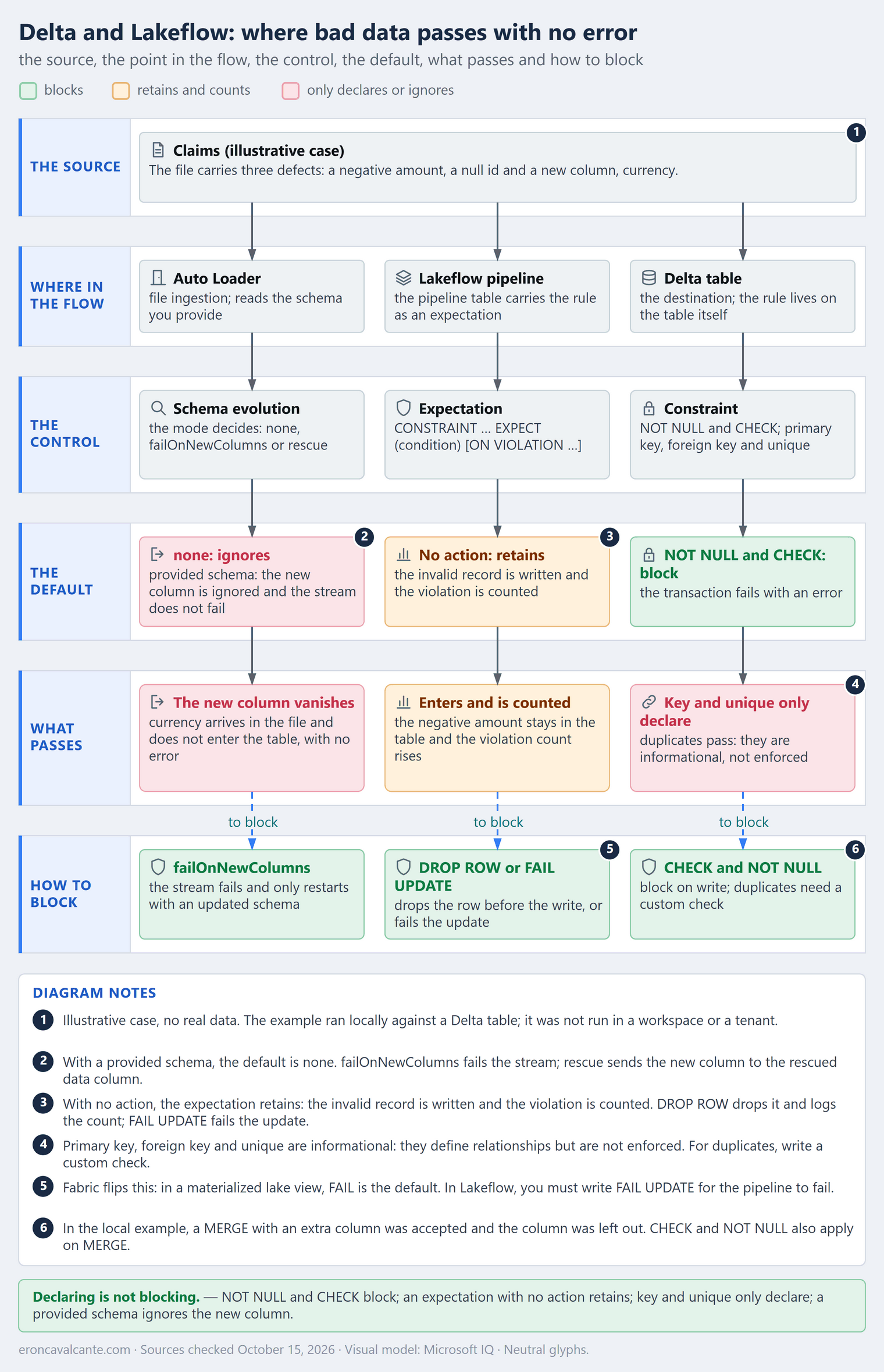
Picture a claims pipeline whose quality dashboard is green. The rule “paid amount greater than or equal to zero” was declared, and still a claim with a negative amount landed in the table. The same week, the source system started sending a new column, currency, and it simply vanished, with no error. Neither defect broke the pipeline. The case is illustrative, but the pattern is real: declaring a rule and blocking the data are different things, and each layer in Databricks and Fabric chooses its own behavior.
Declaring is not blocking
What is a data-quality contract at ingestion?
It is the list of what the data must satisfy before it is written, plus what happens when it does not: block, retain and count, drop, or only declare. It is not a product; it is an architecture decision that each layer answers in its own way.
The article on ontology and governed data covered the meaning of data and its context. Here the focus is conformance: what the write layer does when the data violates the rule.
| Layer | Default when the data violates the rule | Effect |
|---|---|---|
Delta: NOT NULL and CHECK |
Blocks | The transaction fails with an error |
Delta: primary key, foreign key and unique |
Only declares | They are not enforced |
| Lakeflow: expectation with no action | Retains | The invalid record is written to the target |
Lakeflow: ON VIOLATION DROP ROW |
Drops | The record disappears before the write |
Lakeflow: ON VIOLATION FAIL UPDATE |
Blocks | The update fails |
Delta: MERGE with INSERT * and an extra source column |
Ignores the new column | The write is accepted without the column |
| Auto Loader with a provided schema | Ignores the new column | The stream does not fail |
| Auto Loader without a provided schema | Evolves the schema (addNewColumns) |
The stream stops and, on restart, continues with the new column |
| Fabric: materialized lake view | Blocks, because FAIL is the default |
The refresh stops at the first violation |
Sources checked on October 15, 2026. The table summarizes the documentation read on that date. The example in the hands-on section was run locally; nothing here was measured in a Databricks workspace or in a Fabric tenant.
The problem it solves
When a rule exists only on paper, the error shows up far from the source: in the report that does not add up, in the metric that changes without explanation. The map above prevents three mistakes: assuming every declared rule blocks, treating dropping and retaining as the same thing, and forgetting the doors that do not go through the rule, such as MERGE and the new column at the ingestion layer.
How it works — step by step
- List the defects that matter: negative amount, null identifier, new column, duplicates.
- Decide what each defect deserves: block, quarantine, retain and count, or drop. It is a business decision, not a tool decision.
- Place each control in the layer that enforces it:
NOT NULLandCHECKon the Delta table, an expectation in the Lakeflow pipeline,failOnNewColumnsin Auto Loader. - Test the side doors: MERGE, append with a new column, the Auto Loader evolution mode, and reprocessing.
- Read the count of retained or dropped records and turn it into an alert. A count nobody reads protects nothing.
- Mark what is only informational, such as primary key and
unique, so nobody treats it as a barrier.
What blocks: constraints and schema enforcement in Delta
In Delta, NOT NULL and CHECK are enforced constraints: according to the Databricks documentation, when one of them is violated, the transaction fails with an error. Databricks also validates the schema on write: every inserted column must exist in the target table, and the page’s example fails when it inserts an unknown column.
There are two costs to know about. First: adding a constraint upgrades the table writer protocol when the current writer version is lower than 3. Check the external clients that write to the table before you apply it. Second: ALTER TABLE ... ADD CONSTRAINT checks every existing row before it accepts the CHECK, and the same goes for adding NOT NULL. On a table that has already received bad data, the constraint will not go in until the backlog is cleaned, which turns the first rollout into a small remediation project.
-- Before applying, measure the backlog that would block the constraint
SELECT count(*) AS violations FROM claims WHERE paid_amount < 0;

ALTER TABLE claims ADD CONSTRAINT non_negative_amount CHECK (paid_amount >= 0);
ALTER TABLE claims ALTER COLUMN claim_id SET NOT NULL;
Primary key, foreign key and unique are informational constraints: they define relationships between fields and are not enforced. Anyone expecting unique to block duplicates needs another check. The constraints page itself points to Lakeflow expectations as a related concept.
What lets it pass: MERGE, Auto Loader and the warn expectation
MERGE with INSERT * and UPDATE SET *. The source must have all the columns of the target, and enforcement ignores source columns that the target does not have. In the local example, the MERGE with the extra currency column was accepted and the column did not enter the table.
The door can also be opened on purpose. According to the MERGE syntax reference, on Databricks Runtime 15.2 or above, MERGE WITH SCHEMA EVOLUTION updates the target table schema to follow the source, and the new column starts to exist. That gives three possible behaviors for the same defect, and the number that should happen by accident is zero.
| Choice in the MERGE | What happens to currency |
|---|---|
Default MERGE with INSERT * |
The column is ignored and vanishes with no error |
MERGE WITH SCHEMA EVOLUTION |
The column is added to the target |
| Schema test before the MERGE | The job fails if the source brings a column outside the contract |
Auto Loader with a provided schema. The evolution default is none: the new column is ignored and the stream does not fail. With failOnNewColumns, the stream fails and only restarts after you update the schema or remove the offending file. With rescue, the new column goes to the rescued data column.
Without a provided schema, the default changes to addNewColumns: the stream stops when the new column shows up, after Auto Loader records it in the schema location; on restart, it continues with the updated schema. In other words, the same Auto Loader ignores the column in one pipeline and stops the stream in another, depending only on whether the schema was provided.
Mode (cloudFiles.schemaEvolutionMode) |
A new column arrives | When it is the default |
|---|---|---|
addNewColumns |
The stream stops after the schema is updated; on restart, it continues with it | No schema provided |
none |
Ignored; the stream continues | Schema provided |
rescue |
Goes to the rescued data column; the stream continues | — |
failOnNewColumns |
The stream fails until the schema is updated or the file removed | — |
For the claims case, where the new column has to get attention, the explicit choice looks like this (snippet not executed):
(spark.readStream.format("cloudFiles")
    .option("cloudFiles.format", "json")
    .option("cloudFiles.schemaEvolutionMode", "failOnNewColumns")
    .schema("claim_id STRING, paid_amount DOUBLE, status STRING")
    .load("<source-path>"))
An expectation with no action. Retaining invalid records is the default behavior, called warn in the documentation: the invalid record is written to the target. With ON VIOLATION DROP ROW, it is dropped before the write and the count is logged; with ON VIOLATION FAIL UPDATE, the update fails. Retaining and counting can be the right choice, as long as someone reads the count.
Fabric chose a different default
In Fabric materialized lake views, the default action is FAIL: the refresh stops at the first violation, even if you do not specify it. With DROP, processing continues and the records that violate the constraint are removed; the lineage view shows the count. If the same view defines both DROP and FAIL, FAIL takes precedence.
It is the inverse of the Lakeflow default: there, an expectation with no action retains; here, a constraint with no action stops. Whoever carries a rule from one side to the other inherits a different behavior without changing a line.
FAIL precedence has a practical consequence. In Lakeflow, each expectation has its own action and they coexist in the same dataset. In the view below (snippet not executed, syntax from the Fabric reference), the intent seems to be “block claims with no identifier and drop negative amounts”, but the documentation says that, with both actions in the same view, FAIL takes precedence:
CREATE OR REPLACE MATERIALIZED LAKE VIEW silver.claims_clean
(
  CONSTRAINT has_claim_id CHECK (claim_id IS NOT NULL) ON MISMATCH FAIL,
  CONSTRAINT non_negative_amount CHECK (paid_amount >= 0) ON MISMATCH DROP
)
AS SELECT claim_id, paid_amount, status FROM bronze.claims;
My reading: if you need both actions, split them into two chained views, one with DROP and one with FAIL, instead of relying on the combination. Another point: the lineage shows how many records were dropped, not which ones. To keep the rejected rows, apply the same rule in an earlier step that writes the invalid records to a table of their own.
A use case: claims at an insurer
The case is illustrative: an insurer ingests claims and feeds a payments dashboard. The article on medallion architecture shows where the layers sit; here the point is what each entry door does with the defect.
| Defect | Control that blocks it | Without the control |
|---|---|---|
| Negative paid amount | CHECK (paid_amount >= 0) in Delta or FAIL UPDATE in the expectation |
It lands in the table; with an expectation with no action, it lands and is counted |
| Claim without an identifier | NOT NULL on claim_id |
A row with no identifier lands |
New column at the source (currency) |
failOnNewColumns in Auto Loader; the Delta append already fails |
With a provided schema, Auto Loader ignores it; MERGE ignores the extra column |
| Duplicate identifier | A check of your own: unique and primary key are informational |
Two rows for the same claim |
Block, retain or drop: how to decide
The tool executes the action; the business chooses it. Four questions settle most cases:
| Question about the defect | If the answer is yes | In the claims case |
|---|---|---|
| Does it corrupt money, identity or a regulatory obligation? | Block (CHECK, NOT NULL, FAIL UPDATE) |
Negative paid amount, claim with no claim_id |
| Does the record have value but need correction and reprocessing? | Quarantine: route it to a path of its own, for correction | Claim with an unknown status |
| Is the record noise, with no business value? | Drop and count (DROP ROW) |
Test or heartbeat row from the source system |
| Is the rule new, with nobody knowing the violation rate? | Retain and count (warn) for one cycle, then decide |
Newly created tax ID format rule |
The most common mistake is using DROP ROW for a first-row defect: the claim with a negative amount vanishes from the payments dashboard, the totals add up, and nobody investigates. Dropping is for noise, not for money.
In practice: what the Delta table blocks and what it accepts
I ran the example below locally, with delta-rs (deltalake 1.6.6 and pyarrow 25.0.1). It did not run in a Databricks workspace or in a Fabric tenant: it shows the behavior of a Delta table with CHECK and NOT NULL. What the documentation says about MERGE, Auto Loader and expectations is cited, not reproduced.
import json
import tempfile

import pyarrow as pa
from deltalake import DeltaTable, write_deltalake
from deltalake.exceptions import DeltaError

REQUIRED = pa.schema([
    pa.field("claim_id", pa.string(), nullable=False),
    pa.field("paid_amount", pa.float64()),
    pa.field("status", pa.string()),
])


def claims(rows, currency=None, schema=None):
    data = {
        "claim_id": pa.array([r[0] for r in rows], pa.string()),
        "paid_amount": pa.array([r[1] for r in rows], pa.float64()),
        "status": pa.array([r[2] for r in rows], pa.string()),
    }
    if currency:
        data["currency"] = pa.array([currency] * len(rows), pa.string())
    return pa.table(data, schema=schema)


def append(path, source):
    write_deltalake(path, source, mode="append")


def merge(path, source):
    (
        DeltaTable(path)
        .merge(source, "t.claim_id = s.claim_id", source_alias="s", target_alias="t")
        .when_matched_update_all()
        .when_not_matched_insert_all()
        .execute()
    )


def try_write(path, source, write):
    try:
        write(path, source)
        verdict = "accepted"
    except DeltaError:
        verdict = "blocked"
    table = DeltaTable(path)
    return {
        "verdict": verdict,
        "rows": table.to_pyarrow_table().num_rows,
        "version": table.version(),
        "source_columns": source.num_columns,
        "table_columns": len(table.schema().fields),
    }


def make_table(folder, constrained=True):
    path = f"{folder}/claims"
    first = claims([("C1", 100.0, "paid"), ("C2", 50.0, "open")], schema=REQUIRED)
    write_deltalake(path, first)
    if constrained:
        DeltaTable(path).alter.add_constraint({"non_negative_amount": "paid_amount >= 0"})
    return path


def run():
    with tempfile.TemporaryDirectory() as folder:
        path = make_table(folder)
        return {
            "check_on_append": try_write(path, claims([("C3", -50.0, "paid")]), append),
            "null_id_on_append": try_write(path, claims([(None, 10.0, "paid")]), append),
            "new_column_on_append": try_write(path, claims([("C4", 10.0, "paid")], "BRL"), append),
            "new_column_on_merge": try_write(path, claims([("C5", 30.0, "open")], "BRL"), merge),
            "check_on_merge": try_write(path, claims([("C6", -5.0, "paid")]), merge),
        }


print(json.dumps(run(), indent=2))
The output, copied from the run:
{
  "check_on_append": {
    "verdict": "blocked",
    "rows": 2,
    "version": 1,
    "source_columns": 3,
    "table_columns": 3
  },
  "null_id_on_append": {
    "verdict": "blocked",
    "rows": 2,
    "version": 1,
    "source_columns": 3,
    "table_columns": 3
  },
  "new_column_on_append": {
    "verdict": "blocked",
    "rows": 2,
    "version": 1,
    "source_columns": 4,
    "table_columns": 3
  },
  "new_column_on_merge": {
    "verdict": "accepted",
    "rows": 3,
    "version": 2,
    "source_columns": 4,
    "table_columns": 3
  },
  "check_on_merge": {
    "verdict": "blocked",
    "rows": 3,
    "version": 2,
    "source_columns": 3,
    "table_columns": 3
  }
}
| Case | Verdict | Rows in the table | Version |
|---|---|---|---|
| Negative amount on append | Blocked | 2 | 1 |
| Null identifier on append | Blocked | 2 | 1 |
| New column on append | Blocked | 2 | 1 |
| New column on MERGE | Accepted | 3 | 2 |
| Negative amount on MERGE | Blocked | 3 | 2 |
The table starts with two rows: version 0 is the initial write and version 1 is the constraint. The first three cases were blocked and the table did not change. The MERGE with currency was accepted, created version 2 with one new row and left the column out: the table still has three columns. The last case shows that CHECK also applies inside MERGE. The errors observed were DeltaError with “1 rows failed validation check” for CHECK and NOT NULL, and SchemaMismatchError for the new column on append.
In Lakeflow, the same contract becomes an expectation. This snippet was not executed: it adapts the syntax shown in the documentation to the case, following the decision table above. The two defects that touch money and identity block; the source-system noise is dropped and counted.
CREATE OR REFRESH STREAMING TABLE claims_clean(
  CONSTRAINT has_claim_id        EXPECT (claim_id IS NOT NULL)     ON VIOLATION FAIL UPDATE,
  CONSTRAINT non_negative_amount EXPECT (paid_amount >= 0)         ON VIOLATION FAIL UPDATE,
  CONSTRAINT not_heartbeat       EXPECT (status <> 'heartbeat')    ON VIOLATION DROP ROW
) AS SELECT * FROM STREAM(raw.claims);
Quarantine: retain without contaminating
Between blocking everything and dropping silently there is a middle ground that the documentation describes among the advanced expectation patterns: flag the invalid record and split the paths: one view reads the valid rows and another the invalid ones, both over the same flagged table. The pipeline does not stop, the dashboard receives only valid data, and the invalid rows follow a separate path, for correction. The page records no rejection reason; writing the invalid rows to a table of their own is my adaptation.
The snippet below was not executed; it follows the structure of the documented pattern, adapted by me (coalesce, and tables for the two paths), applied to claims:
from pyspark import pipelines as dp
from pyspark.sql.functions import expr

rules = {
    "has_claim_id": "claim_id IS NOT NULL",
    "non_negative_amount": "paid_amount >= 0",
}
# coalesce(..., false): a comparison with NULL also goes to quarantine
quarantine_rule = "NOT coalesce(({0}), false)".format(" AND ".join(rules.values()))

@dp.table(name="claims_flagged")
@dp.expect_all(rules)  # no action: retain and count, per rule
def claims_flagged():
    return (
        spark.readStream.table("raw.claims")
        .withColumn("is_quarantined", expr(quarantine_rule))
    )

@dp.table(name="claims_valid")
def claims_valid():
    return spark.readStream.table("claims_flagged").filter("NOT is_quarantined")

@dp.table(name="claims_quarantine")
def claims_quarantine():
    return spark.readStream.table("claims_flagged").filter("is_quarantined")
The coalesce is deliberate: in SQL, paid_amount >= 0 with a null paid_amount evaluates to NULL, the negation of NULL is still NULL, and both filters leave the row out. Without that care, the record shows up neither in the valid table nor in quarantine: the quarantine gets a side door of its own.
Duplicates: the check the key does not do
Since primary key and unique are not enforced, duplicates need a validation of their own. One of the documentation’s advanced patterns uses an auxiliary materialized view that counts occurrences per key. In the page’s Python example it fails the update (expect_or_fail) when a key repeats; the SQL version below is my adaptation (snippet not executed):
CREATE OR REFRESH MATERIALIZED VIEW claims_pk_check(
  CONSTRAINT unique_claim_id EXPECT (num_entries = 1) ON VIOLATION FAIL UPDATE
) AS
SELECT claim_id, count(*) AS num_entries
FROM claims_clean
GROUP BY claim_id;
The view does not stop the duplicate row from entering claims_clean; it fails the view’s own flow, but does not hold back the other tables. To stop what comes next, split validation and downstream work into separate pipelines, orchestrated by a job whose downstream task depends on the validation task. If a duplicate must not even reach the table, it belongs in a MERGE on the key instead of an append.
Reading the count
“Retain and count” only protects if someone reads the count. In Lakeflow, expectation results live in the pipeline event log, in flow_progress events. The documentation now recommends the pipeline_events system table, which gathers events for every pipeline across the workspaces in the region and is in Beta; the per-pipeline event log remains available through the event_log() function.
The query below uses the documented format for extracting passed and failed records per expectation, but it adds up every update kept in the event log; the documentation filters the last update by origin.update_id and warns that some datasets may lack metrics (snippet not executed):
SELECT
  e.dataset,
  e.name                 AS expectation,
  SUM(e.passed_records)  AS passed,
  SUM(e.failed_records)  AS failed
FROM (
  SELECT explode(
    from_json(
      details:flow_progress:data_quality:expectations,
      'array<struct<name: string, dataset: string, passed_records: int, failed_records: int>>'
    )
  ) AS e
  FROM event_log('<pipeline-id>')
  WHERE event_type = 'flow_progress'
)
GROUP BY e.dataset, e.name
ORDER BY failed DESC;
On the pipeline_events system table the documentation reads details with variant_get, so this query needs adaptation.
The next step is to turn the query into an alert with a threshold per expectation, or to use event hooks, which the monitoring page mentions for running actions, such as sending alerts, when events are logged. In Fabric, the drop count shows up in the materialized lake view lineage.
Where the agent comes in
An agent that queries this table answers with the same fluency whether the data is right or not. That bridge is my reading, not a claim from the documentation: if the negative amount got in, the agent has no way to know. The Genie Agent page describes a domain environment where the data team configures trusted data, metrics and business rules; what makes data trusted happens earlier, at write time.
Data profiling, formerly called Lakehouse Monitoring, provides summary statistics of the table. From what the page describes, it measures. That it does not block the write is also my reading. That is why the order matters: the constraint and the expectation decide what gets in; profiling observes what got in; and the agent should query only the table that went through both, such as claims_valid, never the quarantine table.
Production best practices
- Declare the action of every rule. An expectation with no action retains; if the intent is to block, write
FAIL UPDATE. - Block in the table what must not get in.
NOT NULLandCHECKapply to every write, MERGE included, as the local example showed. - Treat key and
uniqueas documentation, not as a control, and check duplicates with a check of your own. - Fix the new-column behavior. With a provided schema, Auto Loader ignores it; choose
failOnNewColumnsorrescueon purpose. - Use quarantine for what has value. Dropping is for noise; a record carrying money or an obligation goes to quarantine, kept apart from the valid flow, for correction and reprocessing.
- Clean the backlog before the constraint.
ADD CONSTRAINTandSET NOT NULLvalidate the existing rows; measure the violations before applying. - Open the MERGE door only on purpose.
WITH SCHEMA EVOLUTIONadds the new column; the default ignores it. Neither should be a surprise. - Read the count. Retaining or dropping without anyone looking at the metric only postpones the problem. Turn the event log query into an alert with a threshold per rule.
- Review when you move across layers. Lakeflow retains by default and Fabric stops by default; in Fabric,
FAILtakes precedence overDROPin the same view. - Version the rules with the pipeline. Expectations are code; the article on Lakeflow as code shows the deploy path in which they travel with the repository.
What has to be in place
The order below is causal, not chronological: each stage exists because the previous one is in place.
Foundation — every rule has a declared action. Every ingestion quality rule says whether it blocks, retains or drops; what must block becomes NOT NULL, CHECK or FAIL UPDATE; what only declares, like key and unique, is marked as informational.
It is in place when, for every rule, someone can say in a minute whether it blocks, retains or only declares.
Production with context — the side doors have tests. MERGE, append with a new column and the Auto Loader evolution mode are covered by tests, records with value go to quarantine, and the count of retained or dropped records reaches someone who can act, as an alert.
It is in place when a retained or dropped record shows up in a count that someone reads and answers.
Scale and efficiency — the default comes in the template. The team pipeline template carries the explicit actions, the side-door tests, and the rule that unique and primary key do not count as a control.
It is in place when a new pipeline reaches production with the actions declared without anyone remembering to ask for them in review.
Frequently asked questions (FAQ)
Do primary key and unique block duplicates in Delta?
No. In the Databricks documentation, primary key, foreign key and unique are informational: they define relationships between fields and are not enforced. Block with NOT NULL and CHECK, and check duplicates with a check of your own.
Does the Lakeflow expectation block bad data?
It depends on the action. With no action, the invalid record is written to the target; DROP ROW drops it before the write; FAIL UPDATE prevents the update from succeeding.
Does Auto Loader fail when a new column arrives?
With a provided schema, the default is none: the new column is ignored and the stream does not fail. With failOnNewColumns, the stream fails and only restarts after you update the schema or remove the offending file.
Does Fabric treat the violation like Lakeflow?
No. In a materialized lake view, FAIL is the default and the refresh stops at the first violation; with DROP, the records are removed and the lineage shows the count. If the same view has both DROP and FAIL, FAIL takes precedence.
Can MERGE add the new column instead of ignoring it?
Yes. On Databricks Runtime 15.2 or above, MERGE WITH SCHEMA EVOLUTION updates the target schema to follow the source. Without that clause, with INSERT * and UPDATE SET *, the extra source column is ignored.
How do I see which records were dropped?
The count exists for warn and drop: in Lakeflow, in the pipeline event log (with fail the update fails and no metrics are recorded; some datasets have none either); in Fabric, in the lineage. With DROP, the rows themselves are not kept. To inspect them, use the quarantine pattern, which separates invalid records into a view over the flagged table.
Can I add a CHECK to a table that already has bad data?
Not without cleaning it first. ALTER TABLE ... ADD CONSTRAINT checks every existing row and fails if any of them violates the rule.
Conclusion
Declaring a rule is not blocking the data. In Delta, NOT NULL and CHECK block; in Lakeflow, an expectation with no action retains; key and unique only declare; MERGE and Auto Loader with a provided schema ignore the new column; and Fabric stops by default. Between blocking and dropping there is quarantine, and none of them is worth anything without someone reading the count. Before you trust the green dashboard, ask of each rule which action it has, through which door the data can get around it, and who gets notified when that happens.
Official references
- Lakeflow pipelines: quality expectations.
- Lakeflow pipelines: expectation recommendations and advanced patterns.
- Lakeflow pipelines: event log.
- Lakeflow pipelines: monitor and query events.
- Auto Loader: schema evolution.
- Delta Lake on Databricks: schema enforcement.
- Constraints on Databricks.
- ADD CONSTRAINT clause.
- MERGE INTO.
- Fabric: quality constraints in materialized lake views.
- Fabric: Spark SQL reference for materialized lake views.
- Databricks: data profiling.
- Genie Agents on Databricks.
👉 If you have a pipeline where the quality rule is declared but nobody has confirmed what it does when the data violates it, this is the moment to test the side doors before the next incident. Want to talk about data quality on Databricks and Fabric? Reach out on LinkedIn.