Getting an AI agent to run in production has always been harder than building it. The prototype works on your laptop, but then the questions start: where do I host it? how do I isolate each session? how do I scale, persist state, provide secure identity and observability? Hosted agents in Microsoft Foundry (Foundry Agent Service) tackle exactly that gap: you bring your code, and Foundry handles the infrastructure.
On stage at Build This is the topic I’m bringing to Microsoft Build Brazil 2026, alongside Fábio Christiano and grounded in the official Microsoft Learn documentation. If you’re attending, let’s talk about AI agents in production on Foundry.
What are hosted agents?
Hosted agents are containerized agentic applications that run on top of the Foundry Agent Service. Unlike prompt-based agents — defined only by a prompt and tool configuration in the portal —, a hosted agent is your code packaged as a container image. You choose the framework, control runtime behavior, and Foundry runs it on managed infrastructure, calling models from the catalog for reasoning while your code does the orchestration.
The problem they solve
When you spin up an agent on your own with an open-source framework, you inherit a pile of cross-cutting responsibilities: containerization, web server, security, memory persistence, scaling, instrumentation and version rollback. In heterogeneous cloud environments this becomes a whole platform project — before you even deliver business value. The hosted agent shifts that burden to Foundry and lets you focus on the agent’s logic.
How it works — step by step
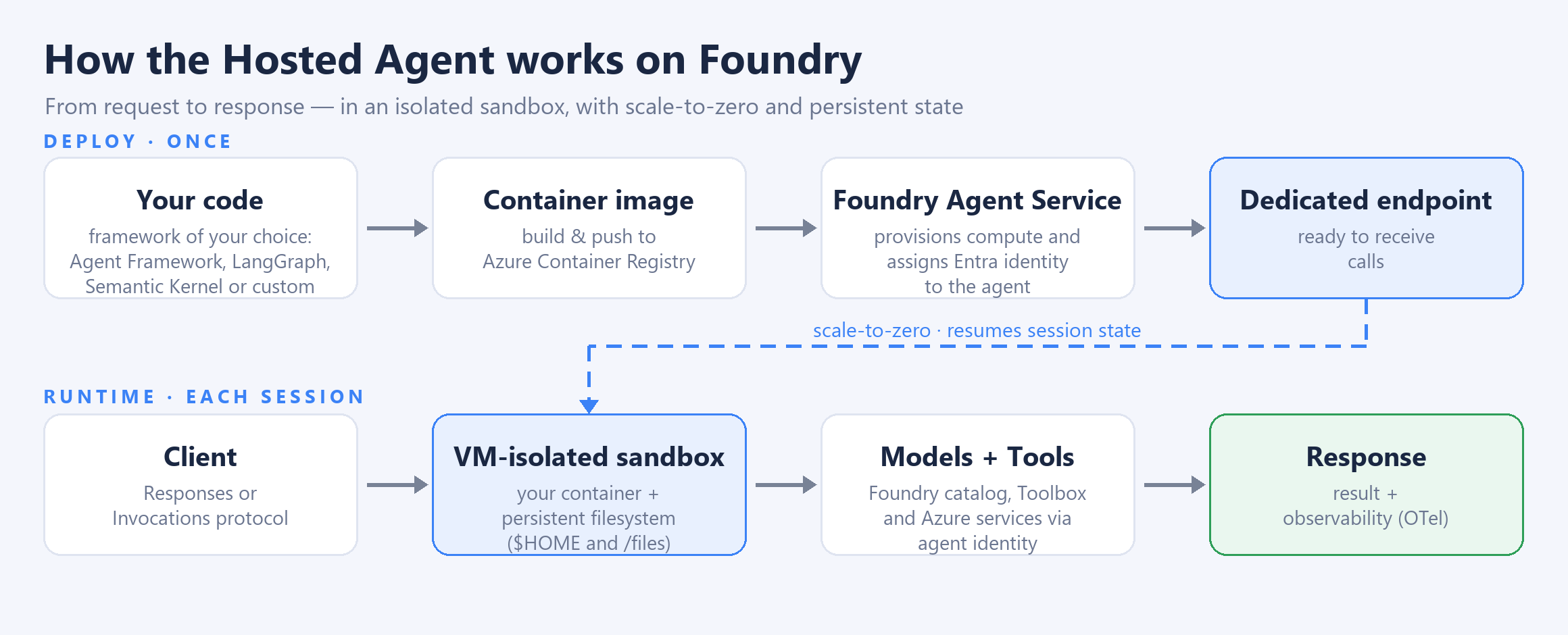
- Package the agent as a container image, using whichever framework you prefer — Microsoft Agent Framework, Semantic Kernel, LangGraph or custom code in Python/C#.
- Publish the image to Azure Container Registry.
- Deploy it: the Agent Service pulls the image, provisions compute, assigns a dedicated Microsoft Entra identity to the agent and exposes its own endpoint.
- At runtime, your code receives requests and can call Foundry catalog models, Toolbox tools and Azure services using the agent’s identity.
- The platform handles scaling, session-state persistence, observability and lifecycle — provisioning when there’s activity and de-provisioning when the idle timeout is reached.
2026 update At Build 2026, hosted agents became even more complete: per-session isolation at the hypervisor (VM) level, a persistent filesystem that survives scale-to-zero for up to 30 days, scale-to-zero billing (you pay for compute only while the agent runs), support for multiple protocols (Responses, Invocations and A2A) and immutable versioning with traffic splitting for blue-green and canary deployments.
Protocols: Responses vs. Invocations
A single hosted agent can expose more than one protocol at the same time — you choose based on how clients will talk to the agent:
- Responses (start here): OpenAI-compatible
/responsesendpoint. The platform manages conversation history, streaming and session lifecycle. Ideal for chatbots, RAG with tools, async background processing and Teams / Microsoft 365 channels (auto-bridged via Activity). - Invocations: arbitrary JSON in and out — you define the schema and manage the sessions. Ideal for webhook receivers (GitHub, Stripe, Jira), classification/extraction/batch, custom streaming (AG-UI) and protocol bridges. There’s a WebSocket variant for real-time voice.
Beyond these two, the agent also speaks Activity (Teams/M365) and A2A (agent-to-agent) — all in the same container.
Sessions, state and identity: the runtime model
Understanding the runtime is what separates a demo from a reliable agent in production:
- VM-isolated sessions: each session runs in a hypervisor-isolated sandbox, with a persistent filesystem at
$HOMEand/files. - Scale-to-zero with resume: state is restored automatically when the session reactivates. Idle timeout is 15 minutes; after 30 days of inactivity the session is permanently deleted.
- Session APIs: list and terminate sessions and upload/download files per session.
- Dedicated identity and endpoint: created automatically at deploy. Use OAuth On-Behalf-Of for user-triggered flows and managed identity for autonomous scenarios; assign RBAC to the agent identity to reach your own Azure resources.
- Durable history: the Conversation ID keeps history in Foundry, accessible across channels (playground, API, Teams).
Hosted agents vs. prompt-based agents: when to use each
Prefer hosted agents when you need to:
- Bring your own code: any framework (Agent Framework, LangGraph, Semantic Kernel) or custom logic, instead of a prompt-only definition.
- Custom protocols: accept webhooks or non-OpenAI payloads via the Invocations protocol.
- Compute control: set the agent sandbox’s CPU and memory.
- Stateful workloads: persist files and context across turns via
$HOMEand the/filesendpoint.
If your case is a simple assistant that can be defined by a prompt and ready-made tools, the prompt-based agent remains the fastest path.
Features that make a difference
- Per-session VM isolation: each session runs in a hypervisor-isolated sandbox — enterprise-grade security, no state leakage between sessions.
- State that resumes itself: the persistent filesystem enables scale-to-zero with stateful resume and predictable cold starts.
- Agent identity: every agent gets a dedicated Entra identity — secure calls with RBAC and on-behalf-of delegation, no secrets in code.
- Native observability: tracing with OpenTelemetry and runtime error logs with minimal setup.
- Real savings: no always-on cluster — you pay for compute only during execution.
Recommended use cases
- Conversational assistants: multi-turn chatbots and RAG with tools, published to Teams / Microsoft 365 via Responses + Activity.
- Event-driven automation: webhook receivers for GitHub, Stripe and Jira — process each system’s native payload via Invocations.
- Data-processing agents: non-conversational classification, extraction and batch jobs — structured JSON in, JSON out.
- Real-time voice: bidirectional voice agents over WebSocket (Pipecat, LiveKit, Voice Live) running in your container.
Getting started: from zero to deployed
- Prerequisites: an Azure subscription and a Microsoft Foundry project with a deployed model (e.g., gpt-4o).
- Tooling: Azure Developer CLI (
azd) with the agents extension —azd ext install azure.ai.agents. - Frameworks: Python 3.10+ or .NET 10, with the framework-agnostic hosting packages.
- Declare the protocols in the
azure.ai.agentservice inazure.yaml(or viaprotocol_versionsin the SDK) and deploy. - Ready-made samples: Microsoft Agent Framework, LangGraph and custom code in the
microsoft-foundry/foundry-samplesrepository.
Best practices for production
- Start with a container: even during dev, packaging early avoids dependency surprises at deploy time.
- Use the agent identity to access Azure OpenAI, Storage and databases — never hard-coded keys in code.
- Instrument from the start: enable OTel tracing so you can debug non-deterministic agentic behavior.
- Version and canary: use traffic splitting to validate a new version with a fraction of traffic before promoting it.
- Governance and RAI: content filters, continuous evaluation and review of any integration with third-party systems and their data/compliance boundaries.
- Right-size from telemetry: the sandbox is sized per session (0.5–2 vCPU / 1–4 GiB) and billing sums CPU + memory across active sessions — if peaks exceed ~70% of the allocation, size up; if well below, size down.
- Tools via Toolbox: use the Foundry Toolbox (MCP endpoint) to connect tools — direct tool injection into the agent is not supported.
- Private data: for sensitive workloads, deploy in a network-isolated Foundry with your own VNet for outbound traffic.
Frequently asked questions (FAQ)
Do I need to containerize my agent?
No — the hosted agent is delivered as a container image published to Azure Container Registry. That’s what gives you framework freedom and runtime control, but you can now also delegate the deploy to Foundry using a source .zip, where it downloads the dependencies from requirements, packages the source and performs the deploy.
Do I pay for the agent even when it’s idle?
For compute, no. With scale-to-zero, the sandbox is de-provisioned when idle; you pay for compute only during execution. Persistent storage stays available to resume the session with state.
Can I use LangGraph, CrewAI or Semantic Kernel?
Yes. Hosted agents are framework-agnostic: Microsoft Agent Framework, Semantic Kernel, LangGraph and custom code in Python/C# are supported. You choose; Foundry hosts.
How does the agent access other Azure services securely?
Every agent gets a dedicated Microsoft Entra identity at deploy time. With it, you grant RBAC and use on-behalf-of delegation — no secrets embedded in code.
Conclusion
Hosted agents in Microsoft Foundry turn the hard part — “getting to production” — into a matter of deployment. You keep framework freedom and your agent’s logic, and gain per-session isolation, identity, persistent state, scale-to-zero and observability — the platform that separates a prototype from a real agent running securely and at scale.
👉 If you’re designing AI agents for production — especially in regulated scenarios —, this is the hosting model worth putting on the table. Want to trade ideas about agent architecture on Foundry? Reach out on LinkedIn.